The Pulse is a series covering events, insights, and trends within Big Tech and startups.
Today, we cover:
Writing code by hand: is it over? In his Rails World keynote, David Heinemeier Hansson (DHH) declared the end for writing code by hand for professional work – at 37signals at least. Is this change now unstoppable?
Listen and watch now on YouTube, Apple, and Spotify. See the episode transcript at the top of this page, and timestamps for the episode at the bottom.
Brought to You by
• turbopuffer – not only a vector and full-text search engine built on object storage, but I also think that they have one of the most refreshing brands in tech. They have charts showing p50, p90 and p99 performance on their landing page, hand-crafted ASCII diagrams, and a team that goes exceptional lengths to deliver for their customers.
• O’Reilly Early Release: Scaling AI Adoption in Engineering– As an engineering leader or CTO, why is it so hard to get business value from AI? CTO Peter Bell brings strategies and tactics that work. The book is available for free, compliments of season sponsor Antithesis. Download your copy here(The book currently has 4 chapters ready, additional chapters will be sent out as the author finishes them.)
• Entire – Git hosting, rebuilt for the agentic era. Entire hosts your code in-region, and is up to 89x faster than any other competitor. Mirror from GitHub with a single click – I’ve already done so.
In this episode
What can everyone else learn from designers and design engineers? As it turns out, there’s plenty, as I discovered when one of the best design engineers in the industry, Maggie Appleton, came onto the Pragmatic Engineer Podcast. She’s a staff research engineer at GitHub Next, where she builds prototypes to explore how software engineers might collaborate with AI in new ways. Maggie is at the intersection of design, anthropology, and web development, and was the first designer hired by AI startup Elicit, and Lead Design engineer at AI startup, Normally.
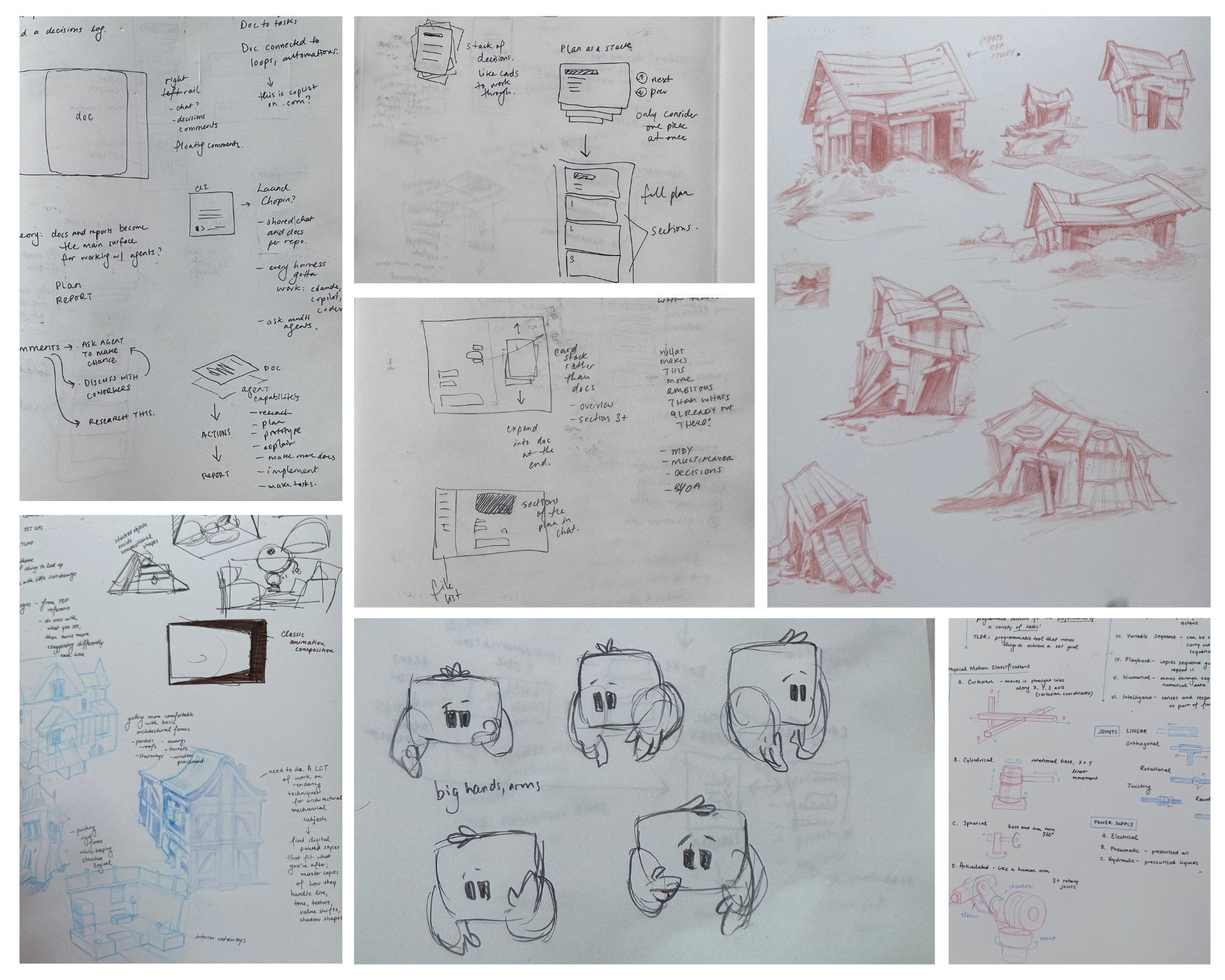
Today’s episode is more visual than usual because Maggie brought her notebook along, so there are peeks inside its pages of prototypes and more:
Where the design process starts: pages in Maggie’s notebook
We got into designers’ work and how their design processes are adapting to and changing with AI. We explore why Maggie starts projects with pens and notebooks, what distinguishes design engineers from other designers, and why understanding engineering constraints leads to better collaboration with engineers.
We also discuss how Maggie uses jigs to gain more control over AI agents, why human judgment and style still matter when models can generate designs, and how inconsistent AI capabilities can mislead us.
Takeaways from the conversation with Maggie
1. Post-graduation, one potential career path led to a job inventing torture techniques for the US army. Maggie said ‘no thanks’ and resolved to work in tech instead. Maggie studied cultural anthropology and her background has helped her through her tech career to date. Software is built by people and relationships matter.
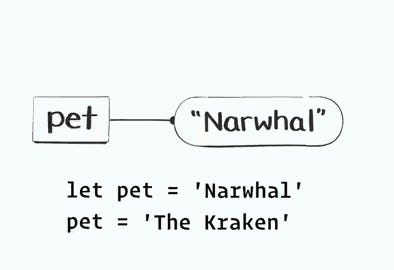
2. Maggie got a frontend engineering education from illustrating React tutorials. She spent four years as an illustrator at the developer education company Egghead, rising to art director. To illustrate the lessons, it was necessary to understand what she was drawing: React components, useEffect, and JavaScript functions. Note from Gergely: I followed Maggie’s work after her excellent illustrations work on Dan Abramov’s Just JavaScript course. Here’s an animated explainer by her for that course:
3. Some folks believe the best UI interface already exists. In 2021, the AI startup where Maggie worked was trying to launch a new interface to speed up scientific research using LLMs – a year before ChatGPT was released. Months of intense work went into a “new UI for AI”, but it turned out that scientific researchers didn’t want innovations like infinite canvases with cards, composable Notion-like documents, and more. They wanted the same, simple tables they were deeply familiar and comfortable with! Maggie says the experience taught her that starting with a familiar primitive is sensible – even when innovating.
4. The nomenclature matters! Also, problem solving is at the heart of design – just like in engineering. Maggie sees design and software engineering as related by being about problem solving. The difference lies in the materials. Coming up with the names and verbs to describe new things which will then be adopted and used by people can be hard work. Easy when building an online sneakers store, harder when building a new product for AWS.
5. Notebooks are an important part of the designer’s toolkit. Maggie often starts her projects by sketching out ideas. She finds it faster to sketch out an idea by hand than to describe it to a tool like Claude Code. Plus, when you sketch out an idea physically, it will still be there in the notebook the next day. In contrast, if it gets put into a tool instead, it’s a lot harder to go back to it, dozens of prompts later!
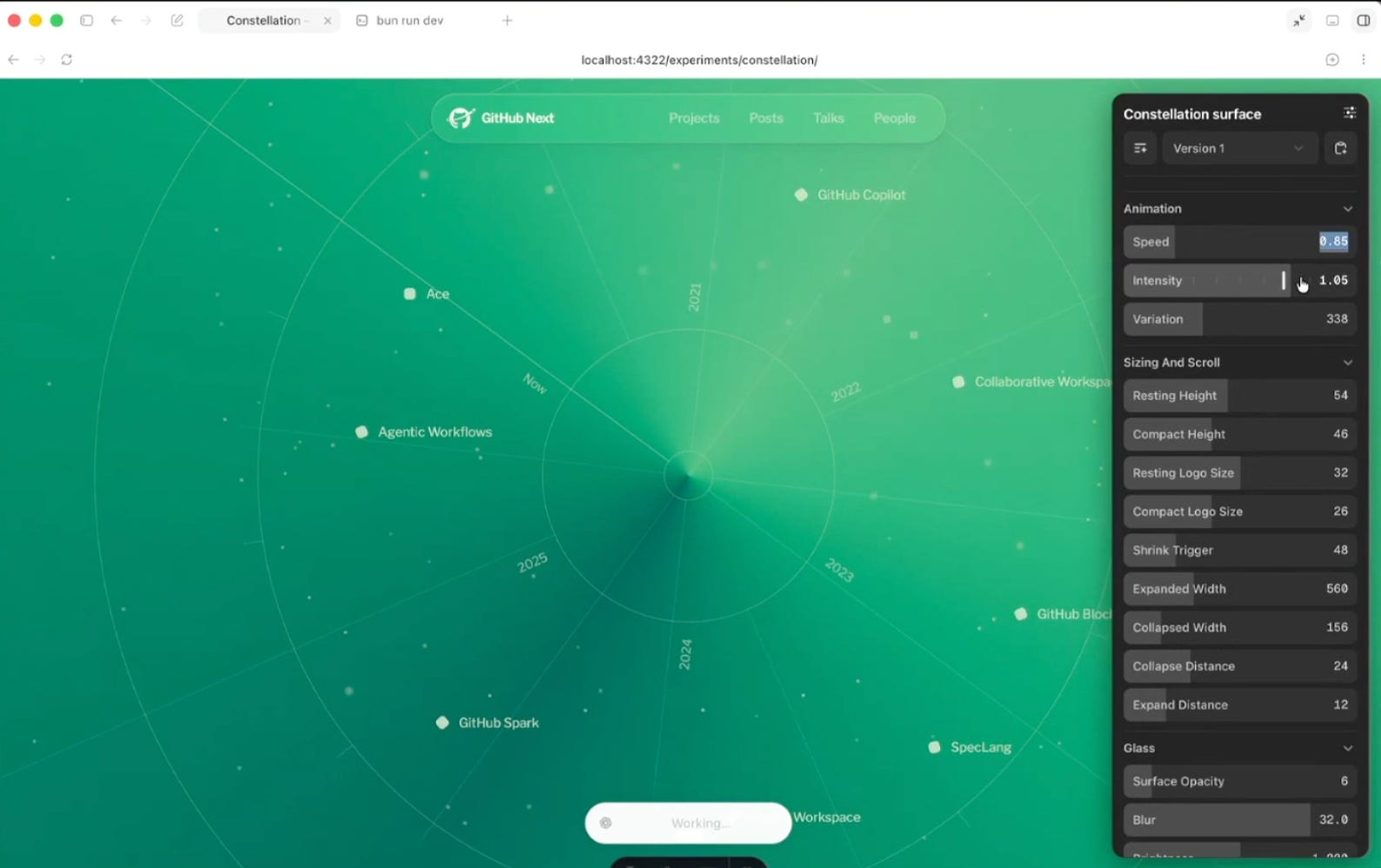
6. Maggie regularly builds her personal Figma called “Jigs,” which is also the name of a woodworking device that helps with a specific job. She regularly asks a coding agent to build a prototype that has sliders and color pickers so she can tweak it in realtime, like having a personal Figma!
A jig: interactive prototype where colors, sizes, and animation speed can be tweaked
7. Maggie has stopped looking at the code at work. When a PR is generated, she doesn’t look at the code, and this approach fits when building prototypes. Once she knows what to build, she composes a detailed spec, listing out how the agent will verify its work. Previously, she did keep an eye on the code, but that’s not needed with the new generation of models.
8. Planning with AI agents breaks when there’s too much text. “I have this theory that planning is a really bad experience at the moment,” Maggie says. “An agent grills you with a set of choice A, B, or C questions a hundred times over. By question 20, you’re quite tired and your brain starts shutting down [because] you can’t make this many decisions in this short of time. Also, it told you A is recommended. Then you just start being like, ‘Yep, enter A, I agree with you.’”
9. “Capability gaslighting” is when frontier models convince users they’re an expert but fail the same task the next day. Maggie coined the term “capability gaslighting” for how models impress users before failing badly soon afterward. Too often, we keep believing in models because we’re convinced they’re capable. The same is true for agents, so we should be vigilant when working with LLMs.
10. We need new types of artifacts for humans and agents to work better together, Maggie believes: “There’s this world that agents live in: there’s weights and models and skills and MCPs,” she says. “Then you have your human side: it is physicality and texture and light and materials and all these things agents don’t understand. Trying to find artifacts that allow us to meet in the middle and create stuff together is a really hard challenge because you’ve got two totally different types. I just find myself frustrated that agents cannot look over my shoulder, looking at my notebook and understanding what I’m drawing, and how they cannot help me move my ideas along.”
11. Engineers should try treating the AI agent as a patient tutor when learning about design: As engineers, we can ask AI agents to teach us about design: they’re good at explaining things like when to change up line height, what a good sidebar looks like, or how many characters to squeeze into a line, etc. In the past, acquiring product design skills was hard, but AI agents make it a bit easier
I hope you enjoyed this episode, and many thanks to Maggie for educating all of us engineers!
The Pragmatic Engineer deepdives relevant for this episode
AI is changing how us software engineers build software, and developers’ tool preferences are rapidly evolving with it – like how AI coding harnesses have gotten very popular. Likewise, future versions of the world’s leading operating systems look certain to feature more support for agentic tools.
To find out how things are changing, we talked with the folks at tech giant Microsoft who shared in detail their plan for Windows, and how AI will play a part. It comes after the company’s previous AI efforts led to it being dubbed “Microslop” by some users online.
The Windows team’s vision is opinionated and includes building new agentic primitives, alongside reversing some decisions that have annoyed engineers. Microsoft wants developers who have shunned the system to return. The big question is: will it succeed?
How many devs use Windows anyway? It’s hard to get exact numbers, but macOS appears far more popular at startups than Windows, while Linux may also be on track to overtake Microsoft’s OS in developer popularity.
Agent identity & discovery. Windows ships with native support for agent identification, plus a centralized registry of locally available MCP servers to be included with the OS.
Isolate agentic tools. Microsoft is building an OS-agnostic isolation mechanism that should make it easy for developers to build agents that run tools safely.
Running models locally: Windows is betting big on local models. WindowsML is a new hardware abstraction layer for building and running local AI models across GPU, NPU, and CPU. The OS aims to ship Small Language Models (SLMs) without requiring an NPU in the future. We’ve also seen an impressive demo of a local model running on a Surface laptop using NVIDIA chips.
Building agents on Windows: one goal of the OS is to allow building of agents with opinionated frameworks and libraries that devs can just assume are available.
More dev-friendly: Windows was plagued by questionable product decisions that resulted in a cluttered Start menu and search, to the chagrin of many developers who lost interest in the OS. Microsoft wants them back and is addressing criticisms – finally!
Linux on Windows (WSL): Windows ships with an embedded Linux called Windows Subsystem for Linux (WSL). It’s proving quite popular with devs. Windows embracing Linux might just be the strategy to get devs to switch from both native Linux and macOS, as counter-intuitive as this strategy sounds.
Windows & hardware: since its early days, Windows has gone out of its way to support a wide variety of hardware. The OS was x86-based from the beginning, but Windows on ARM is starting to finally look like a good alternative. A look into why ARM support took so long, and the upcoming NVIDIA collaboration.
We’ve talked with people on the Windows team to learn about the thinking behind Microsoft’s strategy for the operating system: Pavan Davuluri (EVP, Windows and Devices), Scott Hanselman (VP, Member of Technical Staff, Microsoft CoreAI and GitHub), and Logan Iyer, (CVP, Windows Platform and Developer). Many thanks for your time!
1. How many devs use Windows anyway?
While Windows remains the most popular desktop operating system for mainstream computer users at around 63% market share as per Statcounter – the strong sense is that its popularity is down among developers.
Windows used to be popular with devs…
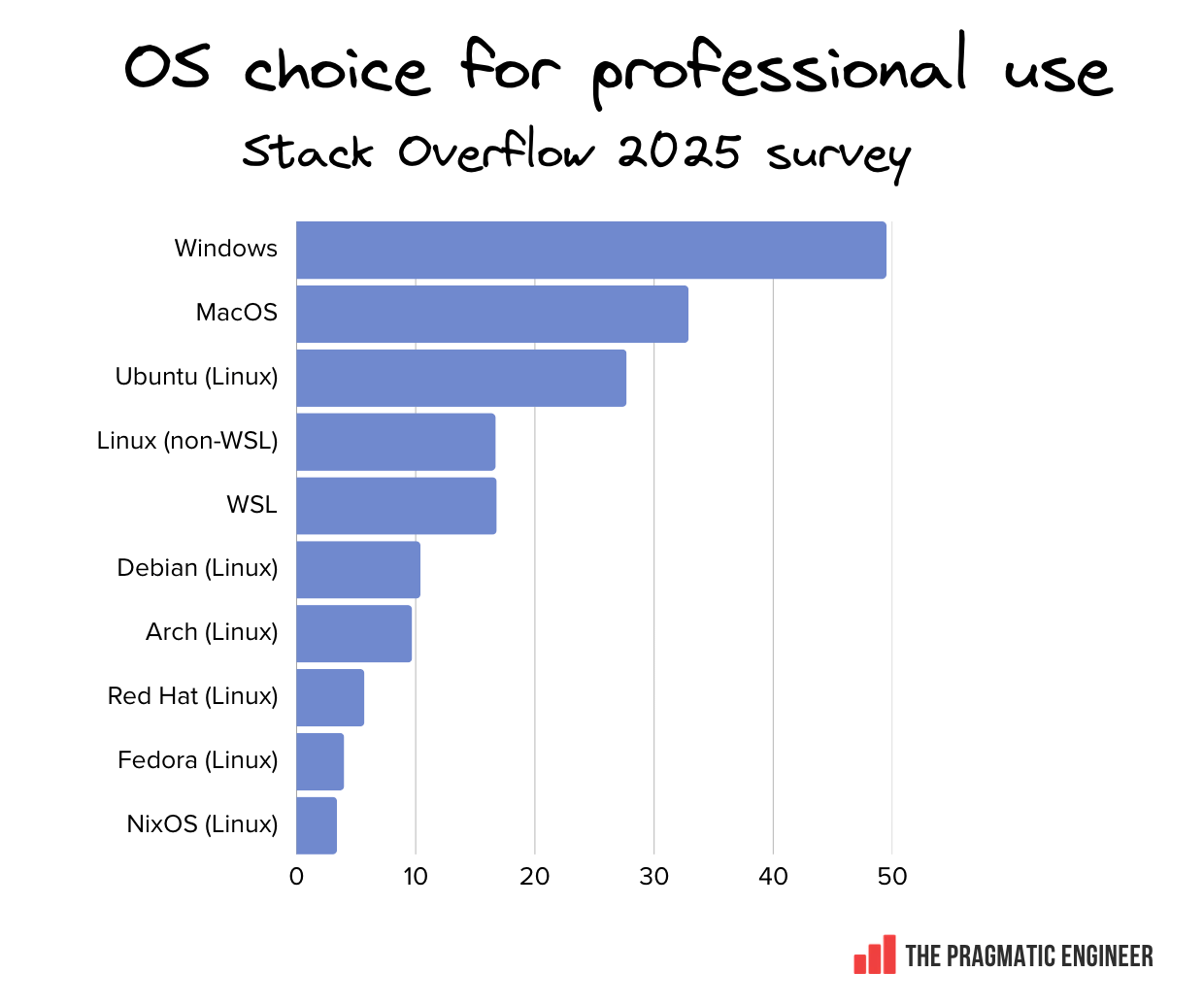
A year ago, the 2025 Stack Overflow survey polled professional users’ choices of OS. It found that a minority of devs overall use Windows – although it remained the single most popular OS. Despite its top ranking in the survey, the number of devs using Windows was actually way down on Microsoft’s XP-era peak. Meanwhile, MacOS and various Linux distributions also showed considerable market share:
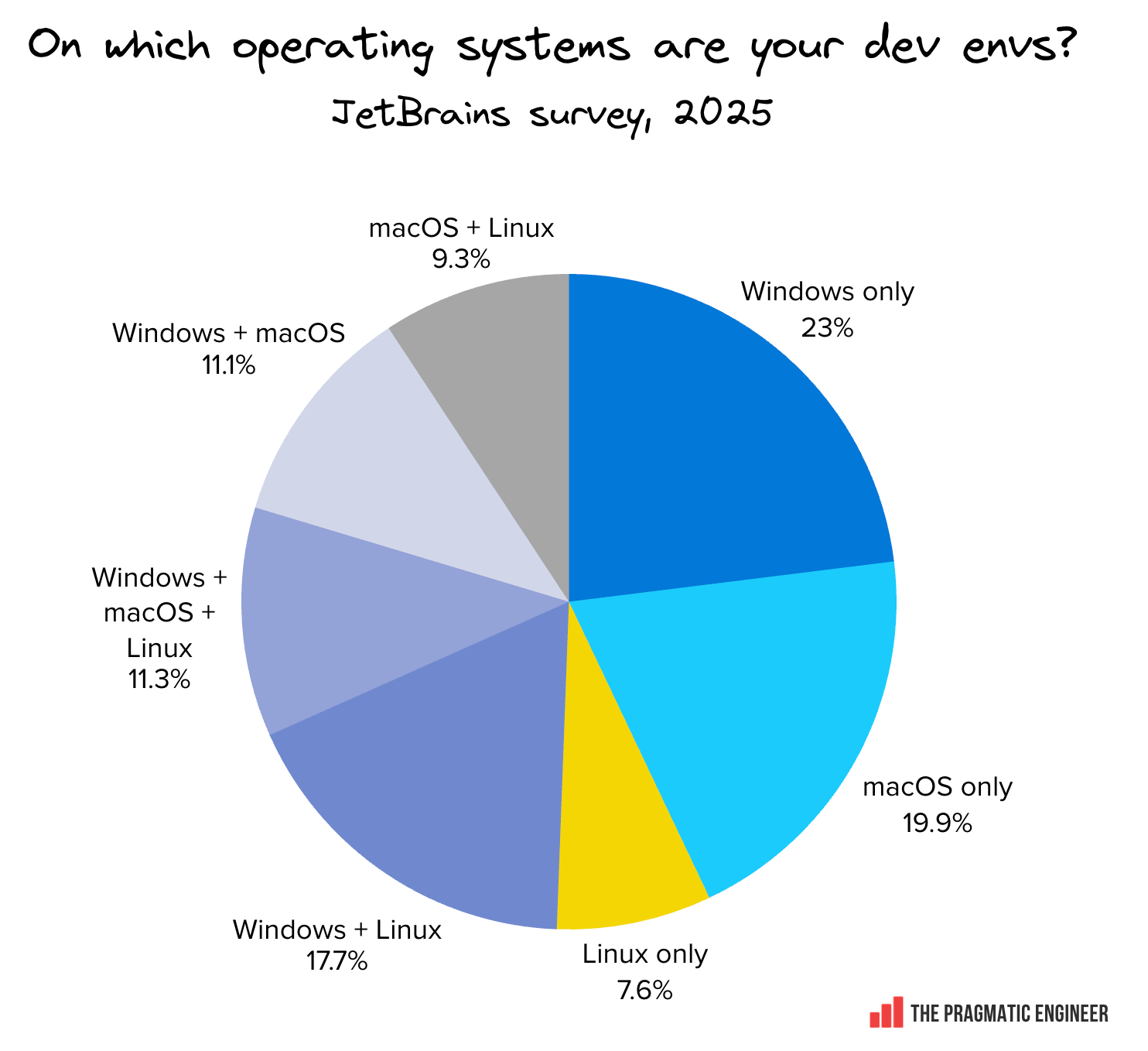
Interestingly, half of devs use more than one OS for development.This JetBrains survey suggests that several devs jump between operating systems for their work. The survey also found macOS close to overtaking Windows as the most-used standalone OS for development work.
… and is Windows declining in developer market share?
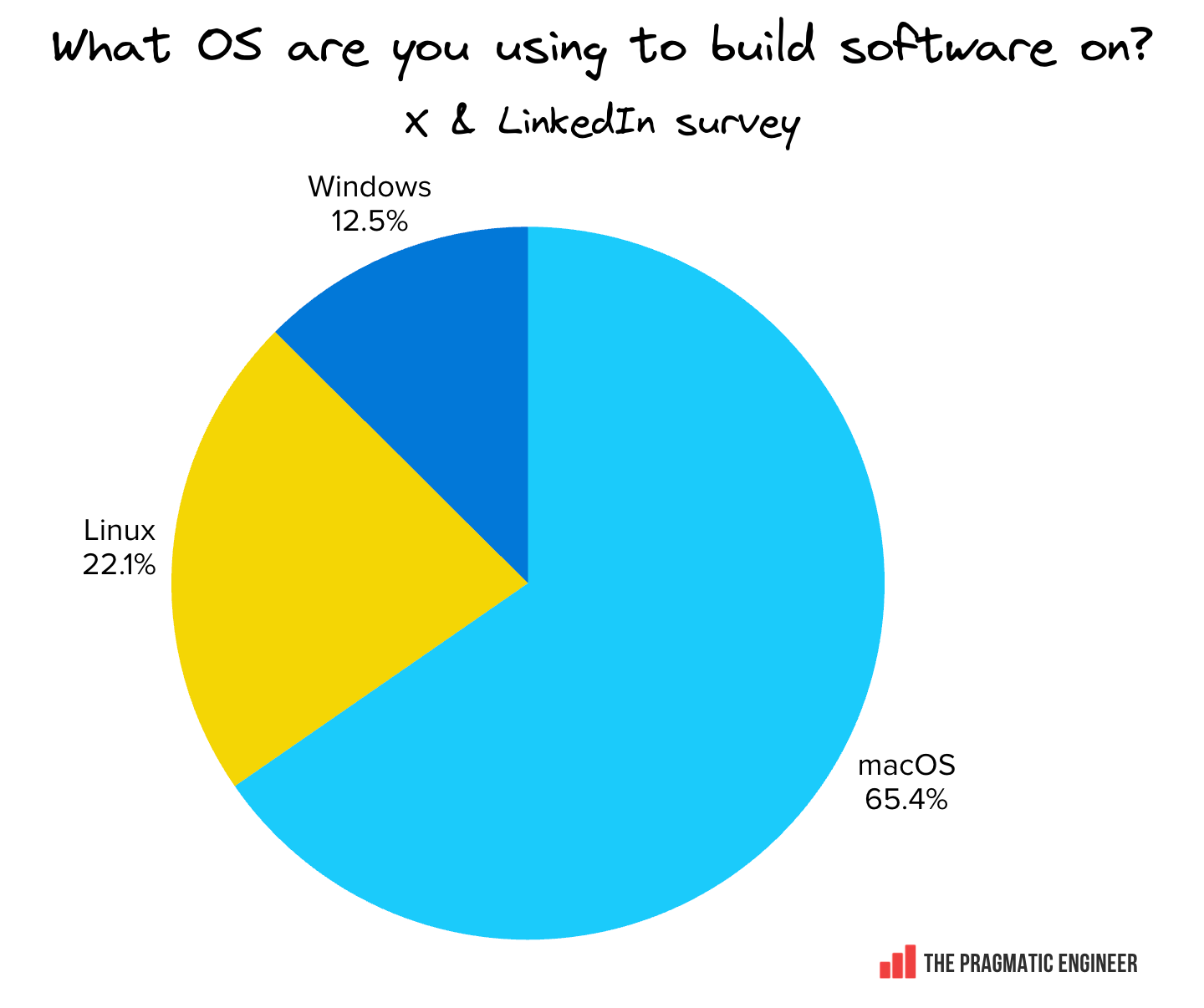
Only last week, myself and Ivan ran two social media surveys on X and on LinkedIn, most likely shown overwhelmingly to people who are also The Pragmatic Engineer readers. We offered a single choice – with no option to select multiple OS usage, Linux on Windows, or via WSL. We were surprised to find Windows in third place behind Linux, based on nearly 10,000 combined responses:
What OS are you using to build software on? Based on 9,937 responses, surveyed in Sep 2026
Based on current research, it’s likely that Windows’ share of the developer market is on the wane, but it’s hard to tell by how much. Inside VC-funded startups and Big Tech, it’s an open secret that Macs have been the most popular developer machine for some years now, partly thanks to the superior hardware performance of M-series CPUs, and also because these companies are not looking to save money when purchasing developer machines. It’s very likely that our own social media survey over-indexes on this group!
Either way, Microsoft has both market share and developer goodwill that it needs to win back. Based on what we’ve heard from them, Microsoft is attempting this.
But where is OS usage at with readers of The Pragmatic Engineer? To figure this out, please cast a vote on the primary operating system you use when developing software. After the vote, you can see the results:
With that, let’s get into how the next version of Windows intends to integrate AI agents at the OS level.
2. Agent identity & discovery
At the operating system level, agents increasingly look like regular users. Their sessions can last hours, use multiple programs, and use OS resources like the UI and clipboard. Windows allows developers to build agentic programs that are distinguishable from users.
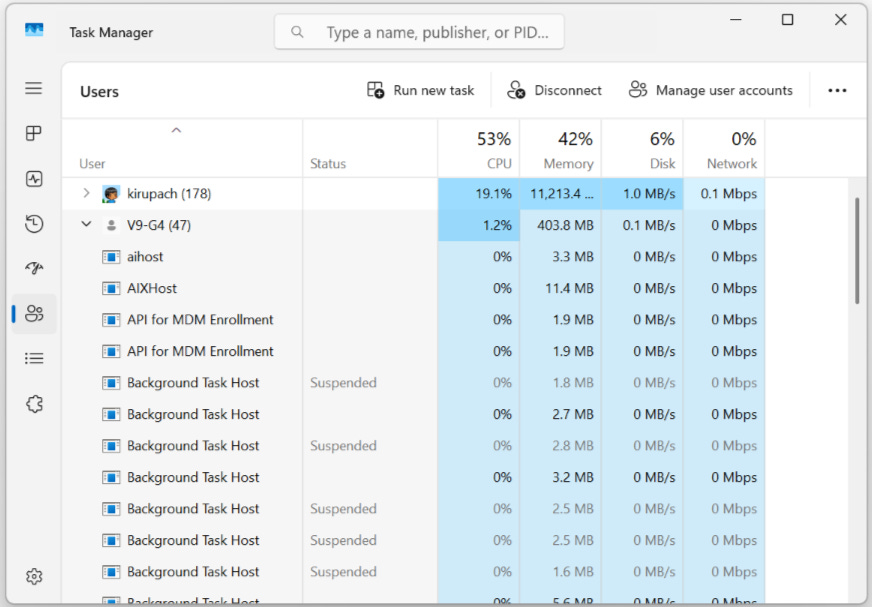
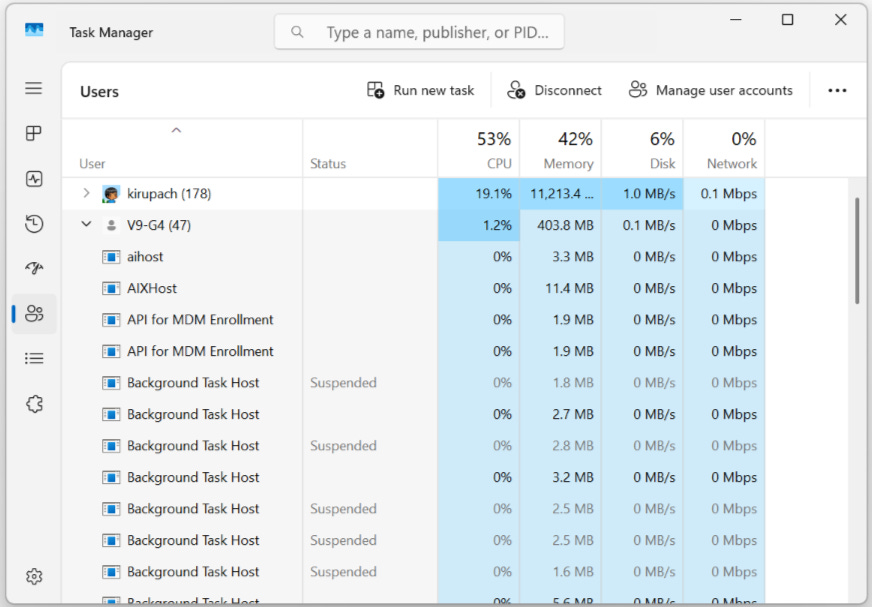
Agent identification is enabled through Entra ID, Microsoft’s tool for centralized identity management in Windows. When an agent has a local identity, it acts as if it is another user on the system as visible in the Task Manager. Below, tasks are grouped by user, and there are two users in the task manager: kirupach (a human) and V9-G4 (an agent). All observability of human users is now available for agent users as well.
Task Manager showing human & agent users (kirupach and V9-G4). Source: Microsoft
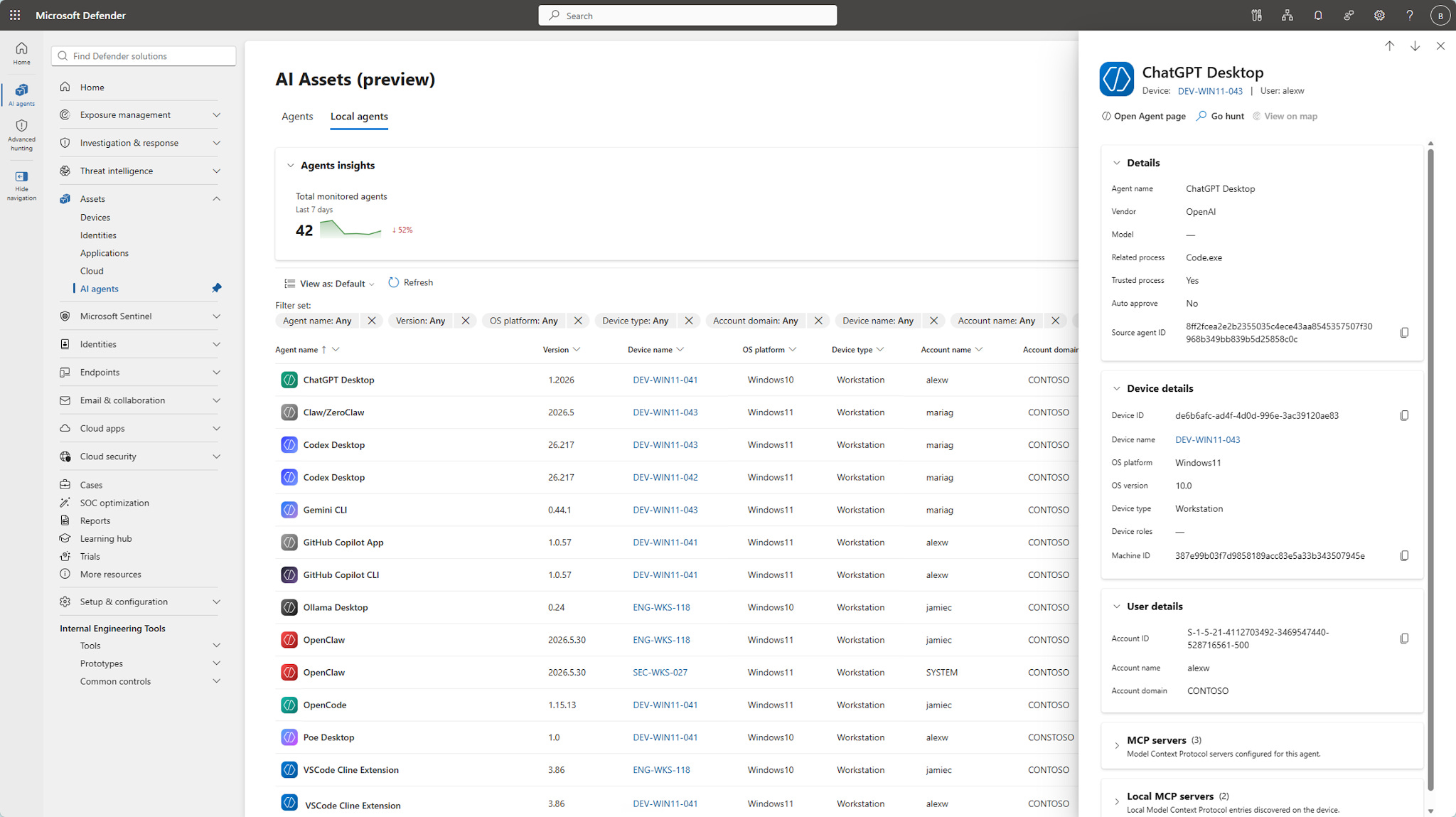
Agents must be built with this agent identification capability in mind. Consider how a rogue agentic application can impersonate a user and not self-register as an agent – which in a sense is how viruses operate by using legitimate OS functionality for illegitimate purposes. That’s why Defender, Microsoft’s antivirus software, is becoming “agent aware” and scanning Windows for known local agent activity like it scans for viruses.
Microsoft Defender’s AI Assets feature can scan for known agent activity. Source: Microsoft
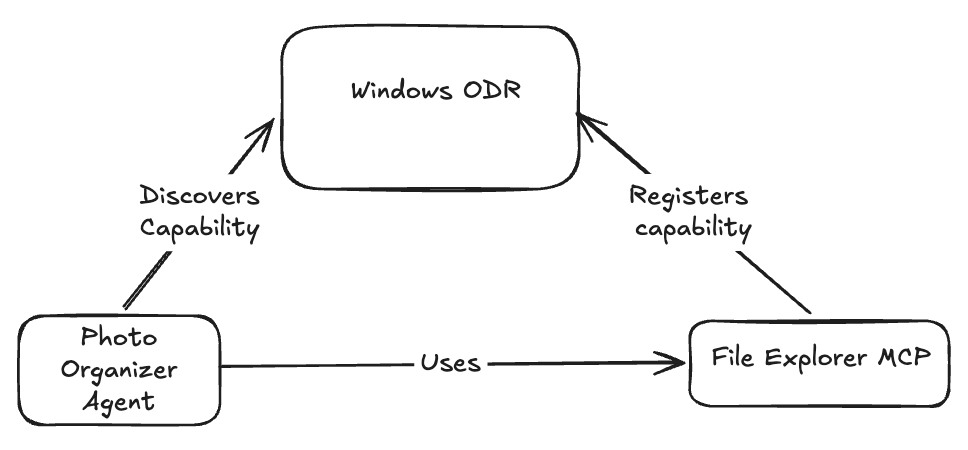
Agent discovery: agents are only as useful as the tools they’re able to interact with, and Windows On Device Agent Registry (ODR) is the centralized place where agents register and discover available MCP tools. ODR manages and runs MCP servers locally, and also comes with connectors for core operating system components like the File Explorer or System Settings.
Let’s say you want to build a specialized Photo Organizer Agent; the organizer agent organizes photos in the user’s Photos folders by theme and starts by running an image classifier to understand photos’ themes, then puts them in the relevant folder, such as ‘parties’, ‘outdoors’, ‘baby photos’, etc.
As such, the Photo Organizer Agent needs the ability to read and change the user’s local files, which starts with Windows ODR finding an MCP connector for the file access capability. After discovering File Explorer, the agent uses File Explorer MCP to access and modify files in the user’s Photo directory.
ODR and built-in MCPs when agents access dependencies
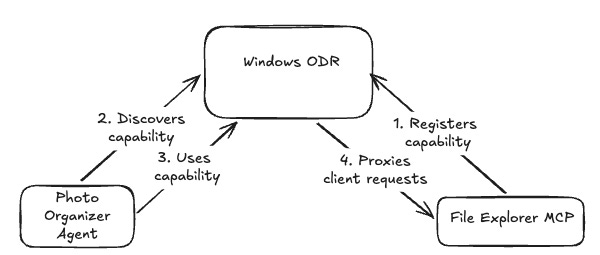
ODR is still in development and available to beta testers, so little is known about its internals, but preliminary research by Origin Technology indicates an interesting implementation detail of ODR. By reverse engineering ODR behavior, researchers proved ODR puts itself as a proxy between the MCP client and its server. Here’s what that would look like in our updated Photo Organizer Agent example:
More than a registry: ODR also acts as a proxy between MCP clients and the server
The Photo Organizer agent discovers the File Explorer MCP capability in the same way as in the dependencies diagram above. However, the process ID that ODR sends back to the agent is ODR itself: the Photo Organizer Agent talks to the File Explorer MCP through ODR!
By putting itself between the MCP client and server, ODR can inspect payloads going back and forth. This is a useful choke point because it enables Windows to detect potentially dangerous behavior. However, this proxying behaviour is as yet unconfirmed by Microsoft, so it remains to be seen how they use it.
3. Isolate agentic tools
Tools are external programs that an agent uses to perform actions on the operating system, such as native OS tools, third-party app calls, or even programs written by an agent. Granting agents rights to execute tools potentially means code execution, so it’s essential the agent tools run in isolation to ensure the user’s files and session aren’t reachable by agentic tools.
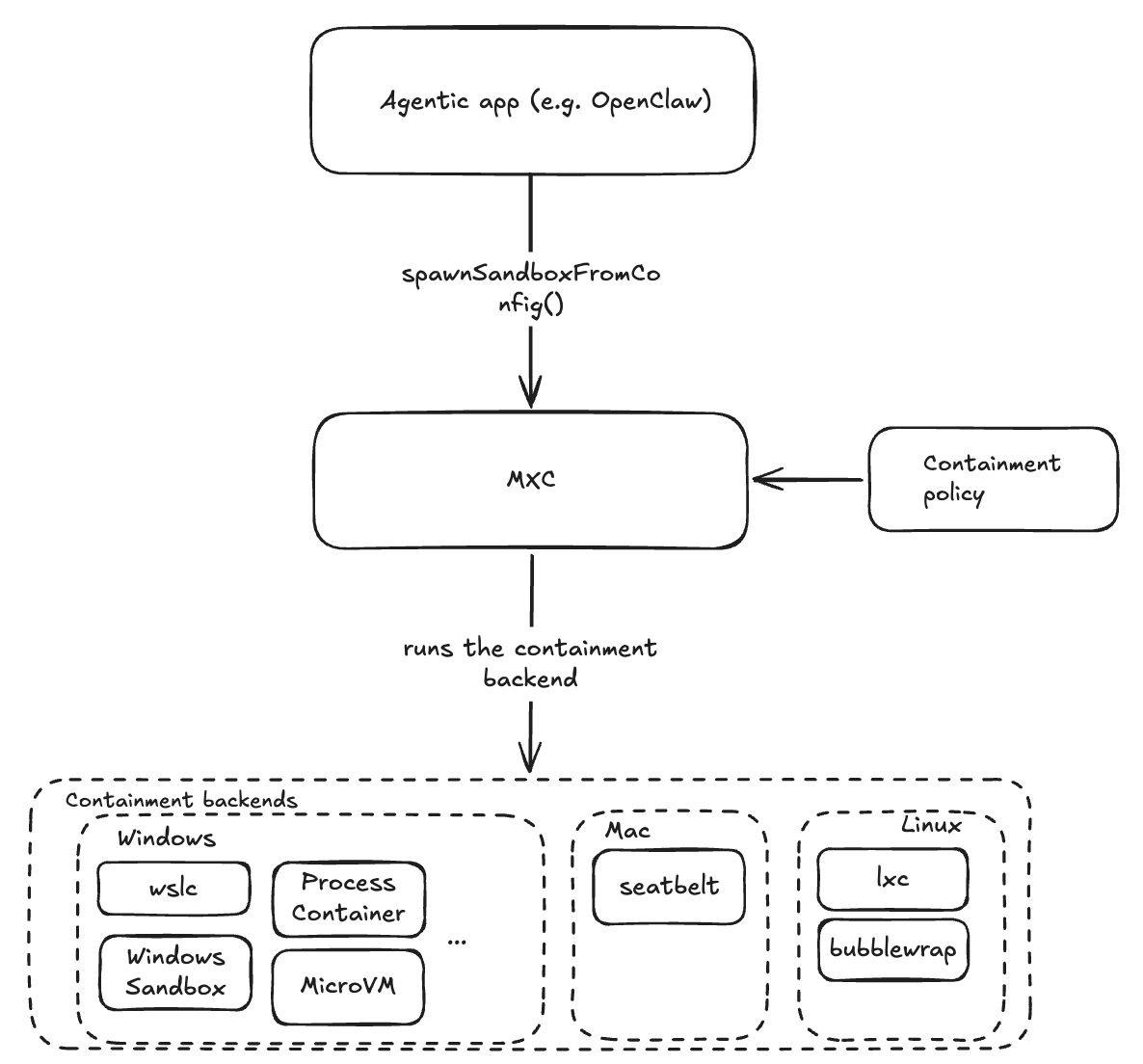
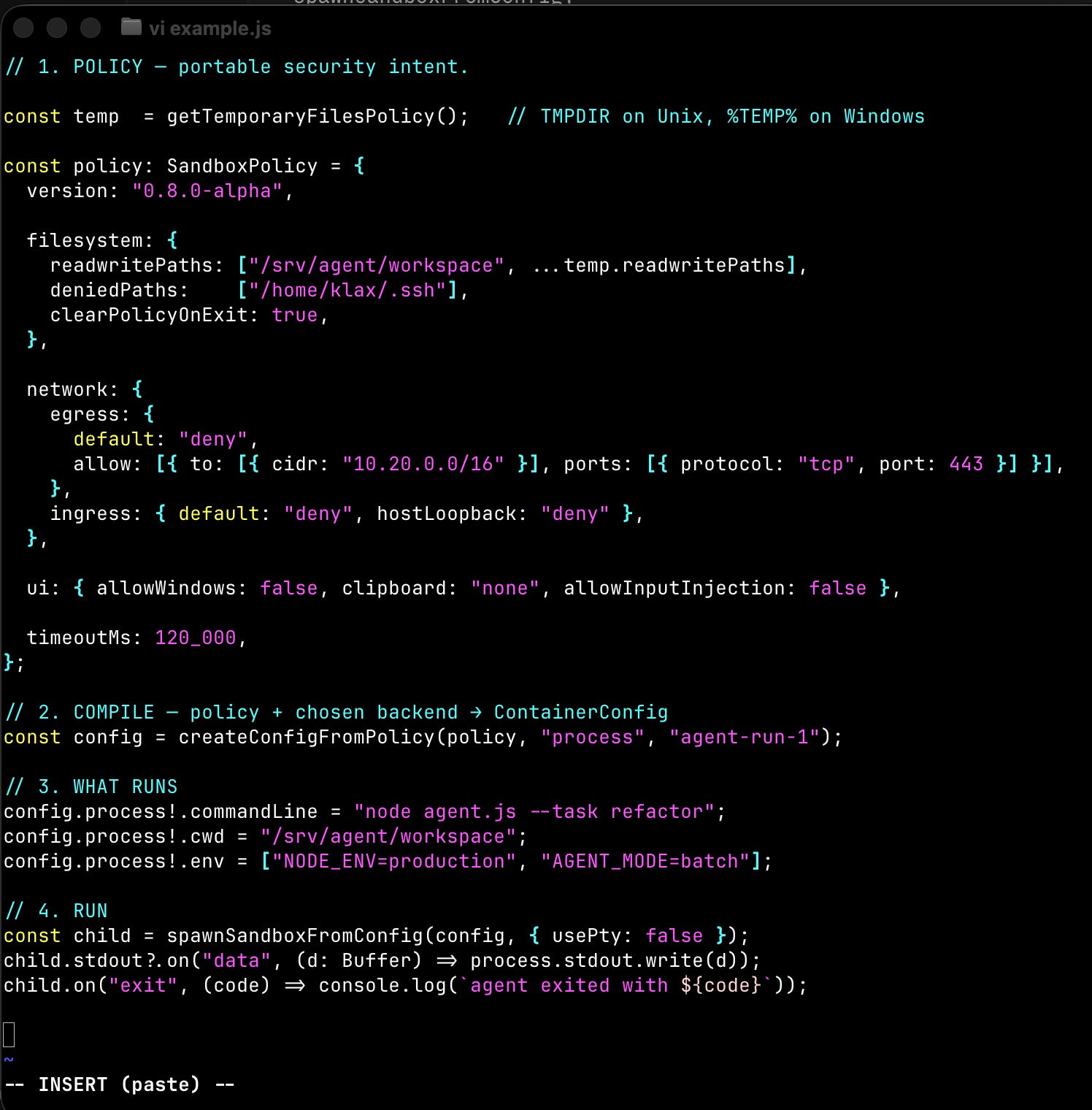
Microsoft Execution Containers (MXC) is a new, in-development agent containment technology by Windows. Developers can use MXC to spawn agentic tools in isolated environments called sandboxes, and agent access within the sandbox environment is configured through MXC containment policies.
Containment policies are JSON-based config files that describe network, filesystem, UI, and execution restrictions. The image below illustrates how MXC works:
Agents run code with MXC in contained environments, with support for different containment tech & OSes
Let’s say you’re building an agentic application like OpenClaw. This application will necessarily have to use tools to do its job and can use file operations, web operations, shell commands, and more. These are potentially dangerous operations, as OpenClaw executes them through MXC’s spawnSandboxFromConfig() method, which spawns a new contained process in which said tools can run safely. The process containment technology used depends on the containment policy config. MXC doesn’t do the containment itself and uses multiple existing containment technologies for that; for example, on a Mac, it would use seatbelt, a process containment layer built into the Mac OS.
Speed versus safety tradeoff: some containment mechanisms are faster to start and cheaper to run than others. For example, starting a new process is faster than starting a new Windows session or a new virtual machine. At the same time, running a new process in the existing user’s Windows session potentially exposes the user’s filesystem to the new process.
MXC allows developers to adapt the containment level to the sensitivity of the operation being run. Multiple containment levels are available in Windows:
Process containment
Session containment
Running WSL containers
Lightweight Hyper-V containers
Full virtual machines
Choosing the right level of containment is a trade-off between the blast radius and speed of execution. The simplified example below shows how it all comes together:
How developers can use MXC to contain agents
The policy object specifies how the containerized workload should be constrained. It specifies network, UI, filesystem restrictions
The createConfigFromPolicy step configures the whole container. It takes the containment policy object, the chosen isolation level (“process”), and names the container.
The app then manipulates what gets executed in the “WHAT RUNS” step
Finally, spawnSandboxFromConfig() runs the container and processes its output.
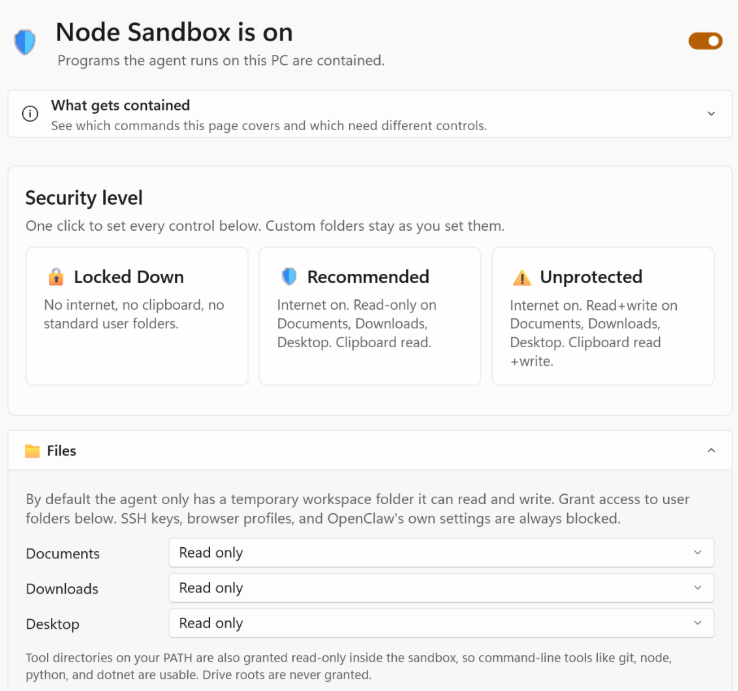
OpenClaw for Windows ships as a native app and is one of the first agents to adopt MXC for isolation. Configuring the MXC containment in OpenClaw for Windows is packed as a standard windows settings screen.
OpenClaw Windows app containment config screen. Source: Microsoft
MXC abstracts away process isolation for agents, so the OpenClaw agent in this example isn’t aware of all the restrictions its tools are running within. It can therefore encounter situations where it tries to do something its sandbox disallows.
OpenClaw agent describes lack of access to Windows resources like installed programs. Source: Microsoft
Combined with agent identities, MXC will give enterprises fleet-wide control of their agents. For admins, Microsoft will offer MXC policy management through its Intune product for corporate device fleet management.
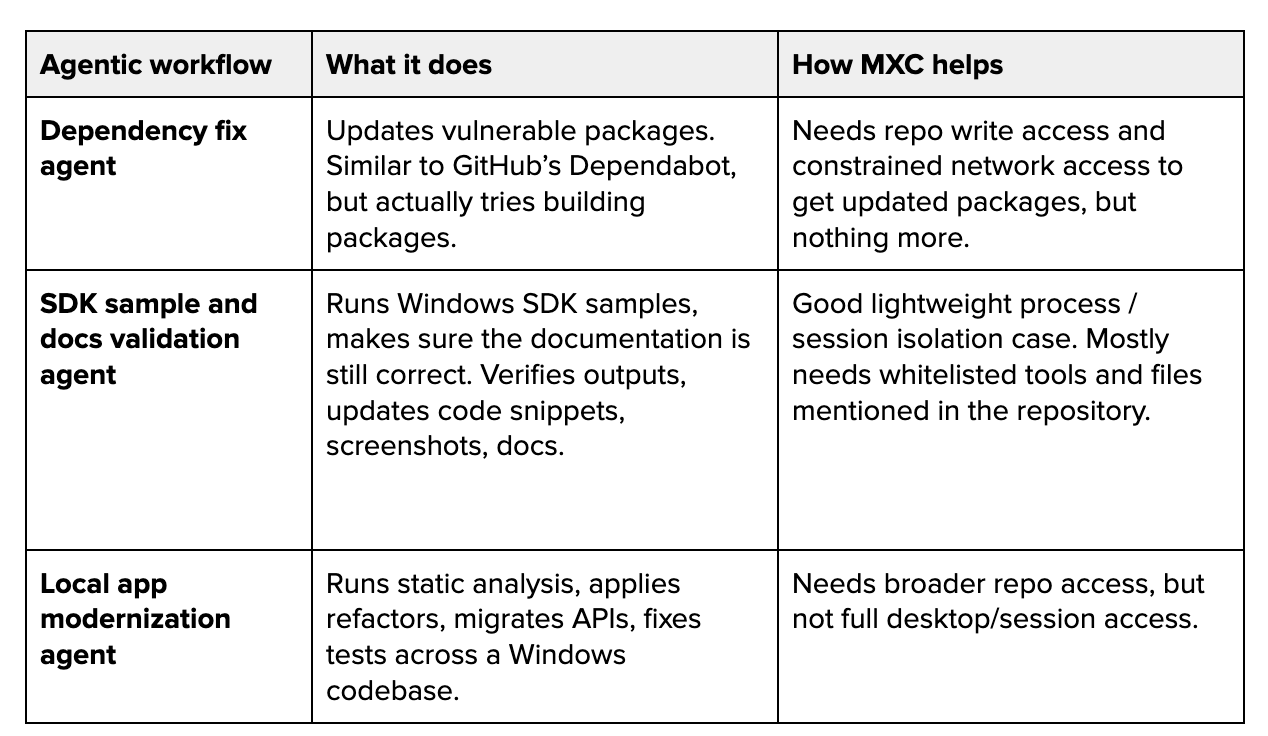
MXC enforcement isn’t broadly adopted yet, so we asked Microsoft for examples of how they use MXC internally to isolate autonomous agents. They shared some use cases with us:
How the Windows team uses MXC to isolate autonomous agents
These cases illustrate how Microsoft is automating many internal developer chores, and how MXC provides finegrained control over agent isolation. MXC is under development, but already runs on Windows, Linux, and macOS. Developers therefore get a unified way of containing external tools across operating systems.
4. Running models locally
Windows ML is a hardware-agnostic layer for running AI models locally on Windows. Its goal is to do for AI what DirectX did for computer graphics: abstract away hardware complexity, regardless of the underlying model’s architecture.
Windows ML is Microsoft’s second attempt at building a hardware-agnostic layer for running ML models. DirectML, the first attempt, is a library for running machine learning tasks on GPUs built on top of DirectX 12, Microsoft’s graphics library used for running games on Windows, released in 2019.
So, an obvious question is how is Windows ML different? They say that Windows ML offers two improvements over DirectML:
#1: Higher level abstraction & better hardware coverage. DirectML is a low-level library where developers have to manually build the inference pipelines from simple mathematical operations, worry about memory layout, etc. Being based on DirectX, DirectML only worked with GPUs.
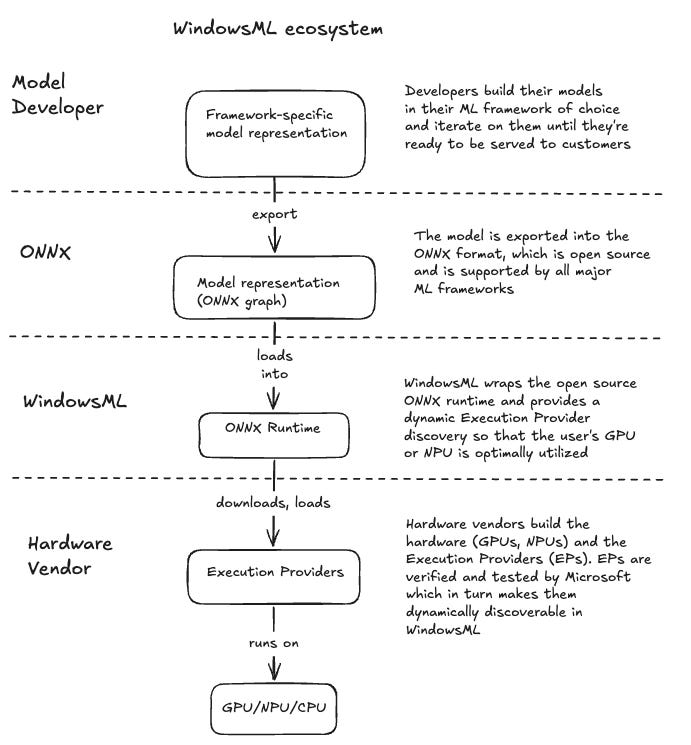
In contrast, Windows ML is based on the Open Neural Network Exchange format (ONNX), an open format for representing and running neural networks. Neural networks built with all popular machine learning frameworks can be converted into the ONNX format called ONNX graph and run on ONNX runtime.
ONNX runtime is an open source, cross-platform system for training and running neural nets defined in the ONNX format. Windows ML provides developers a framework that runs on a broader range of silicon, including GPUs, NPUs, and CPUs from all major vendors.
#2: No driver-update bottleneck: Windows ML wraps the ONNX runtime and abstracts away the hardware-specific runtime optimizations by providing hardware-agnostic APIs. Each hardware vendor implements this API for its own hardware through the Execution providers (EPs) concept. With DirectML, new runtime optimizations had to be done via driver updates which took six months to get meaningful adoption.
Windows ML loads EPs when they are needed, depending on the user’s hardware. For example, if a user has an NVIDIA GeForce RTX GPU, the NVIDIA Tensor RTX execution provider is downloaded and used to maximize GPU performance. Hardware vendors build and submit PEs to Microsoft for certification and testing before they can be used with Windows ML. Most execution providers available today are also available on GitHub.
Windows ML ecosystem layers
Small language models (SLMs) are embedded within the operating system. Without them, developers would have to ship models with their apps, or call cloud-based models. Even if running local models should be easier with Windows ML, it’s still not worth the effort if you want to add simple functionalities to an app.
For example, running a sentiment analysis on some text in an application used to involve calling a hosted AI model in the cloud. On top of incurring app running costs, it can also add lag to the app, whereas with embedded models developers can assume the models are already there, and use them as any other local library.
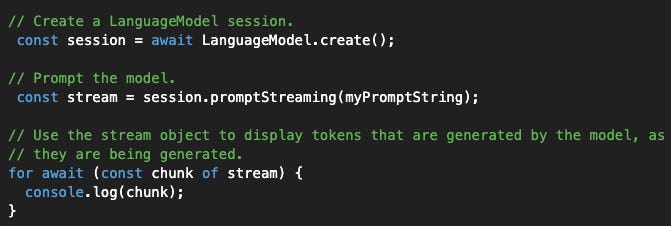
For example, the Aion-1.0-Instruct model is built into Edge, Microsoft’s web browser. Accessed through the Prompt API, Aion model allows developers to build apps like sentiment analysis with a few lines of code. Here’s an example from Microsoft’s website:
Local language model usage example in JavaScript (Source)
Even a simple web application can now have LLM-powered features like sentiment analysis without having to continuously pay for tokens. The demo is JavaScript-only, but versions for native apps and other languages are also expected to be available when it’s released.
Teams being able to run their own models is becoming increasingly important, especially in the corporate sector, driven by escalating costs, mode availability questions such as those recently raised with Fable, and compliance issues.
Running models locally also unlocks a hybrid approach, which is well aligned with a trend among tech companies we recently covered, where tech companies have successfully shifted their LLM workloads to cheaper models for simpler requests, and only use frontier models for advanced reasoning. By running models locally, some agentic jobs could be executed with local LLMs, and more complex jobs delegated to a cloud-hosted frontier model.
Running local models on a next-gen Surface laptop with NVIDIA GPUs is impressive. At Microsoft, Scott Hanselman showed us a pre-release Surface laptop with NVIDIA GPUs running Qwen as a local model, hooked up to GitHub Copilot. This local model churned out tokens at a rate of ~40 tokens per second! Once such laptops become widely available, coding-related use cases could become a lot more viable, running locally.
5. Building agents on Windows
Besides Windows being agent-friendly, Microsoft is also investing in the agent building toolchain to simplify agentic app development by providing a rich agent building framework.
Listen and watch now on YouTube, Apple, and Spotify. See the episode transcript at the top of this page, and timestamps for the episode at the bottom.
Brought to You by
• turbopuffer– Here’s a crazy idea: what if AI agents could search its entire history, but without RAG or other clever workarounds? turbopuffer’s cheap storage, combined with fast performance makes this surprisingly practical, for any and all agent memory use cases.
• Linear – Agents are only as good as what they know about your product, and for teams like OpenAI and Coinbase, Linear is where that lives. You can use Cursor, Codex, Claude Code, Linear Agent, or the agents you built; then delegate work to them right inside Linear, and everyone can see what they did.
• WorkOS – The fastest AI-native teams have to slow down for the hard problems. WorkOS makes sure auth, for your app and your agents, is never one of them.
In this episode
Why is the “grill-me” skill so popular, and why does its creator swear by the importance of software fundamentals? Matt Pocock created this widely-used skill – and many others – alongside being an educator, content creator, and engineer. His latest course is AI Hero, and he previously created the Total TypeScript course that generated more than $2.5 million in total sales.
In this episode, Matt and I discuss his unconventional path from working as a voice teacher to becoming a developer and going all-in on technical education. He reveals how communication skills helped him break into tech, why he took an unusual three-days-a-week contract at Vercel, and how he built Total TypeScript through workshops, courses, and lots of free tutorials.
We also explore “strategic coding,” and how he uses skills like “grill me” and “wayfinder” to plan, delegate, and course-correct with AI agents. Matt explains his “day shift” and “night shift” approach, why splitting context up can keep agents in their “smart zone,” and how concepts from classic software engineering books can guide agents to do better. In this episode, there’s also local versus cloud workflows, whether agents need TDD, how AI is changing the ways that engineers learn the fundamentals, and why humans are still essential in teaching.
Takeaways from the conversation with Matt
1. Matt hacked together a web app for students while working as a voice coach. He taught himself JavaScript to build a web audio spectrogram analyzer for singing students, while he was teaching singing, accents, and Shakespeare at drama schools. He also ran his own company at university, studied for a Master’s qualification in voice, and coached consulting firms on public speaking.
2. Matt took a Vercel job in case Total TypeScript did not work out. Matt produced a lot of two-minute TypeScript tip videos which became popular. When he received a fulltime job offer from Vercel, Matt negotiated to work three days per week as a contractor so he could develop his TypeScript course on the other days. When it took off, Matt quit Vercel to focus entirely on his educational projects.
3. Matt does not work on weekends and dislikes the concept of ‘9-9-6.’ He explained that everything he does is an effort to build a lifestyle where he can spend most of his time with his family. That’s the goal.
4. The ‘grill-me’ skill was inspired by from Anthropic’s Thariq Shihipar. The grill-me skill is surprisingly simple and short: it instructs an agent to interview the user relentlessly. Thariq shared his approach of an agent interviewing its user about a topic – and how it was surprisingly useful –, and Matt created a skill around the novel concept.
5. Is “strategic programming” the future of devs’ work? Borrowing from John Ousterhout’s “tactical programming” vs “strategic programming” categorization, Matt believes that agents are more than capable of tactical programming, leaving us engineers to spend more time at the “strategic” level.
6. Using the right “leading words” makes agents produce better results. Matt noticed that agents try to build software layer by layer and that this causes bugs between the layers. Reading The Pragmatic Programmer, he discovered the concept of a “tracer bullet.” When he instructed the agent to use “tracer bullets” to build an app (aka implement a “golden path”), the agent started to produce better code! Since then, Matt has started reading classic software engineering books to discover other “leading words” that guide agents efficiently.
7. Cloud-based agent setups make more sense than running agents locally. Matt is moving his coding sessions to cloud agents because doing so means agents run when he closes his laptop and cloud agents can be made “multiplayer” (collaborative) in ways that local agents cannot.
8. Memento-driven development: optimize your codebase for a colleague who wakes up with no memory every morning. Matt says:
“Imagine you have a human who wakes up every morning and cannot remember who they are, like the guy from Memento. We are trying to optimize our codebases for new starters, so we want the healthiest codebase we’ve ever had. A human can work around a bad codebase and they develop a memory about it, but an agent can’t do that; it starts afresh every single session. So, you need to optimize your codebase for that agent. And it turns out that software fundamentals have been trying to do that [optimize codebases for readability/understandability for someone who sees the code for the first time] for the entire time.”
9. Matt has mixed feelings on Test-Driven Development (TDD) with agents. He believes TDD is helpful for devs as we tend to have shorter working memories, and so a failing test will remind a distracted human of what is still failing. However, agents have longer context windows, so Matt has started to ask agents to produce proof that their code works – with or without TDD. We cover another take on TDD in our episode with Kent Beck.
The Pragmatic Engineer deepdives relevant for this episode
It’s rare to work with an unlimited token budget, but at OpenAI, that’s what all engineers, researchers, finance colleagues, and marketing folks do. Recently, I visited one of the world’s leading frontier labs to find out how OpenAI operates today – and for a glimpse at where software engineering might be headed as a profession.
Plenty has changed since I visited OpenAI’s headquarters last year. Within a year, Codex has gone from a “nice-to-have” tool to being the backbone of pretty much everything at the company.
To learn more, I talked with seven engineering leaders and engineers there: Venkat Venkataramani (VP of Engineering, Applied Infra), Sulman Choudhry (Head of Engineering, ChatGPT), Andrew Ambrosino (Lead, Desktop), Joe Gershenson (Lead, Core Agent team), Akshay Nathan (Engineering Lead, Productivity), Ahmed Ibrahim (Engineer, Codex) and Steve Coffey (Engineer, Responses API). Thanks to all for taking part!
Today, we cover:
Codex takes over at OpenAI. In a matter of months, nearly all OpenAI’s non-engineers moved over to Codex and ChatGPT Work without a mandate from above for it.
Death of the IDE & pull requests. IDE usage has been down since January when Codex usage started to surge. PRs and code reviews need to be rethought.
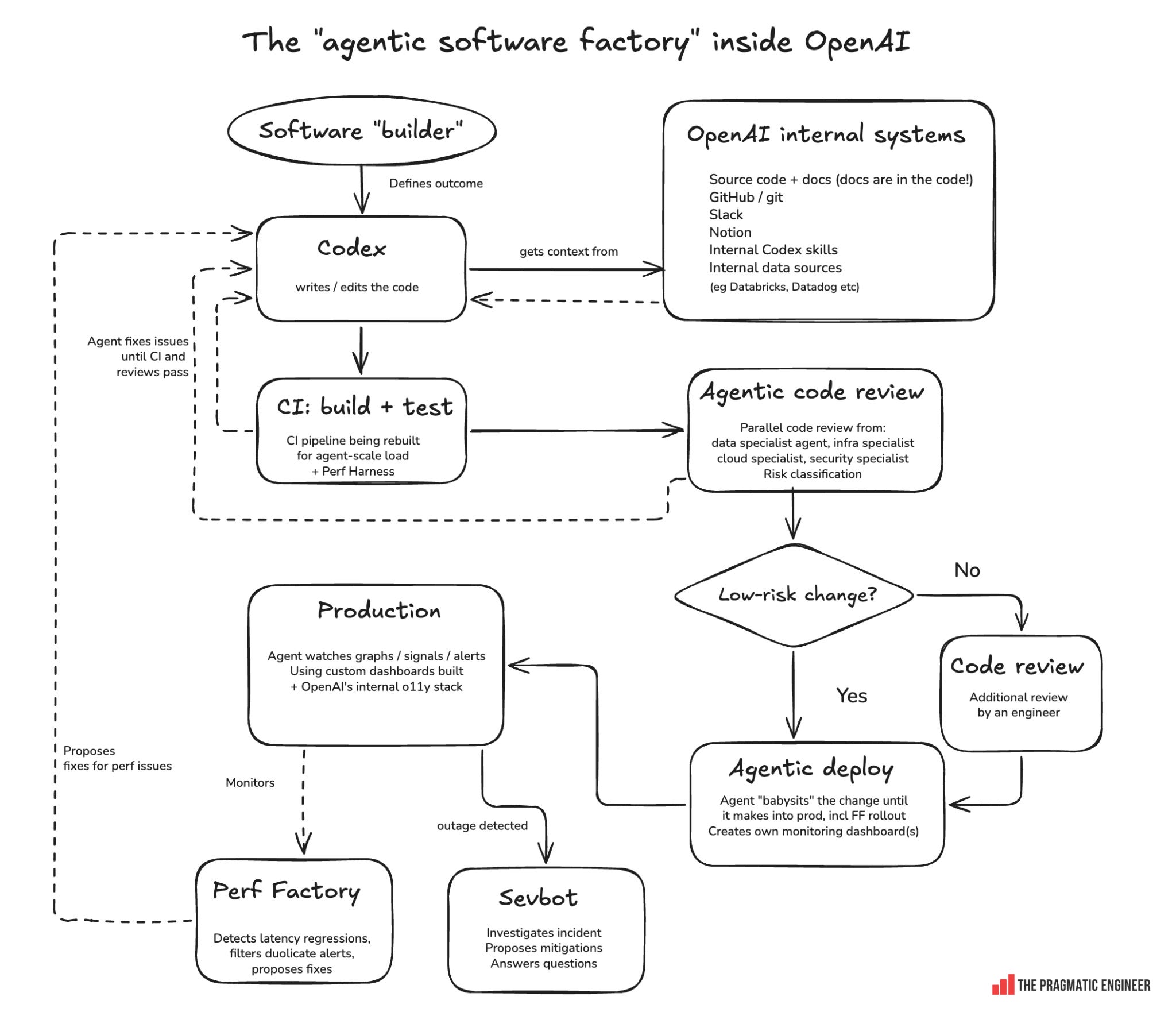
OpenAI’s agentic software factory. OpenAI has built a “software factory” with several automated, agentic feedback loops: for example, Perf Factory monitors production and kicks off Codex agents to automatically fix performance issues.
How engineering tooling & practices are changing. Hand-built internal tools are slowly being replaced by Codex, which is increasingly preferred for debugging over specialized tools. Harness efficiency is critical in software factories.
Engineering for a billion users: how OpenAI scales up its infra. They buy first and take it in-house later. Also, geographic infra distribution, capacity planning tactics and challenges.
Making OpenAI’s API more reliable and performant. CPUs are becoming a bottleneck, doing slower deployments on purpose, and solving load challenges.
How the software engineering job is changing. Engineering specializations are disappearing, judgment and agency are more important, and it only takes one or two engineers for previously “impossible” rewrites and migrations to succeed.
Before we start, a scheduling update: I’m in New York for the week, attending the LDX3 conference and visiting a few startups and tech companies in the city, so there will be no edition of The Pulse on Thursday. Normal service resumes next week!
The takeaway from my visit to the company’s headquarters which really sticks out is that Codex – and lately Codex and ChatGPT Work – have taken over everything there, starting in around January. Desktop lead, Andrew Ambrosino, told me:
“The big theme of the past months has been that everything is now a coding agent. Whether the visible code is your output or not, agents write your artifacts.
Think of it like this: your entire life is via software. You have these powerful tools (agents) in your computer, and the ability to loop and reason and write code is the ability to do everything.”
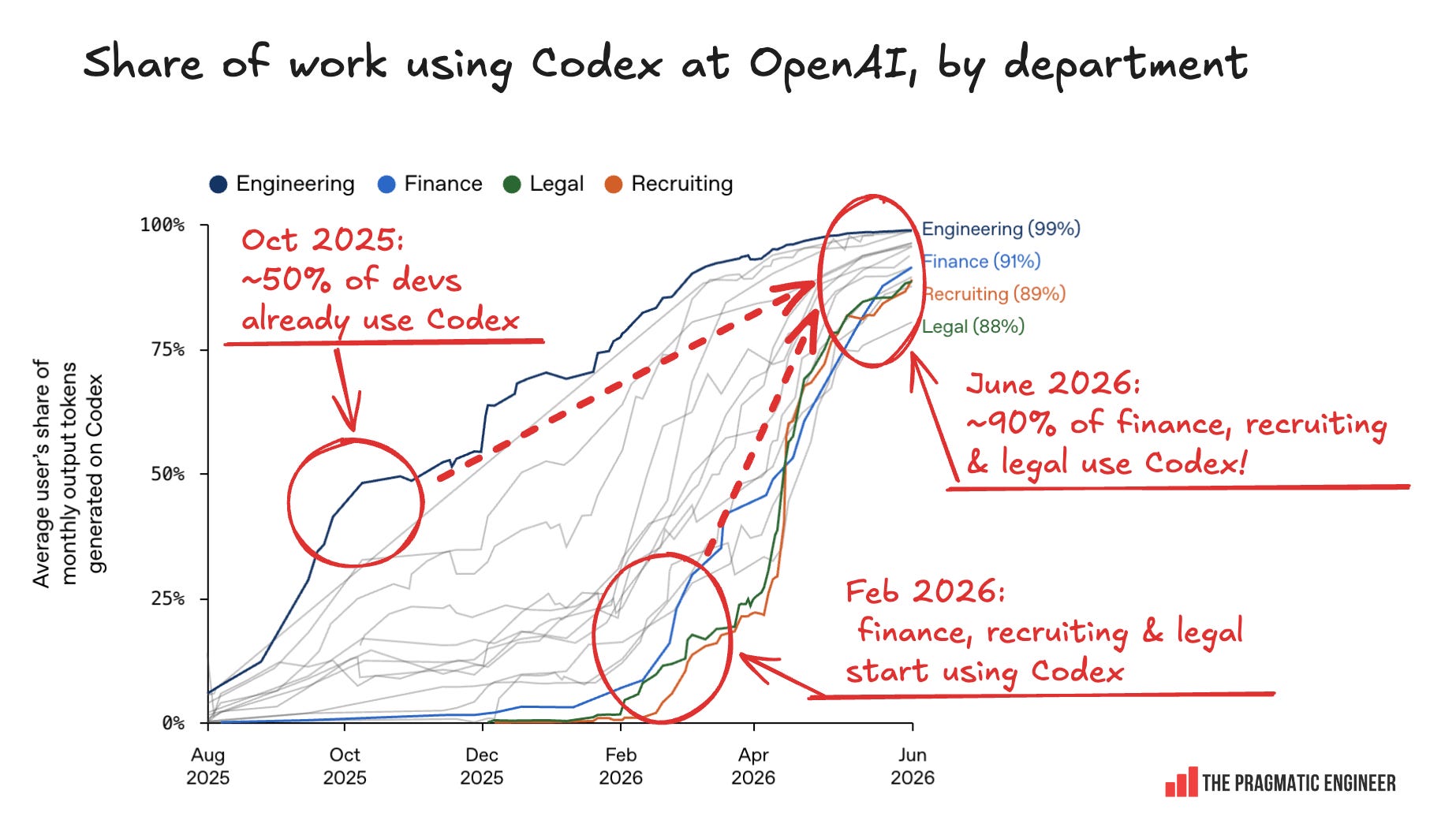
The token usage chart below shows this sudden adoption surge:
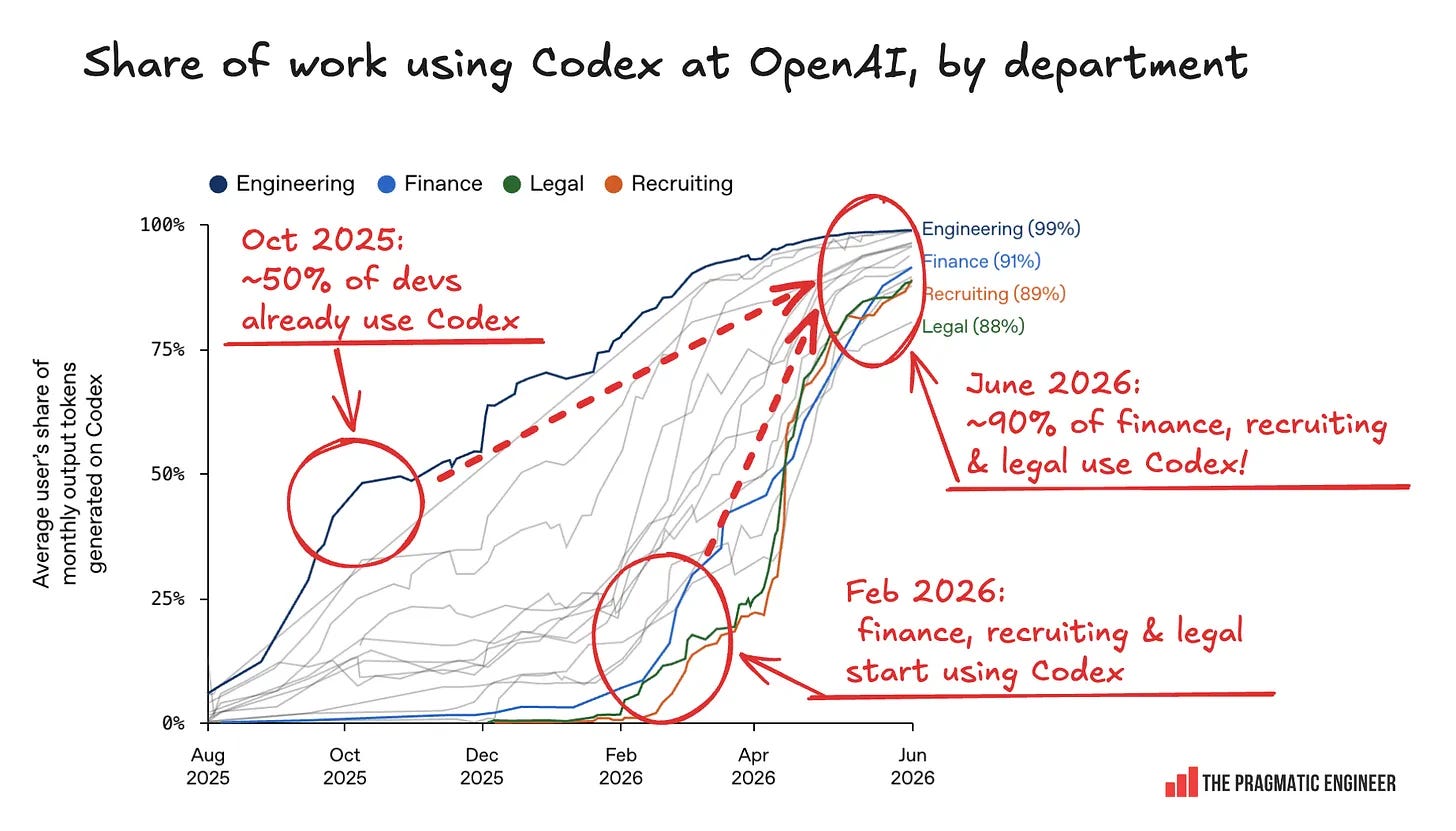
Codex usage since August 2025 at OpenAI by department. Source: OpenAI
In a four-month period, non-engineering orgs like finance, recruitment, and legal went from ~0% usage of Codex to 90% usage. Now, almost all OpenAI employees use Codex and ChatGPT Work weekly. So, what happened?
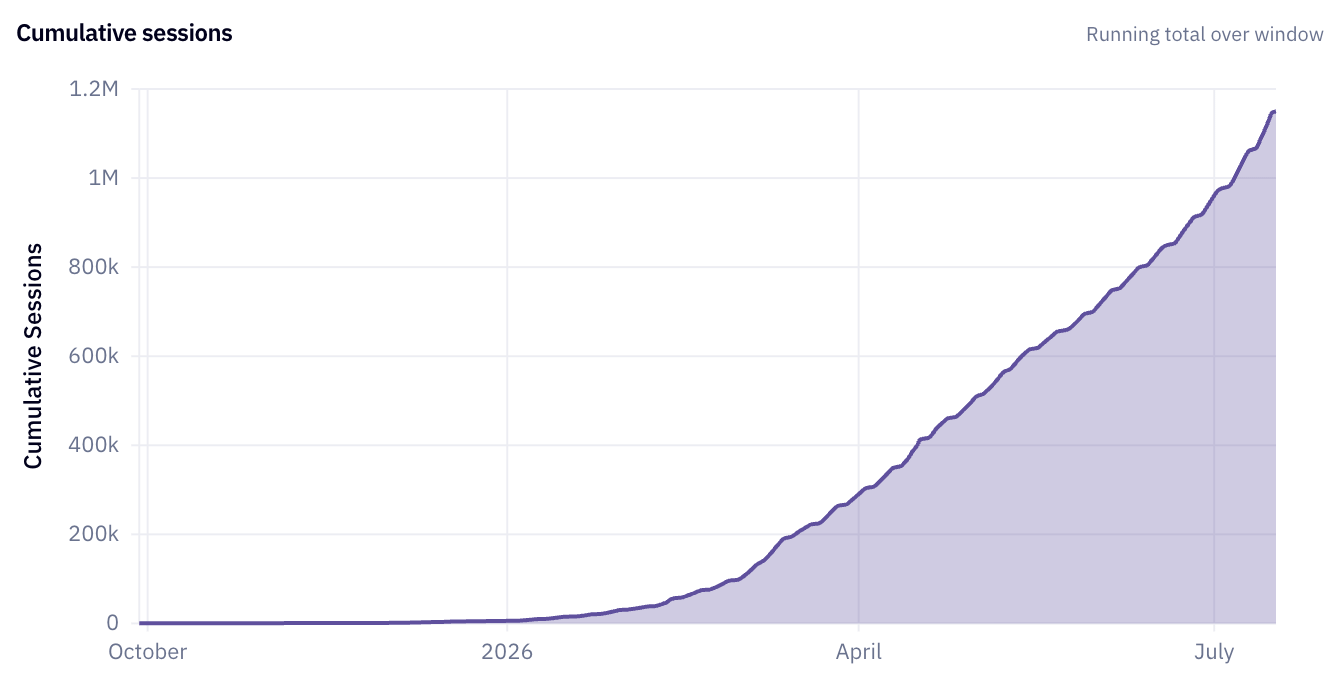
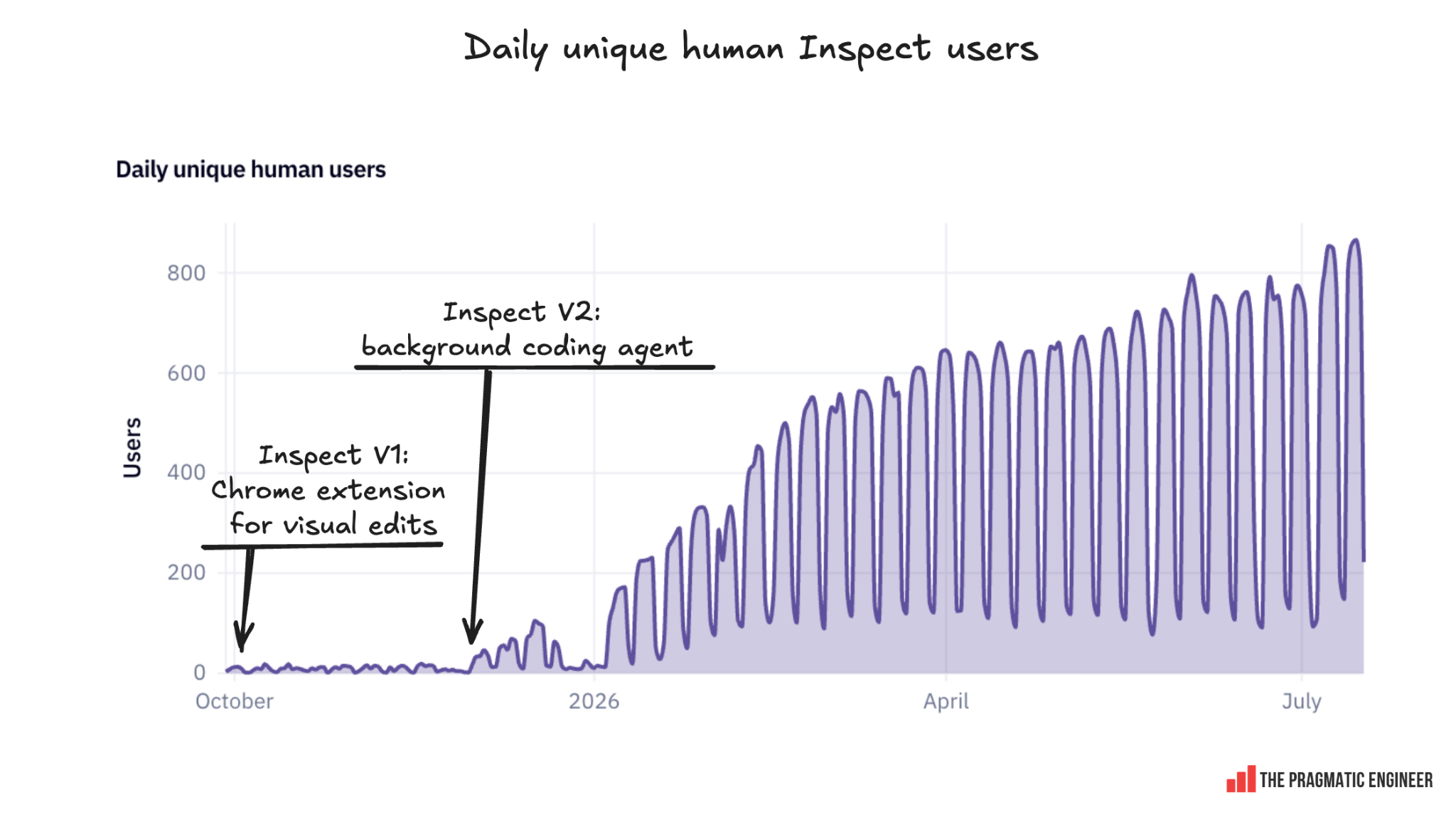
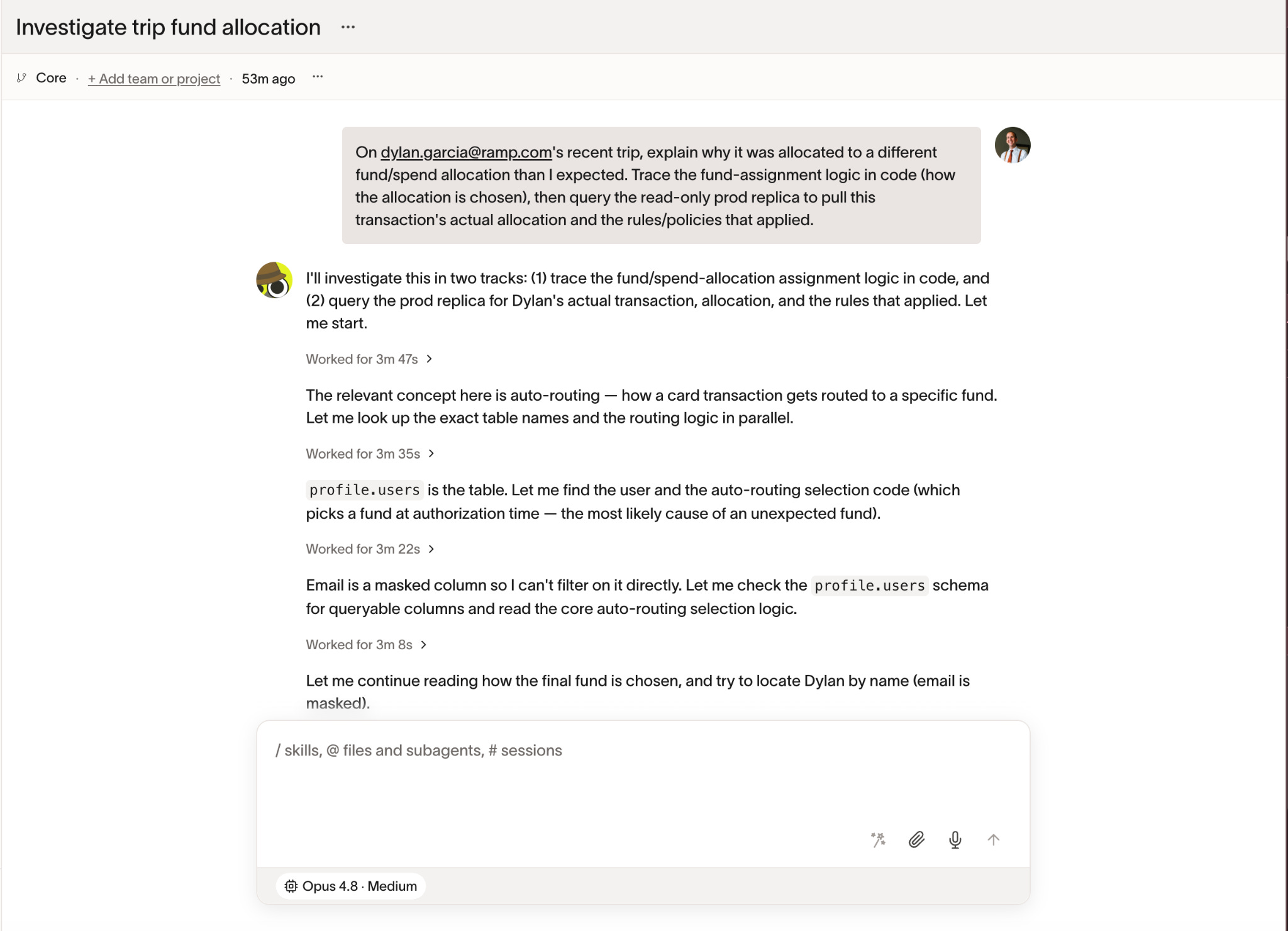
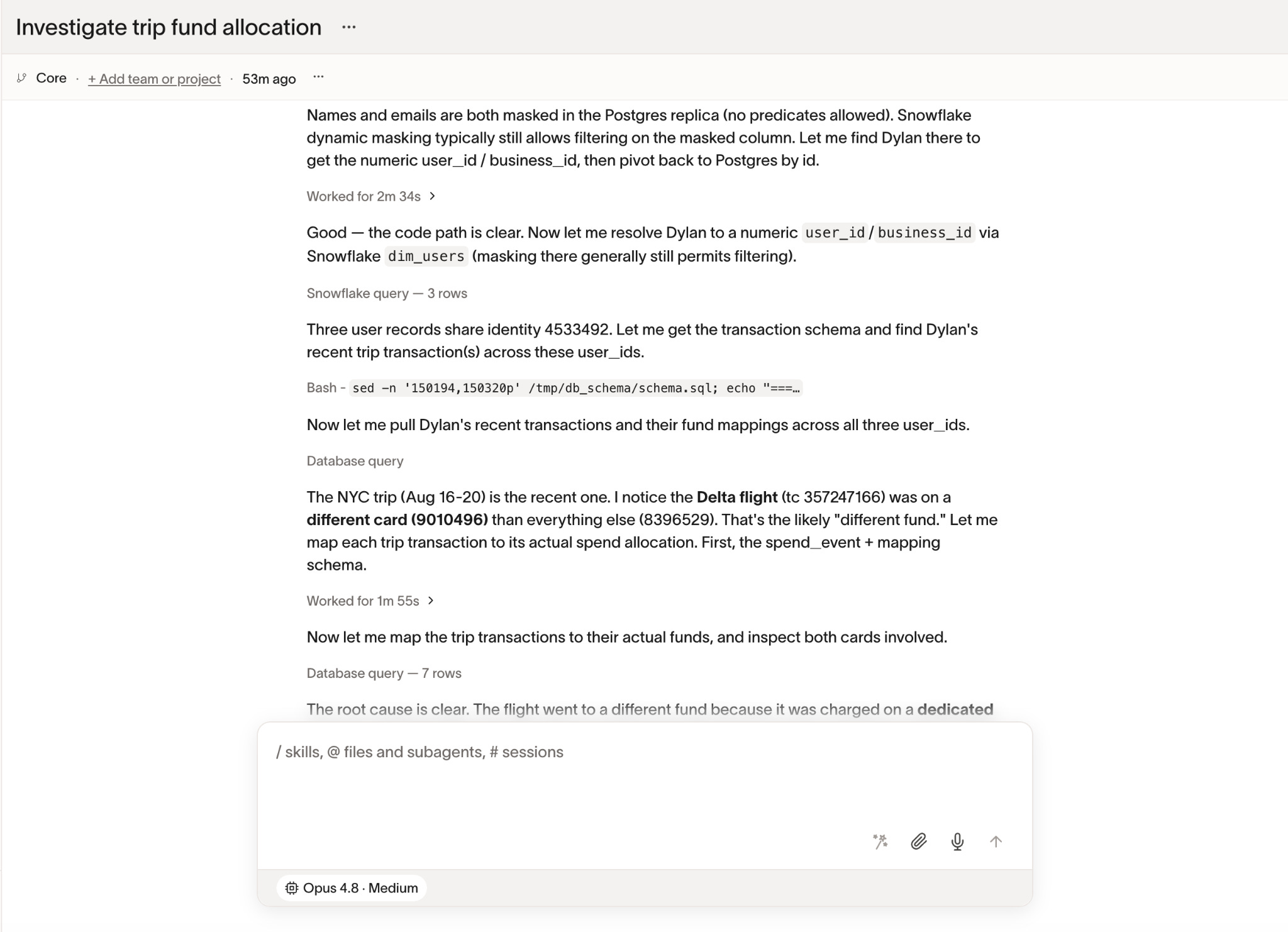
OpenAI released the Codex app for Mac in February and for Windows in March, and ChatGPT Work (powered by the Codex harness) in July. Following that, non-engineers there moved all their workflows over to Codex and then to Work.Caveat: OpenAI’s internal version of Codex is a lot more advanced than its external counterpart because it’s plugged into pretty much every OpenAI system – similar to how Ramp’s Inspect AI agent has been wired up.
The fascinating part of this is that OpenAI got close to 40% adoption across non-engineering teams at a time when the Codex app was hostile to non-engineering users (hard to use). Between February and April, the Codex app still showed the code on-screen, but even so, non-technical colleagues outside of engineering still used it because it could do complex work like researching and creating a presentation, document, spreadsheet, or tasks that produce rich output. Today, those folks are very heavy users of it.
Being able to work for longer on more complex things drove adoption. OpenAI added the /goal setting to Codex, where you can set up a goal for the agent and it keeps working until it is complete. Between April and May, usage surged from 60% to 90%. Andrew believes improvement in the harness’s handling of long-running tasks was one cause of this:
“The number one thing that is changing is that people are starting to use threads for much longer, and this longer usage has been a breakthrough. It’s surprising to see the sheer length of time that people spend on a thread – even days! They often set a goal and then have the model crank.
Codex being good at longer-running tasks seems to cause people to do fewer things in parallel. This is because a long-running agent often spins off other agents to do other things, reducing the surface area that you, as a human, have to manage.”
“Awareness overhang” is another cause of the rapid adoption, the Codex team believes. As Akshay Nathan, Engineering Lead, Productivity team, told me:
“For a long time, we had a ‘capability overhang’: the models were capable but the products didn’t fully bring that out. Now, we’re seeing an awareness gap. Some people have figured out they can use Codex to monitor Slack, update Airtable, or create onboarding materials. But many others still use it for one task and then discover more uses from teammates via word-of-mouth.
But there’s still so much more, under the surface, that you can do with Codex.”
Role-specific and team-specific plugins are created and distributed. Another thing that sped up adoption is that each group started to distribute useful role-specific workflows as plugins. Andrew explained why it’s important to not just offer a generic coding agent:
“If you build a product that can do anything, teams need a way to make it their own. You can’t just give everyone an empty box. Skills and plugins let teams adapt the agent to their work. Sometimes, we also need a new app capability, like a browser that the agent can use alongside those skills. But the same building blocks already cover a lot of different roles.”
Subject matter experts are embedded in ChatGPT Work engineering teams. The models have become “smarter” than developers in some domains, so devs cannot channel “taste” into the harness in those areas. So, people who are domain experts are onboarded onto engineering teams. This is one outcome of ChatGPT Work being used by so many non-engineering domains: experts embedded with engineering advise developers on things like what a good slide deck, spreadsheet, or business report looks like.
Of course, domain experts being in engineering teams is a decades-old best practice for building quality products. It seems like this gets rediscovered in different contexts every few years!
OpenAI is fully dependent on Codex and Work. This is so much the case that in the event of even a minor outage, internal messages from colleagues alert the Codex and Work teams at the same time as – or before – automated alerts.
Basically, work happens through Codex and Work, and pretty much nothing else. From the outside, this dependence on a single shared harness is particularly eye-catching; two years ago, there were no AI agents, only advanced AI autocomplete!
2. Death of the IDE & pull requests
Late last year, the Codex team was torn about whether to release the Codex desktop app. Andrew recalls the hesitation:
“In December 2025, we weren’t entirely sure if we would release the Codex app. We had the Codex CLI as a terminal, and there are large, feature-rich IDEs out there. So, would there be space for a dev tool that is between a terminal and an IDE? In my head, there was this future where it would not work out, and be the kind of ‘misfit’ like the iPad was.
A lot of people buy iPads and then never use them: they either use their smaller, more portable smartphone (which could be the equivalent of the CLI in this metaphor), or their feature-rich laptop (the equivalent of the IDE).
Also, don’t forget that in November, Antigravity came out as a VS Code fork. This added to the feeling that perhaps we should have also forked VS Code for the Codex app. But still, we dismissed the temptation and went with our gut feeling that as AI agents get better, IDEs will matter less.”
Indeed, since January, IDE usage has gone down and OpenAI’s bet looks like a good one. However, the Codex app is becoming a little more akin to an IDE: for example, the ability to edit files inside the app was shipped in June.
CI/CD systems are seeing massive load increases. One sign of productivity gains from Codex is the amount of additional code flowing through OpenAI’s dev infra systems. More code being created and pushed leads to new scaling challenges which the team is currently heads-down on solving. Venkat Venkataramani, VP of Engineering, Applied Infra, said:
“The number of pull requests (PRs) per engineer is growing like a hockey stick (at a very high, accelerating rate). Every part of the build-test-deploy pipeline is seeing dramatically more load.
We’re talking about roughly a 10x increase in load on some systems. At most companies, that kind of growth might happen over two or three years. At OpenAI, we see it in about six months.
That level of acceleration exposes bottlenecks everywhere: version control has to handle far more code being written and pushed, CI/CD systems have to scale with it, and production release processes have to absorb a much higher rate of change.
Every month, we wake up to a new set of infrastructure scaling challenges to solve. Just when we think we’ve created enough capacity for the next phase of growth, the model unlocks another wave of capabilities, which creates a new set of bottlenecks somewhere else in the system.”
In this context, PRs and code reviews are being rethought. They have “core primitives” in software engineering, but this level of development acceleration is an opportunity to reimagine them. Again, from Venkat:
“The question we ought to ask ourselves in the middle of all this development acceleration is how do we reimagine many things we took for granted. For example, how do we reimagine the CI (continuous integration) and CD (continuous deployment) process? What does observability mean in this world, and how should people interact with pull requests?
If you ask me, the way we do code review today makes less and less sense, and the same is true for pull requests.
We’re now seeing agentic code reviews that look at code changes through a series of different lenses. In the past, it would have been impractical for a cloud infrastructure engineer and a security engineer to review every single code change. With agents, that becomes possible.
We can rethink how code is deployed with agents, too. We are building an agent that “handholds” a change all the way to production — whether it’s a code change or a change behind a feature flag. It observes the relevant monitoring graphs, but can also build its own dashboard to monitor important signals. More of our code changes are going to production with this kind of agent monitoring.”
An increasingly painful bottleneck is in deploying native mobile apps. When there are ten times more pull requests, it’s challenging to deploy on the backend or the web and more infrastructure is needed to do so. Then, after you rework a CI/CD system and make sure there’s enough capacity to run them, you’ll be deploying that many more PRs to production.
This arises in the shipping of updates to native iOS and Android apps because every app update needs to go through Apple’s and Google’s manual approval processes which take hours or days to complete.
Talking with Sulman Choudhry, Head of Engineering, ChatGPT, he explained how the app review bottleneck is affecting iteration speed. Sulman used to work at Facebook and remembers how the social media company sped up shipping mobile releases:
“Back in the 2010s, Facebook had a pretty important breakthrough in how to ship native mobile code faster. App Store releases went from monthly to bi-weekly to weekly. At the same time, experimentation and feature flags let teams ship code before it was ready to launch, then turn features on remotely when they were.
That model brought a lot more velocity to mobile.
In the age of Codex, I think we’re hitting the next version of this problem. Code generation is getting dramatically faster, but getting that code into users’ hands on native mobile is not. For Codex in particular, where usage is heavily mobile-first, that gap is already becoming painful for us and users.
I expect the pressure here to increase quickly. If software can be written in minutes, waiting days or weeks to get it onto a phone starts to look increasingly absurd.
We should be aiming for a world where shipping code on native mobile is as fast as shipping on the web. Getting there will probably require some creative rethinking of what we ship, when we ship it, and what can be activated remotely. Today, we’re nowhere close.”
There’s some irony in how shipping a native iOS or Android app has the exact same challenges today as in 2008, when the App Store was launched. In 18 years, not much has changed! Apple still does not officially allow apps to bypass the App Store review process to ship meaningful experience changes.
3. OpenAI’s agentic software factory
The idea of a “software factory” is similar to a physical factory where robots and humans produce autos together. In the software context, it is AI agents and humans producing software. Some manufacturing sites are fully automated “dark factories” where illumination isn’t needed because there are no humans. Could the same fully automated process emerge in software engineering? At OpenAI today, there’s a “software factory” running and it’s all built around Codex.
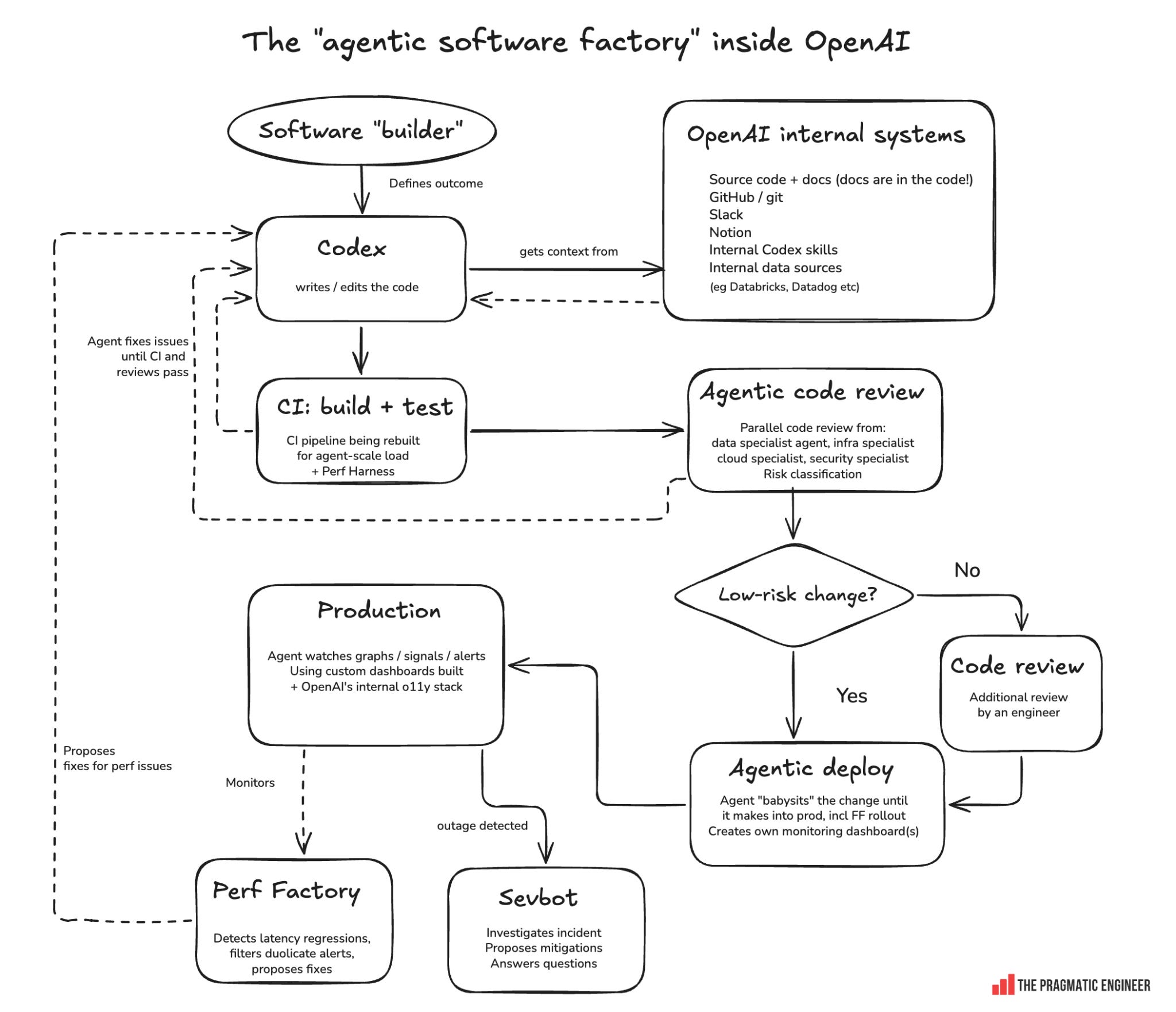
Here’s how the “traditional” software development pipeline used to look, compared to what OpenAI’s agentic infra pipeline looks like today, as described by VP of Engineering, Applied Infra, Venkat Venkataramani:
OpenAI’s “agentic software factory”
The pipeline:
1. A human builder defines the desired outcome. A software engineer or product manager specifies the problem and desired outcome. Judgment, prioritization, and taste are becoming more important for this phase. Interestingly, Venkat told me that engineers at OpenAI are becoming more like product managers than traditional systems engineers.
2. Codex gathers context. OpenAI has moved all its documentation inside of the source code, which makes it easier for agents to understand more of the code. Codex also has access to:
Git repositories and GitHub
Slack and Notion
Internal data sources: Databricks, Datadog, internal logs, etc
Internal Codex skills – some of which are maintained by OpenAI’s Codex implementation itself!
Codex is so “plugged” into OpenAI that new engineers are directed to ask Codex any questions they have during onboarding because it has a surprising amount of context.
3. Codex implements code changes. This part is trivial enough: Codex gets to work and makes a series of code changes until it reaches its goal, and then verifies that the software works as it should.
4. Build & test, then CI. The agent builds the code, runs the tests, fixes the code when it breaks the test, and then creates a pull request. This pull request triggers the continuous integration (CI) server to run and execute a more thorough suite of linters and tests. The agent babysits the PR until it’s “green”, fixing any CI failures and automatically updating the PR.
New: a “perf harness”: the agent also uses a perf harness to send problematic PRs to the Synthetics A/B framework for evaluating performance implications. As mentioned above, the load upon CI systems has increased greatly in the past six months.
5. Agentic code review. Instead of using one generic AI code reviewer, OpenAI spins off multiple agents, each with a “domain specialist” configuration. Venkat told me they see this as equivalent to having a human domain expert from each relevant infrastructure team review every change.
Note from Gergely: I was skeptical about the claim that an agent that’s told to be a cloud infra specialist would produce a different review from a generic agent. However, all Codex agents have full access to OpenAI’s code and docs, so this “cloud infra expert” agent likely has gathered a lot of context about cloud infra setup and best practices, meaning it should provide highly targeted feedback. The important thing is how these “domain specialist” agents are set up, the context they have access to, and how they focus only on their own domain to make best use of their limited context window.
Code changes are classified by risk. High-risk changes can be sent through stricter processes; for example, they might invoke more AI code reviews, or mandate that a human reviews it after the AI agents finish. Low-risk changes follow an easier path; areas of the codebase can opt in to an agent that will auto-approve low risk PRs, removing human acceptance as a bottleneck and improving velocity.
A neat thing about risk assessment is that OpenAI can automate when additional compliance input is needed: either automated (via another agent) or human review. With the quantity of PRs being produced, it simply wouldn’t be possible for humans to review all code without assistance.
Just like with CI, the coding agent babysits the comments and updates the PR to fix issues surfaced.
6. Agentic deploy. After a human approves a change to go to production, it is assigned its own agent with an instruction that could be summarized as:
“Handhold this change until it is safely and fully rolled out into production.”
Agents handhold both the code changes and the changes behind feature flags. For example, in the case of a change behind the feature flag, the agent will:
Read the codebase and figure out where the feature flag lives
Understand what the change does
Decide which signals indicate success and failure
Builds its own monitoring dashboard to use – this is a pretty impressive improvement and something that’s new to me
Watches relevant production signals and its dashboard(s)
OpenAI’s long term goal is to have something like a “per-change autonomous SRE” (site reliability engineer) in the form of an agent that can deploy pretty much autonomously.
7. Observe production. Tools which track the production system:
Dashboards generated by the agent during previous steps
OpenAI’s internal observability stack, including a bunch of custom tools that generate logs, metrics, trace & wide event data
One big change at OpenAI since my previous visit, pre-Codex, is that back then, engineers created dashboards to monitor services whereas now, agents do this at the granularity of per-change deployment.
8. Production monitoring feeds back into development. OpenAI’s “Perf Factory” uses agents to sift through alerts and dashboards, de-duplicate signals, identify real latency regressions, root-cause them and propose fixes. This helps catch performance issues introduced by ongoing code changes, extending the workflow beyond deployment into continuous improvement.
9. Respond to outages. Sevbot is OpenAI’s internal incident response agent; unsurprisingly, it’s also built on top of Codex. When an incident is detected, the bot “wakes up.” Here’s what it does:
Collects context about the incident
Determines possible mitigations (but never executes any)
Answers devs’ questions (it’s part of the Slack channel)
An engineer can tell it to apply a specific mitigation
OpenAI’s goal is to get to the point where Sevbot can take autonomous action when mitigating some outages. The dream is that no humans be woken up outside of their working hours during an outage because Sevbot can handle “routine” outages autonomously, with humans reviewing its actions when they return to work. But as of now, oncall duty is not a thing of the past at the company.
4. How engineering tooling & practices are changing
Unsurprisingly, Codex is changing how easy it is to build internal tools and having an impact on standard engineering practices like debugging. Here’s what I gathered from talking with folks at OpenAI.
The Pulse is a series covering events, insights, and trends within Big Tech and startups.
Today, we cover:
New trend of CPU shortages: after a GPU shortage and memory shortage driven by AI companies, we’re now experienceding a CPU shortage, thanks to AI agents using a lot more CPU with tool usage. If you will need more compute in the future: secure it now…
Listen and watch now on YouTube, Apple, and Spotify. See the episode transcript at the top of this page, and timestamps for the episode at the bottom.
Brought to You by
• turbopuffer– a vector and full-text search engine built on object storage. It’s fast, cheap, and extremely scalable. The teams building the smartest AI products out there — Anthropic, Cognition, Notion, Harvey — all run on turbopuffer. Check it out
• Antithesis– use AI agents to work on critical systems without worrying about correctness. Antithesis runs your complete system in a hostile environment, analyzes its behavior, and reproduces every issue perfectly. Learn more
• Entire– Git hosting, rebuilt for the agentic era. Entire hosts your code in-region, and is up to 89x faster than any other competitor. Mirror from GitHub with a single click – I’ve already done so.
In this episode
Tibo Sottiaux is one of the engineers who created Codex, and today, he heads up the Core Products & Platform org at OpenAI which also includes Codex. He’s also one of the most public faces of Codex due to his frequent – and generous – usage reset announcements, like this one yesterday.
In this episode of the Pragmatic Engineer Podcast, Tibo and I discuss how Codex was built and continues to be iterated upon. We explore why the Codex CLI is written in Rust and was released as open source, how the harness and models have evolved, and why Codex supports models from multiple providers.
Tibo also shares details about how the OpenAI team uses Codex throughout the software development lifecycle, including code reviews, maintenance, and system rearchitecture. We look into how AI is lowering the cost of changing code – and some interesting side effects of this – the merger of ChatGPT and Codex, and also how Tibo uses the tools in his own work.
Takeaways from the conversation with Tibo
1. A shock cancellation proved to be an important lesson. While at Google in London, Tibo spent two enjoyable years working on a project in the Ads organization – right up until a VP flew in from California and abruptly cancelled the whole thing. Tibo was shocked: there were hundreds of users and he was having a great time solving engineering challenges. Reflecting later, he realized he’d been blind to the fact that the product had no product-market fit and the feedback loop from users was poor. Tibo also learned that just because a product manager says a project is going well, doesn’t mean it is! That experience means he now always questions the impact of his work, and the importance of projects to which he contributes. Looking at Tibo’s career since, it seems like a well-timed lesson!
2. Google had a “ChatGPT-like” project a year before OpenAI. At the start of the decade, DeepMind was largely focused on games and reinforcement learning, but some members, including Tibo, reckoned that scaling language models might lead to artificial general intelligence (AGI). Their “chat with an LLM” project spread like wildfire internally, but for some reason the product was never launched. Who knows what would have happened if Google had beaten OpenAI to the public launch of AI chatbots in 2022.
3. Tibo was drawn to OpenAI because only 20 people worked on ChatGPT. Tibo had a great run at Google, but missed working somewhere where Research and Product collaborated more closely than at the search giant. When he learned in 2023 that ChatGPT was built and maintained by around 20 engineers – despite its massive popularity – he was very surprised and wanted to join.
4. Codex is built using Rust, even though the AI models were much better at writing Python and TypeScript at the time. The Codex team had a vision of Codex instances running on millions of cloud machines, which meant performance, security, and engineering for efficiency and scale were the first design principles. This led to Rust, despite AI models then not being the strongest at writing Rust. The team’s decision to choose a performant language upfront and avoid a rewrite later reminds me of Casey Muratori’s point about the need to architect for performance, upfront.
5. Codex is open source, which has upsides and downsides. Codex’s biggest competitor, Claude Code, is closed source, so I find it inspiring that the Codex team chose the open source path. Tibo says the upsides are trust and the community of contributors who are an energizing influence. A less discussed downside of open source is that the Codex team’s work sometimes gets copied and released in other tools before Codex. Tibo told me this stings, but it’s the price of working in the open.
6. Open source is a big reason why Codex supports working with other AI models. Claude Code can only be used with Anthropic’s models, whereas Codex is usable with any model, not just OpenAI’s. Being open source means that even if Codex were locked down to a model, anyone could still fork the harness and change a few lines of code to support a different model. Tibo believes in winning by letting users use the best models; the Codex team themselves also try other models in the same harness. Personally, I appreciate this approach of encouraging competition from a frontier lab!
7. Cloud development environments (CDEs) never took off outside of Big Tech because of setup costs – but AI agents could change this. Tibo predicts a resurgence of fully cloud-orchestrated machines, where agents like Codex can configure and stay in sync with your local machine setup.
8. The Codex harness is always slightly ahead of OpenAI’s latest model. The harness provides the model with crutches: guardrails, safety, efficiency, steerability, and the developer message injected into context at the start of each turn. As models improve, some “crutches” are discarded and the harness shrinks. This has been the development cycle between Codex and OpenAI’s new models to date.
9. Codex “knows” a staggering amount because it’s plugged into pretty much every OpenAI system. I asked Tibo what pointers he’d give a new joiner on the Codex team. His answer: “have you asked Codex?” At OpenAI, it’s plugged into Slack, every document, and all code, by default. New starters are surprised about being able to ask it anything, including who’s working on something, or why a decision was made. The team purposely work in public channels and open documents with broad permissions.
10. Correctness checks and security reviews will be automated with AI. With code review changing under AI’s influence, Tibo believes that discussion about the intent of code doesn’t have to happen inside a code review, which is mostly about correctness, information exchange, and providing a forcing function for conversations that should’ve happened sooner. With AI code review, conversations about what the system should do still matter, and are probably best had before the code is written. This echoes the theme of this week’s Tuesday article about what is happening with code reviews.
11. Maintaining and re-architecting code is becoming very cheap with agents, especially time-wise. Maintenance tasks like dependency upgrades can be handled by a model blasting through the codebase within a couple of hours. Meanwhile, re-architecting for new tradeoffs that used to take years can now take days, at most. Tibo adds a caveat: quality code, good abstractions, and good test suites greatly affect how easy – or not – a codebase change is to make.
12. Being “in the zone” is history; Tibo sees code as a tool for solving problems. During the podcast recording, we bonded over remembering the “good old days” of pulling late nighters and staying “in the zone” to solve difficult problems with code. These days, Tibo has adapted, like most people at OpenAI. He still opens an editor and writes a little code because it feels nice, but says that an upside of AI agents is being able to gather more data faster – meaning there’s less need for the lengthy coding sessions of yore. Instead of making gut calls, he can fire off an agent and get the data within a minute to make much better decisions with.
The Pragmatic Engineer deepdives relevant for this episode
One question haunting the minds of CTOs and heads of engineering whom I’ve been talking with, is how to deal with large quantities of code review which have only been growing now that AI agents generate most code at many tech companies.
Since the end of 2025, it has seemed that the era of devs writing code by hand is over at startups and in Big Tech. AI agents work faster and generate more pull requests (PRs) than devs ever did, and the size of those pull requests is also increasing.
Today’s article summarizes some approaches to code review at various workplaces in this new paradigm, covering:
Humans review the AI code reviews. The most popular approach: AI code review tools go through code changes, and devs review the review itself.
Triage by “blast radius” & decide an approach. Low-risk changes don’t need human review, and high-risk ones do. Adopted by OpenAI, Anthropic, and others.
Review the plan/tests/database schema, but not implementation. Focus on reviewing the “before” and “after” states of an implementation, rather than the implementation itself.
Produce less code. Set up AI agents to produce smaller PRs that are easier to review and reason about.
Review everything by hand. Not everyone has adopted AI code review tools – even those that have sometimes still expect devs to read through all the new code, before allowing it to go to prod.
No human code review? There’s more talk about dropping human code reviews than there is evidence of this actually happening, so far. The most I could find was AI startups doing it and building additional layers for safer production rollouts.
Why do we review code, anyway? Before figuring out whether or not code review should stay, it’s worth going back to the fundamental technical, team, and organizational reasons for code reviews.
Unsurprisingly, it’s clear there’s no one-size-fits-all solution to the question of how to handle a deluge of AI-generated code review. Please leave a comment below about how your team or company deals with this new, pressing issue!
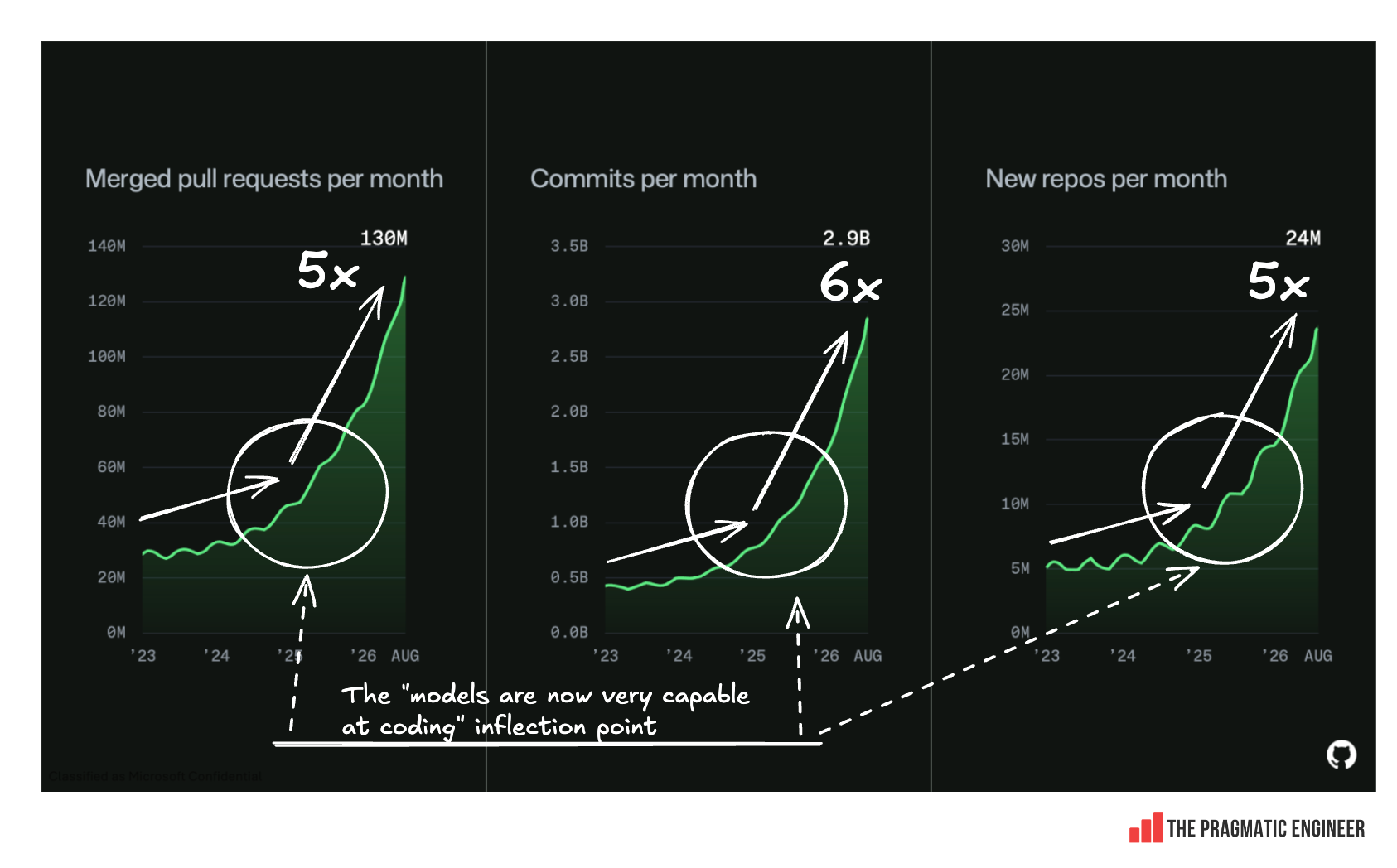
A snapshot of what’s going on in code review at this stage of AI development is provided by the graphic from GitHub, below. The background context it provides is pretty stark. It shows the stats for the number of PRs and commits over the course of three years on the popular platform:
Change in number of PRs, commits, and new repos across three years. Source: GitHub
Over that time, the number of PRs opened has increased fivefold, which is a lot! And growth sped up from the end of 2025, when PRs and commits nearly doubled just in that period alone! So, how are teams dealing with this avalanche of extra work? To find out more, I asked around.
1. Humans review the AI code reviews
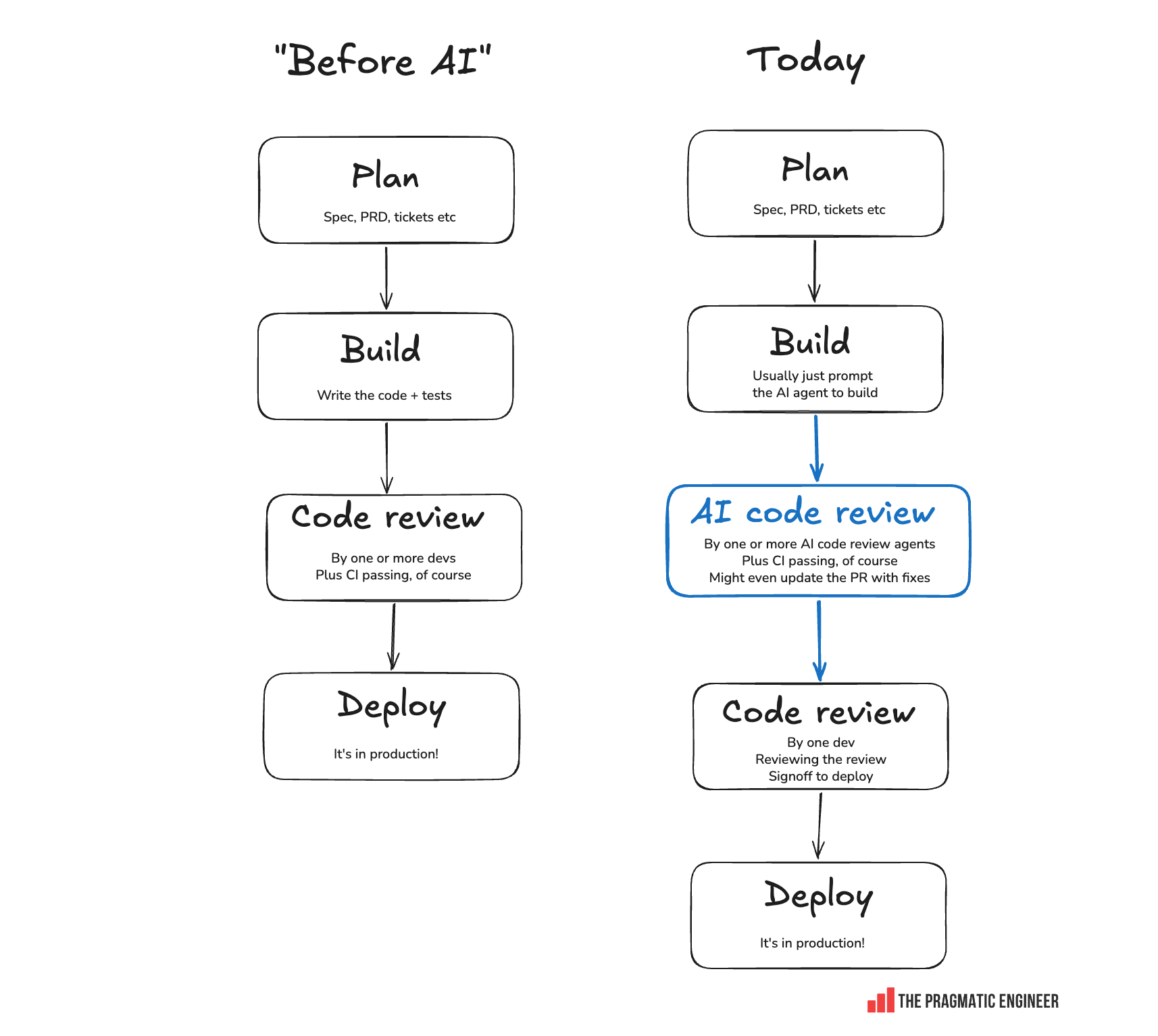
The most common approach is to add an AI code review step to every pull request in a variety of ways:
Use one or more vendors to review PRs. There are dozens of vendors offering this functionality – ones like CodeRabbit, Gitar, Greptile, GitHub Copilot Code Review, Qodo, Claude Code Review, Ellipsis and more. Many teams choose one or more, and the bots then review PRs, leaving comments for devs. For example, the Bun project by Anthropic has CodeRabbit, GitHub Code Review, and Claude Code Review all generating comments on PRs.
Multi-agent code review. Build a custom solution which triggers several models/agents to review the code and suggest fixes.
Agents update PRs with fixes. Vendors and home-grown solutions can instruct agents to update PRs with fixes and then re-trigger reviews – if you trust agents to make sensible fixes, that is!
Typical processes:
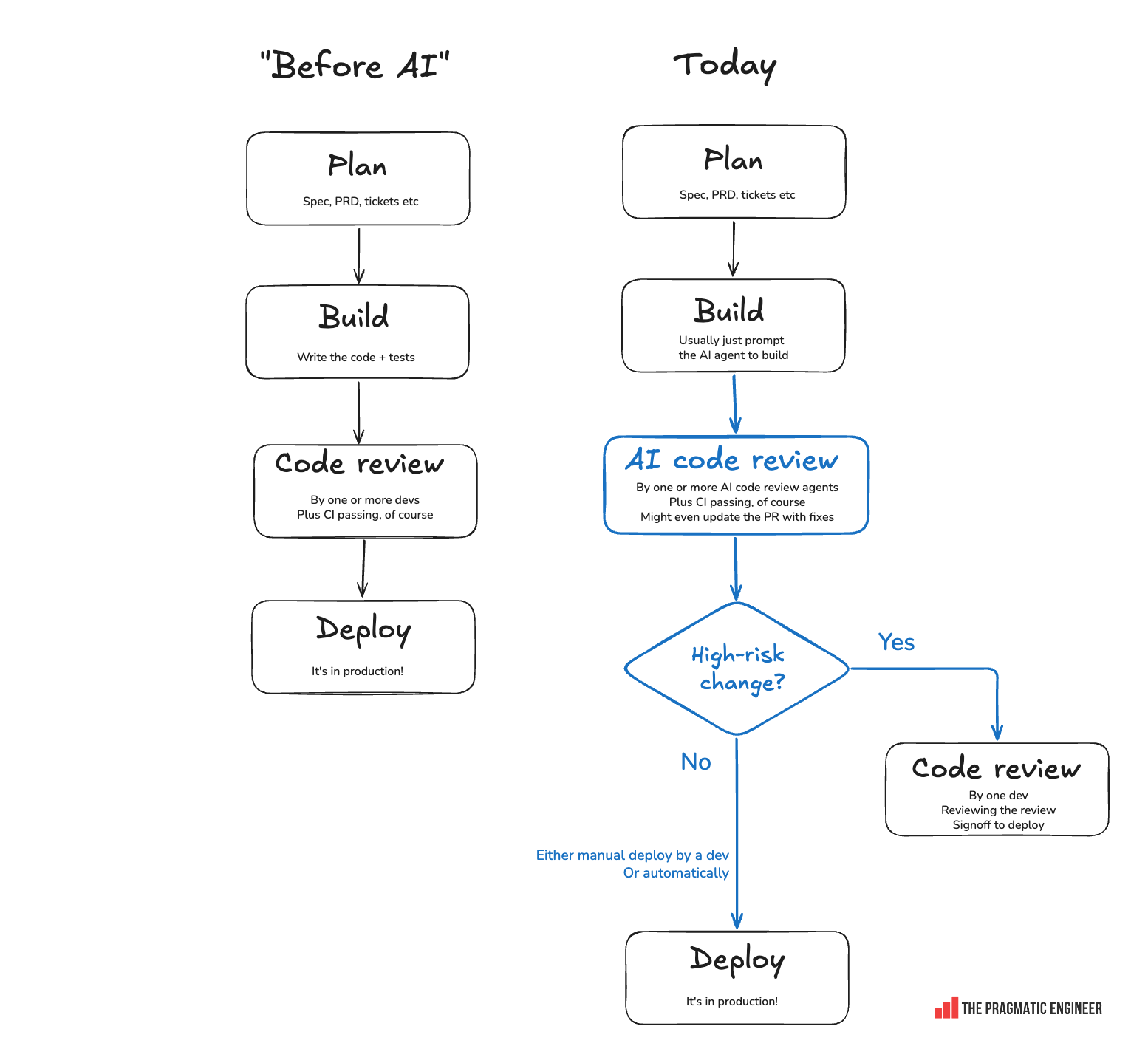
AI code reviews increasingly part of the development cycle
In the above cases, engineers typically review the review itself, and not usually the code. Here’s Etienne Dilocker, cofounder and CTO at AI database software, Weaviate, explaining why he likes their approach:
“It’s very hard for agents to get the balance [of the code review] right. If you ignore human code review entirely and leave it to agents, every PR will either suffer from scope creep or ship critical issues. But, of course, you can’t review everything by hand. So my current favorite setup is:
1. an (adversarial) agent does a review
2. a human makes a scope decision
3. an agent implements the feedback
4. either repeat or break the loop (likely a human decision)
So basically, 90% is left to agents, with humans in the loop for critical scope decisions and exit criteria.”
Noise is a big problem with AI code reviews. WeTravel, a Series C travel tech company, decided to not use AI for code reviews because of the amount of noise it generated. In June, they did an updated evaluation which showed lots of improvement, but still not enough to justify adopting AI for the task.
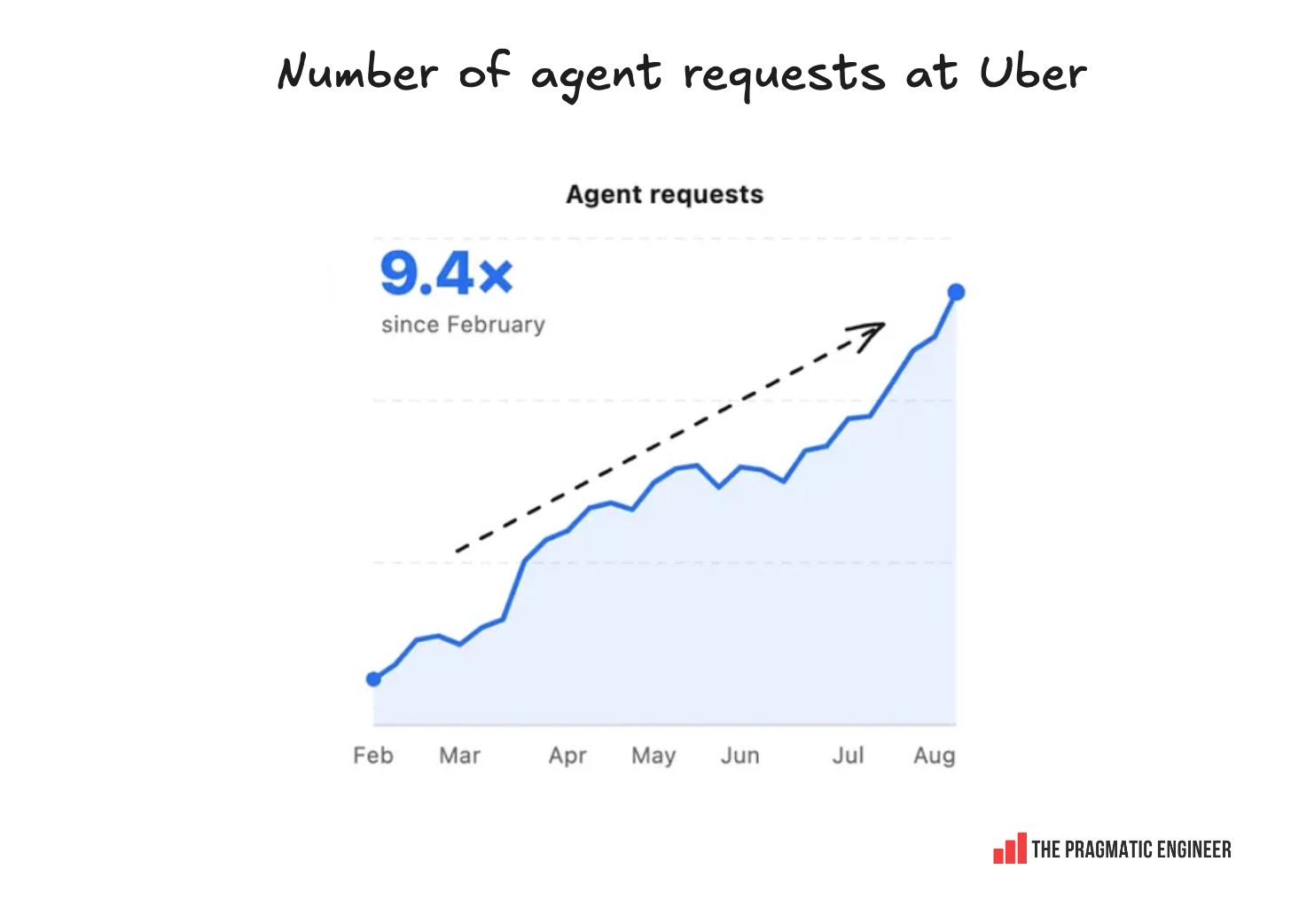
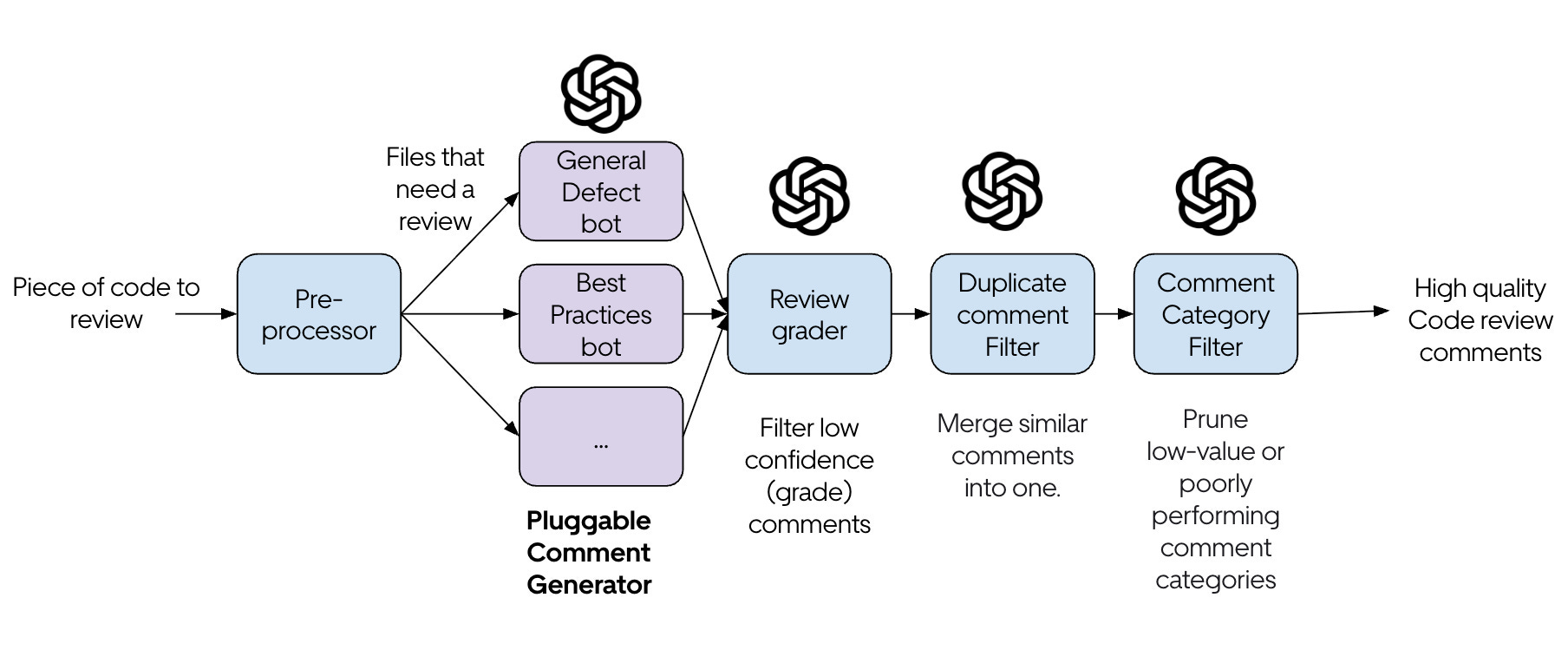
As things stand, custom tooling is probably needed to reduce code-review noise. Uber built a clever approach for this; an agentic pipeline called uReview:
What uReview does:
Bots generate lots of code review comments
Comments are graded, and low-confidence comments removed
Comments are merged, categorized, and unimportant ones removed
… in the end, the AI review results in important comments being shown to devs
2. Triage by “blast radius” & choose an approach
Another common approach is to decide whether to review code by hand or with AI, based on how “risky” a change is:
Low-risk change: only AI, without human review. It can ship to production once AI agents are happy
High-risk change: mandatory human review
This is the approach that Anthropic and OpenAI follow, which I confirmed by talking with both companies. At Anthropic, Jarred Sumner told me that a human merges even low-risk changes, but that their goal is eventually to get another Claude instance to merge low-risk changes.
And it’s not just at leading AI labs: fifteen-person startup, Duckbill, a cloud and AI compute and contracts management company, changed their process, as explained by cofounder and CEO Mike Julian:
“We ditched code review at Duckbill Group (mostly)
About a month ago, we found ourselves with 60 open PRs for a team of five. They had been accumulating for a few weeks and we all had the sudden realization we were looking at two days of just code review.
I had been tossing around the idea for a while about having AI do all code review and so I just asked the team: what if we just didn’t review the PRs?
We decided to do a couple of things:
Switch to a risk-based system. With a risk-based system, we agreed that if your change touched the public API/MCP, auth, design system, non-additive database schema changes, or agent skills, it needed a human review. We then enforced that with a shell script to add a GitHub label.
Improve our guardrails (unit and end-to-end testing, post-deploy observability, stricter linting and type checking, etc). Improving guardrails was pretty easy, just expensive in tokens and attention. We enabled nearly every rule in ruff/prettier/eslint/ty, and we improved our unit test coverage to a floor of 85%.
Results before vs after:
PRs merged: 353 → 684 (80/wk → 154/wk, +94%)
Merged within 1h: 28% → 45%; within 24h: 76% → 80%
Human-reviewed PRs median merge time: 26h
No human-review median merge time: 1h.”
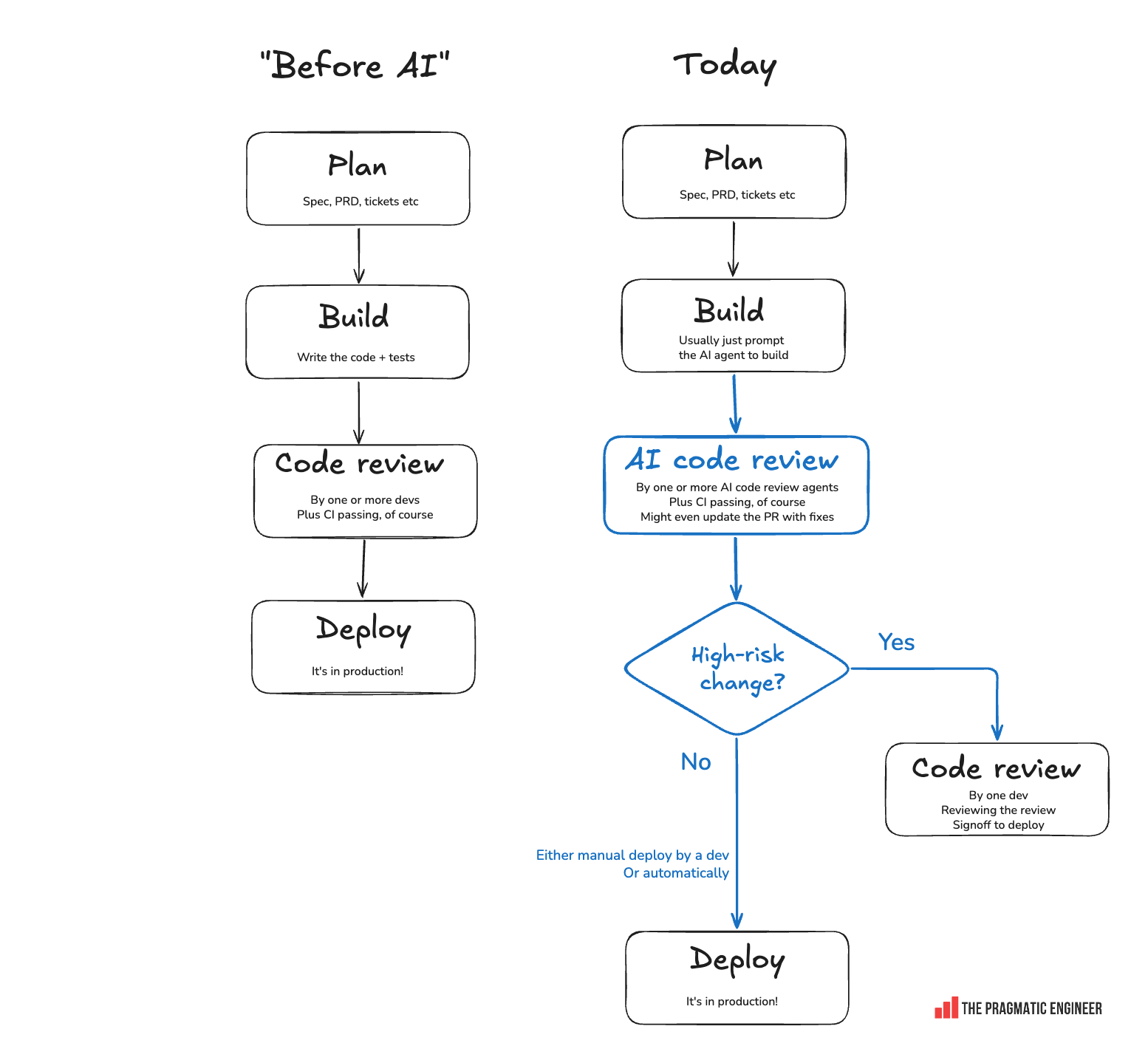
Here’s how I’d visualize this approach:
Selecting a code review approach by “blast radius”
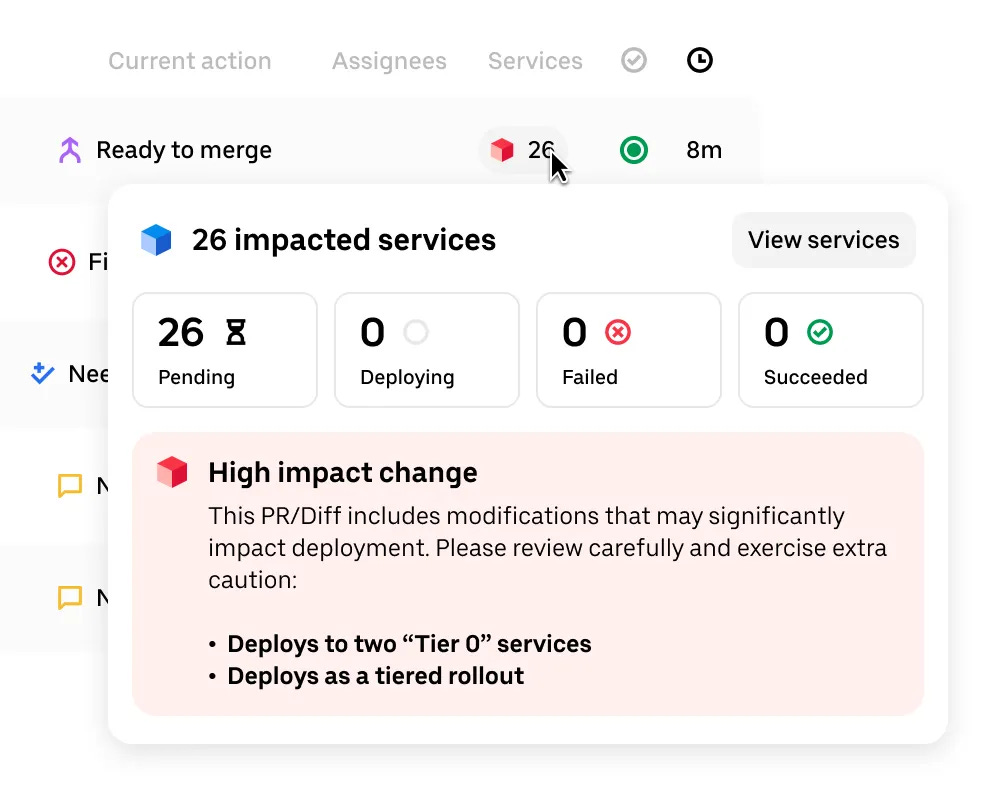
Some companies have built additional tooling to make it easier for devs to know which reviews to focus on. For example, Uber’s custom-built Code Review Inbox highlights high-impact changes, so devs know to spend more time and effort on them:
3. Review the plan/tests/database schema, but not the implementation
Some devs and teams have stopped reviewing the code (the implementation), and instead review the “before” and “after” states:
Review the plan: spend a lot more time on the plan than before, to get a much more detailed spec. Using The /grill-me skill by Matt Pocock is a popular method, and I’m also a fan of it for thorough upfront planning, as is Andrea Francesco Speziale, Principal Engineer at Musixmatch:
“After 3 hours of /grill-me, it better one-shot the implementation. I’m not spending a single minute on any review!”
Review the tests: via Test Driven Development (TDD) – which is much easier with agents when writing the tests upfront is a chore – or by focusing the review to ensure the software is tested.
One argument for this approach is that customers and users of software usually don’t care about the code. There’s a caveat that automated tests can verify a lot of different software – and are great at verifying business logic – but they don’t do a good job at verifying whether a UI looks and feels good.
Review the database schema. Jackie Luo, cofounder and CEO of AI startup Sigil, and formerly an engineer at Square, says:
“My current take is that all that really matters is the database schema. Speaking from a fast-moving startup perspective:
1. Everything, besides data, is fluid and recoverable.
2. The schema is the “hard” representation of what’s been built and reveals the riskiest changes, so it’s a good attention/impact tradeoff.
3. Business logic only matters because product behavior matters—so ideally align on that before interacting with a coding agent at all. Then, once the code is written, use abstractions to understand any other significant decisions made.
Understand the product over the code. Use abstractions to translate the latter to the former – except in the case of schemas!”
Jackie’s point is that data (that is, the state) is the most “rigid” part of any system. Stateless business logic is now easy to change because it’s “just” code, and code is easy and fast to generate and regenerate. For startups, it’s worth getting the data schema – and thereby your state machine – right. Then, everything else will be easy and fast to iterate on.
My sense is this approach makes perfect sense for a startup iterating to get product-market fit. However, once you have a business, you’ll want to “guard” the business logic with tests: else your product could break, and existing users will be unhappy when this happens!
The Pulse is a series covering events, insights, and trends within Big Tech and startups.
Today, we cover:
New trend: tech companies moving to open models. Uber, Pinterest, Stripe, Coinbase, Ramp, and AT&T are making large savings on their AI bills by dropping proprietary models and using smart model routing.
Automatic software maintenance experiments by Linear and Anthropic. Both startups are experimenting with how far they can push AI agents to automatically fix bugs and remove tech debt. It’s working better than anyone might’ve expected in the recent past, but not producing code that can be merged without review.
Frontier AI lab wars: OpenAI pulls models from SpaceX / Cursor. With SpaceX now a frontier model and rival to OpenAI and Anthropic, OpenAI has pulled its GPT models from Cursor. This isn’t an option for Anthropic which is dependent on the SpaceX compute they rent to serve Claude.
HR tech startup’s one-dev-per-project approach. A full-remote HR startup with 70 engineers has a single engineer run each project, and says the approach works well. Will this approach be adopted elsewhere, especially at other full-remote startups?
Industry Pulse. Meta moved over to Slack for better agent interoperability, layoffs at Uber and PagerDuty, Anthropic upsets users by calling a rate limit decrease an “increase”, token usage explodes on OpenRouter, AI drives surging demand for Apple’s Mac Mini & Mac Studio, and more.
1. New trend: moving to open models at tech companies
Update: a week after publishing this article, Ara Krahzian at Ramp has confirmed that AI spend in August, has, indeed, declined at the top 1% of businesses by 10%, based on Ramp data. I’d wager those companies are not spending fewer tokens, but they are optimizing cost, in ways outlined below.
In May, I covered an emerging trend of companies wanting to cut back their AI spending, starting with engineering departments. Different approaches were being tried:
Wow, has it already been five years?! The newsletter hits a big milestone this week, and it wouldn’t have been possible without subscribers. Thanks to everyone who’s read an article or listened to a podcast episode during that time!
Before we get into the latest issue, I’d like to point you to two upcoming events in New York City which I’ll be at. It would be great to meet some of you! They’re free to attend:
Wednesday, 16 September, 6pm: turbopuffer talks. What happens when you mix a whiteboard, two senior turbopuffer engineers, and myself, with the spotlight on database internals? We’ll draw out turbopuffer’s database architecture and geek out over it, then hang out afterwards. Join us! Sign up here.
Thursday, 17 September, 5:30pm: An evening with The Pragmatic Engineer and WorkOS.A fireside chat between WorkOS founder, Michael Grinich, and me, with him asking the questions. We’ll get into stories about the tech industry – including a few which probably won’t get published! Sign up here.
If you’re at LDX3 New York on 15-16 September (Tue & Wed), I’ll be doing a keynote on Tuesday morning and hanging out around the Antithesis booth during the day. See the full agenda and get tickets.
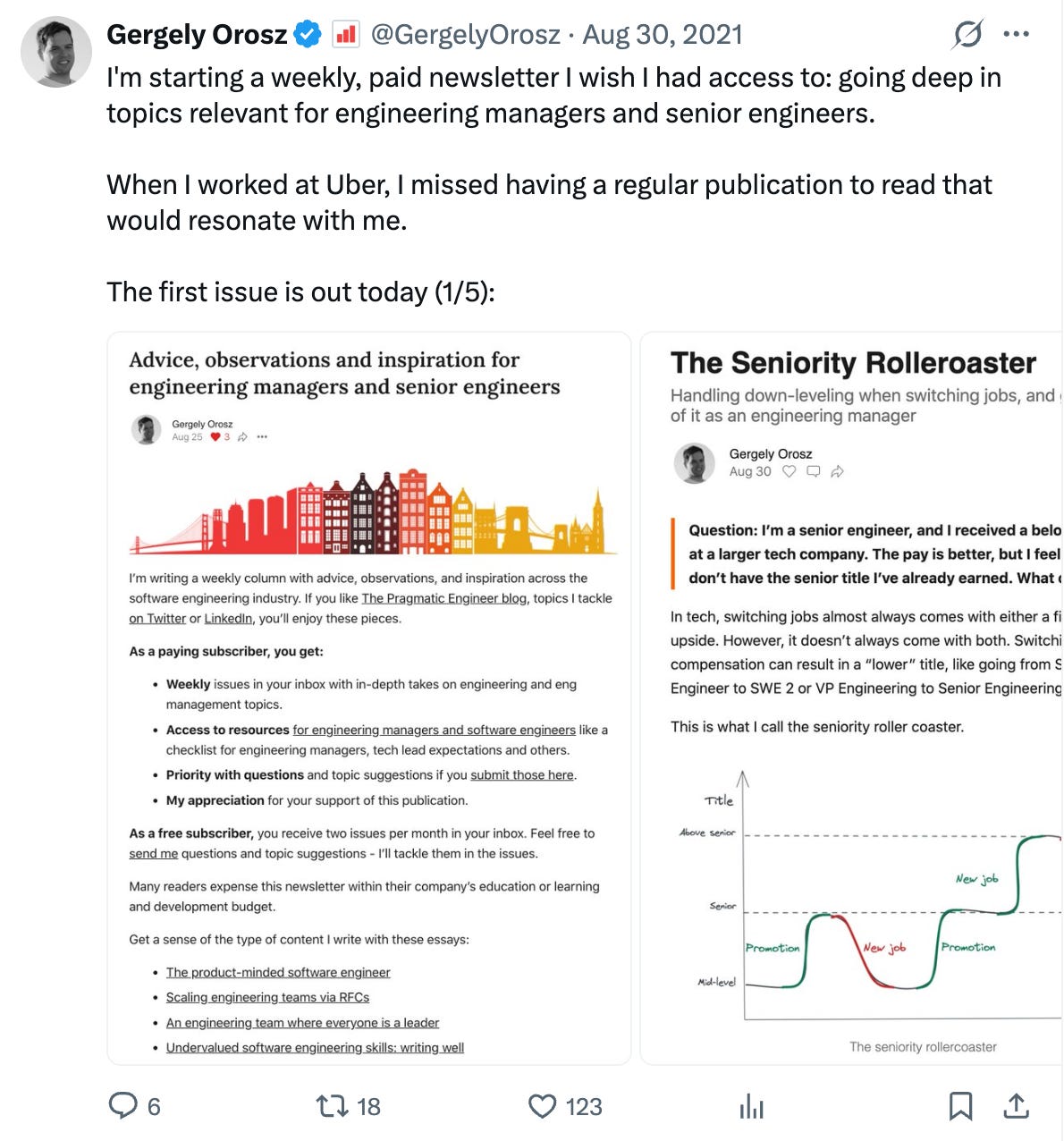
I checked the calendar and it is indeed half a decade – almost to the day in 2021 – since I published the first-ever issue of The Pragmatic Engineer:
On launch, the paid version of The Pragmatic Engineer cost $100/year, or $10/month (this has since increased to $150/year or $15/month). As a special offer, I’m “resetting” the price of the publication to annual subscribers for $100/year: claim this offer here. The offer ends in a week, on 8 September. Get this offer here.
My personal expectations weren’t high back then; the subscription model for newsletters on platforms like Substack was starting to take off, but the focus was strongly on politics, business, and finance. It wasn’t clear if there was any demand for a publication about software engineering, written by a software engineer.
I soon found out there was demand that surpassed all my expectations – and then some! Fast forward to today; the newsletter has more than 1.1M readers, tens of thousands of paid subscribers, a podcast, and more than 500,000 YouTube subscribers.
But the numbers aren’t the most validating thing for me; that would be the feedback sent in by readers. Via email, in DMs, or in-person at events, it’s great to hear how an article or a podcast we published helped someone try a new approach, or to gain confidence that theirs was the right one, or that an article helped convince a team to change things. It also means a lot to learn that The Pragmatic Engineer helps people feel more confident about keeping up in this fast-changing industry.
Thanks again for your support! It’s the reason why The Pragmatic Engineer is a viable business and a growing publication, and means we can “scale up” our coverage to deliver ever-more detail about how software gets built, today.
Today’s issue covers:
Diving deeper, year after year. The evolution of the Pragmatic Engineer’s coverage over five years, getting in through the “front door” instead of the “back door” for deepdives, launching the podcast, The Pragmatic Summit, and growing our team.
What’s next? What we’re excited about, the second Pragmatic Summit, and how you can expect us to stay focused on how building software is changing, and the ways that successful engineers, teams, and companies adapt.
Cash-prize writing contest: Software is changing faster than ever. Send us your essay about how things are changing for you, for the chance to win cash prizes worth up to $10,000. Read more on how to take part.
1. Diving deeper, year after year
The Pragmatic Engineer was 15 years in the making and not an overnight success; I started to write a blog in 2007 about software development, which was “rebooted” as “The Pragmatic Engineer Blog” in 2015. At the time, it was read by almost nobody!
In 2019, I launched an email digest (“v0” of the newsletter), and a year later, I decided to focus on the newsletter fulltime. This was, after I resigned at Uber, as a manager, following job cuts in 2020. The pandemic hit Uber hard: during those cuts, a quarter of my team was laid off and the rest were disbanded due to the pandemic. I took an employment break, planning to finish ‘The Software Engineer’s Guidebook’ in six months and then start a VC-funded startup.
In the end, finishing the book took another two years, and I didn’t kick off that VC-funded startup I was originally planning to do. Instead, I decided to go all-in on writing a newsletter targeted exclusively at software engineers and engineering leaders.
2021: product-market fit
The Pragmatic Engineer started off with one in-depth article on an interesting topic per week, including these ones:
Growing a junior-heavy team: this was published when it was hard to hire seniors and many teams were junior-heavy
This time, the newsletter took off and crossed 1,000 paid subscribers six weeks after launch. By the end of 2021, it was the #1 paid technology newsletter on Substack (!!), with 2,700 paid subscribers and 30,000 free subscribers. Most surprising was that the growth happened via word-of-mouth, and from me posting about issues on social media, without spending on ads and marketing. Growth has continued since then; for example, as per the Brex Benchmark, The Pragmatic Engineer is the third most expensed newsletter at startups, globally, in 2026, and remains one of the fastest growing ones.
In the second year, I added a Thursday article called ‘The Scoop’ – now ‘The Pulse’ – alongside the research-heavy Tuesday articles. Unlike those articles, The Scoop covered tech news and developments on a weekly basis and wasn’t ‘evergreen’ material. But as I talked with more techies, I got to spot new trends and patterns, often months before mainstream publications covered them.
Recent examples have included us reporting the odd tokenmaxxing trend a month before the Financial Times did so, or covering the extreme work patterns at AI startups months before The Wall Street Journal picked up the story, or The Economist republishing my Trimodal Nature of Software Engineering Compensation diagram four months later across their digital and print editions.
2023: Going direct for engineering deepdives
Until mid-2023, I mostly wrote deepdives on engineering topics without the involvement of companies that weren’t interested in showing me how they did things from the inside.
At the end of 2022, I heard from former colleagues at Uber that the ridesharing giant was moving off its own data centers, and moving onto the cloud, and onboarding to GCP and Oracle. I gathered plenty of details from current and ex-Uber workers, but the infra leadership didn’t engage with me via official channels.
So, I went ahead and published ‘Inside Uber’s move to the Cloud’, which got the majority of details right, except for a few. Inside Uber, the article was criticized for not getting everything correct, but that would’ve involved me talking on the record to Uber’s infra leadership, which they didn’t do!
In 2023, the newsletter had 350,000 readers and was starting to make a name for itself, which began to open some previously closed doors. I increasingly got details from engineers at companies via the “front door” rather than the “back door” route of informal contacts and scraps of information. Uber’s cloud migration was the final deepdive of its type; after that, going through the “front door” became easier, with companies sharing details with me about what they were doing. This change led to more accurate and detailed articles, including:
Since then, deepdives about interesting, cutting-edge tech companies have become a regular part of our publishing schedule. And as a bonus, we’ve figured out a “recipe” for getting access to folks at tech companies who are usually off-limits to the media, which leads to more exclusive content for readers.
Share previously “private” conversations. When doing a deepdive about an interesting company or technology, I usually did a call with engineers. These fascinating, one-hour-long conversations got summarized in a paragraph or two in articles, but I always felt there was more that readers would be interested in.
Meet interesting people. I was spending most of my days behind a keyboard writing deepdives, with the occasional video call when researching engineering teams. I hoped that doing a podcast would just allow me to meet more people!
Simon Willison, one of the most grounded voices in AI engineering, was the first podcast guest, and feedback was warm and positive. I always look forward to talking with guests due to their experience and significant industry contributions; the likes of Grady Booch, Nicole Forsgren, and Mitchell Hashimoto – or for their unusually deep expertise – like context engineering with Dex Horthy, developer productivity with Laura Tacho, and building software without looking at the code with Peter Steinberger. These days, when I go to a conference, more people talk to me about the podcast than the written articles, which is interesting.
Over time, I’ve developed a preference for in-person podcast conversations instead of video calls. When the podcast launched, I had a home studio set up for the remote recording of on-screen meetings:
My podcast studio in Amsterdam. On the left wall: a noise-absorbing panel and a city map
But you might have noticed that these days, podcast episodes are in-person conversations more often than they are video calls. I find that conversation flows better in person, and that the format is more engaging for everyone involved than a conversation on a screen is. It also offers an opportunity to hang out before and after the recording! Of course, the logistics of in-person recording are more complicated due to travel, and when there’s someone I’d really like to get on the show but it’s tricky to arrange, we stick with the remote option.
I’d like to hear your suggestions about future guests for the podcast. Let us know who you’d like to hear from and why. Send suggestions here.
2025: The Pragmatic Engineer Summit
In summer 2025, I attended the LeadDev Conference in London and enjoyed it so much that I asked if we could organize a conference for The Pragmatic Engineer, with deepdives and podcast guests for readers and listeners.
We spent the second half of last year organizing the first-ever Pragmatic Summit, which took place in February this year in San Francisco, with great help from the excellent Statsig team (many of whom now work at OpenAI). With 500 attendees, 15 standout speakers – and with it being the first-ever conference I’d organized – it was a smashing success. A one-minute video recap of the event:
Based on the feedback from attendees, there will be another Pragmatic Summit in San Francisco next year. I’ll share details in the coming weeks; we’re in the middle of putting this event together now!
2026: Growing the team in order to dive deeper
Predictably, the most time-consuming task in The Pragmatic Engineer is working on deepdives. We often spend up to two months on a single deepdive, educating ourselves on the topic being covered, talking with expert engineers, and generally getting deep into a topic in order to deliver a deepdive worth reading.
I say “us” because this year, Jessica Salmon and Ivan Klaric joined the team. Both are software engineers with startup and Big Tech experience, who enjoy spending time getting to understand topics and contributing to longform articles.
2. What’s next?
With a larger team than before, we’ve continued to produce deepdives for readers. A few recent ones:
I’ve found there are no shortcuts for producing an in-depth article on a relevant topic for readers. You simply have to put the time and effort into it. This involves spending a lot of time on thinking and understanding things, going directly to engineers who build what we want to learn about, and then spending even more time on organizing research material into a lengthy article that’s informative and hopefully not dull to read.
Needless to say, we’ve experimented with the analytical powers of AI tools in parts of the research process. The technology is good at gathering publicly-available sources and does a decent job of summarizing them, but that’s been more or less the limits of AI’s usefulness for our purposes to date – except as a spelling and grammar checking tool after a full draft is written by a person.
If anything, AI can easily lead you down the wrong track by theorizing about non-existent connections and confidently espousing theories which some basic critical thinking could easily debunk!
Aside from research and correcting (most) typos, we don’t use AI in this publication. That’s because we are writing for a readership of humans and believe in the value of human voices. What you read, hear, and see in The Pragmatic Engineer comes from me and other engineers, and plenty of thought goes into each sentence.
What comes next?
As a company that doesn’t have any venture funding, we can be ambitious without chasing any “growth goals.” In the near future, our goal is to keep doing what we do, and do it better. This means:
More ambitious deepdives. We’ll keep bringing you deepdives from inside companies and teams building cutting-edge, fascinating software; how do they do it, what is working for them, and why? The more you understand about why engineering approaches work in certain places and situations, the more likely you’ll be able to effectively apply them in your own setting.
In-person events. The Pragmatic Summit returns to San Francisco in February 2027. It’s my long-term goal to have a second summit in Europe, as well. Meanwhile, I’ll keep attending in-person events, like the upcoming shows in New York City with turbopuffer and WorkOS, and let you know in the newsletter when these happen.
Interesting podcast conversations. Recording conversations with software professionals and leaders is something that keeps filling my bucket. Expect more great conversations coming your way.
Keeping up with The Pulse.I spend most of the week talking with engineers on various channels and at companies as part of my efforts to check ‘the pulse’ of the tech business: what’s happening and what’s changing. Writing The Pulse on Thursdays remains a personal highlight of my week.
Building more of our own software stack – on the side. One thing that AI has made easier is context switching between writing and building software. In the past six months, I’ve found myself building more parts of The Pragmatic Engineer backend stack, such as landing pages, through to API endpoints used for group subscriptions, refunds, and more. This year, I’ve probably built more software scratching my own itch at the publication than in previous years combined! Of course, our software stack is not our top focus, but it’s a welcome distraction to work on.
A big theme for the rest of 2026 is how software engineering is changing: tools used for decades like IDEs are falling out of style, and processes long considered as best practices, like code reviews, are becoming optional. Of course, the biggest change is that we’re spending little to no time on typing out the code, which has never been the case since computing existed. Even before computer keyboards, programmers were writing programs on punch cards!
The good news is that we see that fundamentals still matter: many software engineers who were considered standout devs before seem to be even more in demand than ever, while picking up AI engineering appears to be easier than learning a new programming language.
Nonetheless, this change is destabilizing, fast-paced, and no one has figured out the “right” way to build software with AI. We’ll keep reporting on cases of teams and individuals that adapt well, while also paying attention to those things that don’t change, such as how teams, as a “core” unit of a business, seem to be just as important at leading AI labs as they were pre-AI.
3. How software engineering is changing: essay challenge
To finish, we’re delighted to announce an essay challenge on the prescient topic of how software engineering is changing for professionals.
As mentioned, the pace of change in software engineering is only accelerating, with rapid industry-wide adoption of LLMs, AI tooling, and AI infrastructure. At The Pragmatic Engineer, we aim to cover much of what’s going on, and as part of that, we’d love to pull in more perspectives than what our team can cover alone.
Send us an article no more than 10,000 words long on how you see things changing at your startup or tech company. We’ll award $10,000 for the best essay we read, and other leading entries can win smaller prizes. Articles sent to us will be eligible for publication in future editions of the Pragmatic Engineer. See more details here.
So, tell us what’s new, different, better, or worse in your part of the tech industry since AI has been in your workflow.
Submissions close 4 October at midnight (PST). Read all details of the challenge here, and we look forward to reading your article about interesting and consequential changes in your part of the industry.
If you’re thinking of upgrading to the paid version, you can do so for the “launch” price, with a 33% discount on annual plans. This offer ends in a week, on 8 September. Get it here. If you have an L&D budget to expense from, here’s an email template to send to your manager.
Thank you for being a reader of The Pragmatic Engineer; we value your attention and support, and never take it for granted. With that, onwards to the next five, exciting years!
The Pulse is a series covering events, insights, and trends within Big Tech and startups.
Today, we cover:
Did Meta really decide to reduce team sizes by 60% because of AI? An in-depth report by Reuters details how Meta’s leadership decided to slash team sizes by 60%, hatching plans in January to execute the social media giant’s largest-ever layoffs. But …
Listen and watch now on YouTube, Apple, and Spotify. See the episode transcript at the top of this page, and timestamps for the episode at the bottom.
Brought to You by
• Antithesis– turbocharge testing of your systems by running your whole system under aggressive fault injection. There’s good reason teams like Jane Street, Fly.io, and the etcd community rely on Antithesis. Learn more.
• Sentry– application monitoring software built by developers, for developers. Sentry’s Seer AI agent is one of their new, neat tools, which I’ve used as a way to quickly fix errors on my backend. Check out Sentry.
• turbopuffer– A vector and full-text search engine built on object storage. It’s fast, cheap, and extremely scalable. I met their team in San Francisco, and am a fan of their “hardcore and whimsical” engineering culture, and how pragmatic their engineering philosophy is. Check them out.
In this episode
There can be few people around who care about software performance more than today’s pod guest, Casey Muratori. He’s a programmer and videogame developer, founder of Molly Rocket, and creator of Handmade Hero – a long-running series about building a game from scratch. He also evangelizes about performance on his Substack, Computer, Enhance.
We got to know each other about three years ago, first via messages, including this one from Casey:
“Why does the industry zeitgeist place so little emphasis on software performance when there seems to be overwhelming evidence that performance is critical to their bottom line?
Like you, I run a Substack for professional programmers, but I focus exclusively on software performance. Although we are quite large by Substack standards, so a certain subset of programmers must believe performance is important, I nonetheless hear lots of dismissive excuses when I post on social media. This happens so frequently, I devoted an entire article to cataloging the extensive pro-performance evidence we already have from the world’s leading software companies: Performance Excuses Debunked.
Strangely, nobody has a rebuttal to why performance is important. When I point people to this, they actually tend to agree. But the prevailing attitude nonetheless stays the same.”
I’m delighted we finally have Casey on the podcast because it’s overdue! In this episode, we discuss why software performance matters, why it’s overlooked, and how developers can get better at writing performant code. We explore why performance should be considered during design, the value of learning to read assembly & understanding how CPUs work, Casey’s critique of ‘clean code’, and why he believes testing shouldn’t drive software design.
We touch on how videogame development has changed, and influential game engines. Casey also tells us why he prefers to write code by hand, not with AI, and more.
Takeaways from the conversation with Casey
1. DirectX might not exist without an “unauthorized” internal Microsoft project. DirectX is a very popular Microsoft library that standardized rendering on top of GPUs, used mostly for games. Casey tells how Chris Hecker built a library for fast on-screen rendering at Microsoft called WinG, which was never authorized; it was a total “Skunk Works” project. DirectX’s roots go back to WinG, which its three founders were testers on.
2. Is performance starting to matter to businesses? Enterprise software buyers care mainly about cost, compliance, and capabilities – but not performance. Even so, there are some products gaining major popularity and market share due to their performance, such as File Pilot (next-gen file explorer) and the Blick video editor. Is the tide turning?
3. Profiler-driven performance optimization is the wrong way to optimize. The standard way of optimizing is to profile the application, tweak hotspots, then check if the stats have improved. But this only finds a local minimum; Casey says every engineer he’s worked with who was a great “optimizer” began by establishing what the hardware could theoretically do, and then did not stop until they’d closed the gap to that performance level.
4. If you care about performance, learn to read assembly (no need to write it). There are about 20-30 instructions you need to learn to be able to read basic assembly. For example, here’s a program that calculates the value of 5 + 3 - 1 (which is 7), then prints it out:
An assembly program calculates 5+3-1 (the first 3 lines after _start), then prints the result to stdout
5. Take a grain of salt with conventional wisdom that premature optimization is the “root of all evil”. Many devs use it as an excuse to delay performance optimization, but Casey says that not optimizing in time could mean that only performance hotspots can be fixed later, and not the architectural issues that create poor performance. Architect your system to be performant, or you’ll have trouble solving problems without a rewrite!
6. Only three things are needed to understand how CPUs work. Casey believes that knowing them means you’ll be able to tell from any CPU announcement roughly how well it performs. Those three pillars of understanding:
How data moves in and out: load/store units and L1–L3 caches
How instructions flow through the pipes: branch prediction, i-cache
Execution unit scheduling: raw throughput per operation type
7. Why are game studios so secretive? Before licensable videogame engines existed, the game engine was a studio’s “core” intellectual property (IP), and every studio built rendering, pathfinding, and other tools from scratch. This is how Blizzard rolled Warcraft 1’s engine into Warcraft 2. Any competitor making a rival game had to start from scratch, which was a reason for game studios to closely guard the secrets of how their own game engines worked.
8. The games industry already had its “AI moment” – and it wasn’t pretty. When game engines became licensable, pretty much any developer could build and publish a game with the likes of Unity and Unreal, on a platform like Steam.
Initially, this change empowered new devs to build interesting games. But soon enough, the market was flooded with tens of thousands of releases per year, which destroyed organic discovery. Without a marketing strategy, the chances of a game gaining traction today are basically zero, says Casey.
9. Old games don’t look dated anymore, and that’s a problem. For decades, graphics were a vital barometer for showing how videogames improved over time; a new release in 1995 was guaranteed to be visually superior to one from 1990. But a new game in 2026 likely doesn’t look much different from one that’s nine years old, and new releases face ongoing competition from older games.
10. Casey’s problem with test-driven development is the “test” bit. Casey believes tests should be a cost/benefit decision, and not put in place by default. For some projects, doing tests upfront – or doing any tests at all, in some cases – is simply a bad choice.
11. One trait of almost every great engineer: refusing to accept programming wisdom untested in the real world. As Casey puts it:
“I find there’s a lot of received programming wisdom that’s just nonsense. Clearly, no one’s ever tested it. In order for something to be received wisdom, you should have to at least demonstrate concrete upsides, but often this cannot be done. I would say focusing on what actually works in practice is a huge plus.”
12. No AI in Casey’s upcoming game. He acknowledges that many developers will disagree, but insists there’s nothing wrong with being outside of mainstream tastes, just like some people chose handmade furniture over the flatpack kind. His reasoning for omitting AI is straightforward:
“I want to program things in a game because I want to program them. If I only wanted output, I’d just get the Unreal Engine.”
The Pragmatic Engineer deepdives relevant for this episode
At a select few tech companies, they write most of their code with their own, custom-built, internal AI coding agents. This is different from most of the industry which uses AI coding agents and harnesses like Codex, Claude Code, Cursor, OpenCode, GitHub Copilot, etc. At Ramp, their own version is called Inspect, while at Block it’s Goose (open source), at Stripe it’s Minions, and River at Shopify.
But why not just use what frontier labs and coding harness AI startups already offer; why take the time and effort?
We reached out to Ramp, a fintech company big on building its internal AI infrastructure, and sat down with the founding team of Inspect and engineering leadership. We talked with CTO Rahul Sengottuvelu, Head of Engineering Hamid Dadkhah, and Zach Bruggeman, principal engineer and founding engineer of Inspect.
Today, we cover:
What is Inspect? Imagine an AI coding agent running on remote sandboxes with access to most internal data sources, and verifying all backend and frontend changes on the remote machine.
Why build your own background coding agent? Engineers and designers at Ramp were dissatisfied with third-party harnesses: they wanted to run more than a few agents in parallel – which local machines don’t support – to have better frontend tooling, and also faced demand for remote development environments.
How Ramp uses Inspect: coding, bugfixing in Slack, debugging, and building internal agents like code review and incident management on top of the Inspect platform
What makes Inspect so popular? The machine in the cloud is a developer machine, plus it has access to numerous internal integrations via API and MCP.
Inside the sandbox. OpenCode, services for development (e.g. Postgres, Redis, RabbitMQ, Temporal), Chromium, and VS Code Server. Plus, we check out smart tricks to make sandboxes spin up in five seconds or less(!!)
Collaboration & feedback. All Inspect sessions are public and open to collaboration, with no opt-outs allowed. More than 150 people at Ramp have contributed to the project.
If you’re like us, you might wonder what the point would be of building your own harness and investing the time and resources in it, given all the choices already out there. This article sets out to answer that question, to understand why other places chose a similar path, and how a non-AI frontier lab can build more efficient tooling than what the frontier AI labs offer. It looks like the “buy, don’t build” tooling convention might not apply to AI tools!
Let’s get into it.
1. What is Inspect?
Inspect is Ramp’s internal background coding agent, shipped and opened internally last November. Engineers at Ramp can use any tool they want, but 75% of merged PRs are now raised by Inspect; a clear indication that many engineers prefer the tool over others:
Inspect’s home page: showing sessions started by the user
Inspect: how the UI looks for engineers inside of Ramp
A couple of things make Inspect different from coding agents like Claude Code and Cursor:
Remote sandboxes: Inspect spins up a sandboxed remote development environment which unlocks unlimited session concurrency, centralized setup configuration, and cross-functional session collaboration.
Internal integrations: Inspect is integrated across the org with the same tools and context that a Ramp engineer has; the only constraint on agents’ ability is model intelligence, not missing tools or access.
Inspect verifies all its changes. As a remote development environment with full tooling access, it can “close the loop” and confirm the changes it makes work:
Frontend work verification: Inspect visually verifies its own work by providing screenshots and live previews to users.
At present, most third-party AI harnesses cannot do these kinds of verifications ‘out of the box’ because they lack internal integrations with things like telemetry and feature flag systems. Also, almost a year ago, Ramp built screenshot verification before it was supported by third-party vendors. Things like this placed Ramp months ahead of nearly all AI coding harnesses, and they could also build a far better feedback loop in their own harness.
Rapid adoption when background agent released
The v1 of Inspect was a Chrome extension for designers to prompt AI to make minor website changes. A few months later, the v2 version with background agents followed.
History of adoption numbers
By January of this year, just two months after the v2 launch, around 60% of PRs at Ramp were authored by Inspect, which increased to 75% by May. At Anthropic, Claude Code won rapid adoption after an internal release, as covered in the deepdive How Claude Code is built.
Then Inspect hit a neat milestone in July, crossing the one million total sessions mark:
Milestone: one million Inspect sessions
2. Why build your own background coding agent?
There are a few reasons why Ramp decided to turn down tried-and-tested products and create their own:
Local machines are limited in how many agents they can run. Ramp found third-party products below expectations; they liked Claude Code on day 1, but were constrained by only being able to run one or two sessions on local machines.
Better frontend tooling. The web engineering team wanted to improve their frontend tooling so designers could make small UI tweaks. There was an opportunity to use AI to automate themselves out of that loop.
Need for remote dev environments. As Ramp scaled, so did the complexity, and with it there was more work at the intersection of systems, like debugging backward compatibility, and broken API contracts. The solution was to create remote dev environments.
Inspect started as a designer’s frontend tool, and a good part of its team were frontend engineers with interests in UX and speedy performance. The v1 was a Chrome extension for visual edits, where a user could highlight an area and tell the AI what minor website changes to make, like copy edits and button placements. The task of building a tool for making UI edits with AI was given to two frontend engineers, Zach Bruggeman and Jason Quense, who aside from their frontend domain knowledge, brought a welcome adversarial perspective, as they were less than fully convinced by AI at that time.
People liked v1 but it wasn’t adopted because engineers already knew how to go to a file and edit a single line of code, so didn’t have a reason to use it, and it also required setting up a local development environment, making it too complicated for non-devs.
For the current iteration of Inspect (released November 2025) the team pivoted. They built Inspect v2 as a remote development environment with a coding agent on top. Setting it up as a remote environment that they could configure centrally removed the need for local setup on each machine. They were also encouraged by seeing that OpenCode, the open-source coding agent which serves as Inspect’s harness, exposed an HTTP API which made it straightforward to set up, and was open-source, good enough, and importantly, offered model agnosticism.
After pivoting, adoption skyrocketed to where it is today:
Daily unique human Inspect users
Adoption numbers today:
75% of all merged PRs come from Inspect sessions
~90% share of PRs merged into the Inspect repo come from an Inspect session
Under 5 seconds to spin up a fully provisioned remote dev environment
5.5 people in the Inspect team: four engineers, a director, and part-time PM
150+ engineers at Ramp who have contributed to the Inspect codebase
3. How Ramp uses Inspect
Having built it, Ramp uses Inspect for a few things:
Coding: obvious use case; engineers prompt Inspect with small and medium-sized coding tasks that can often be one-shot passes. For larger, more complex tasks, devs often use Inspect to kick-start an idea and then take over developing it locally.
Bugfixing in Slack: the @inspect fix this prompt in Slack. Inspect reads all the thread context and raises a pull request (PR) with a fix.
Debugging: Inspect can do things like debug the code (stepping through the code in debugger mode), query the sanitized read-only prod DB replica, find business logic/data mismatches.
Using Inspect to build Inspect: Inspect is used to build itself, and more than 80% of Inspect is written in Inspect sessions.
Platform for agents: Engineers at Ramp have built more than 200 agents running on top of the Inspect platform
Here’s an example of how debugging works. Devs can ask the agent to investigate an issue, and Inspect goes off and pulls data from the correct sources:
Debugging with Inspect: asking the agent about an incorrect allocation. Debugging is done via the web chat interface
The tool goes and makes database or Snowflake queries when helpful:
Making database and Snowflake queries
The debug agent can be long-running while it gathers data from various sources. Finally, it presents its findings:
The debug agent found the root cause: in this case, it was a routing/policy decision, discovered by querying relevant data sources
This debugging example illustrates how much more capable agents can be with the correct access to tools, data, and context.
Some internal agents built on top of Inspect:
ReviewBuddy: Ramp’s own code review system, customizable per team. The difference from third-party AI code review tools is that it’s very aware of Ramp’s context, and the team found it to work better than third-party tools. Built by a single engineer in a week.
Oncall Assistant: connected to all production and observability systems. When the agent detects an incident, it gathers all relevant context and tries to determine the cause. The oncall engineer can choose to join the Inspect session and prompt against this proposed fix.
Testo: a frontend QA tool and browser-based agent that clicks around like a user would, and creates Playwright tests.
Ramp Research: the company’s agentic “data analyst” is connected to all Ramp’s data sources, like Looker, Snowflake and dbt tables. Ping it from Slack about any topic and it gets answers. Before Ramp Research, engineers and data analysts had to know which data tables to query and join. Ramp previously shared more about its Research.
Voice of the Customer: connects to several customer feedback sources like chat, email, App Store reviews, etc. It collects feedback from the last 90 days, and allows prompting against them as a Slack bot
Error automations: automatically create draft pull requests based on alerts from Sentry or Datadog.
Visualized:
Most agentic automations inside Ramp are built on top of Inspect
It’s clever that the Ramp team extended Inspect into a platform, and made it easy to build additional agentic tools, without engineers having to worry about the cloud backend for those tools. Not bad for a tool that started as a simple Chrome extension almost exactly a year ago!
4. Architecture and tech stack
Inspect’s core principle is that agents should have access to the same context and tools as software engineers.Hooking up Inspect to the data sources that engineers would browse with the same tools seems to be a key difference between Inspect and third-party AI harnesses.
The Pulse is a series covering events, insights, and trends within Big Tech and startups.
Today, we cover:
More on the “great engineering leader career break.” The industry is changing fast, and the VPE and CTO roles also need to adapt. And don’t forget that these are the roles from which you can drive change that reorganizes engineering in ways that work better.
We need to talk about migrations with AI. Asana needed to migrate off testing framework Enzyme, but it meant doing a massive rewrite of test cases. With AI, the project was completed in two weeks: without AI, this work would surely have been kicked down the road. Airbnb and Uber share similar stories, and AI seems like a superb fit for framework migrations.
Are AI startups making the Gartner Magic Quadrant irrelevant? Gartner ranked AWS, Microsoft and IBM above Anthropic, Cursor and OpenAI in their “AI code modernization tools” ranking. This is most likely because the first three pay large sums of money to Gartner, but AI labs and vendors refuse to pay this “Gartner tax.”
Industry Pulse. Another hours-long GitHub outage, GitHub alternatives are here and fighting for market share, Slack launches Slack Code, text generated by Claude to be watermarked, and Uber open sources SubmitQueue.
Before we start: apologies for the numerous typos last week. My editor, Dominic, was on vacation, and numerous typos made it through the spellchecker. A reader asked for cute puppy pictures to accept my apology, and so I updated the post with pictures of our 3-month old puppy.
1. More on the “great engineering leader career break”
Listen and watch now on YouTube, Apple, and Spotify. See the episode transcript at the top of this page, and timestamps for the episode at the bottom.
Brought to You by
• Antithesis – verify your system’s correctness without human review or traditional integration tests – and avoid bugs or outages. Teams like Jane Street, Fly.io, and the etcd community use Antithesis to ship better code, faster. Learn more.
• Sentry – application monitoring software built by developers, for developers. Sentry’s Seer AI agent is one of their new, neat tools, which I’ve used as a way to quickly fix errors on my backend. Check out Sentry.
Addy Osmani spent more than 14 years at Google, working on Chrome, DevTools, Core Web Vitals, and most recently, AI developer experience.
If you’ve ever opened Chrome DevTools, or optimized a page for Core Web Vitals, you’ve used software built by Addy Osmani. In this episode, I sit down with Addy and we talk about his path from building a web browser aged just 16 to becoming a director at Google. We discuss what he learned from building tools for millions of developers, Google’s engineering culture, and why he continued doing hands-on coding work as a manager. We also get into how he works with AI agents today, the risks of ‘cognitive surrender,’ his approach to ‘loop engineering,’ and why it’s good to develop skills in product management, go-to-market, and other areas.
Takeaways from the conversation with Addy
Here are eleven interesting points from the chat with Addy:
1. Addy built a web browser from scratch, aged just 16. Back then, a pain point was that Addy had to carry floppy disks to his local library to download data. To speed up browsing, he built a browser that opened multiple connections when fetching webpages.
2. Publishing free educational materials helped Addy land a job at Google. A documentary about Google which he watched as a youngster made Addy want to work somewhere like it. Later, Google noticed his work in publishing educational resources about frontend and JavaScript development. The company reached out about a DevRel-and-builder role, and Addy was hired to join the Chrome team.
3. Chrome DevTools was an effort by Google to meet web developers in the browser. Today, DevTools is one of the closest things Google has to an IDE (not counting Antigravity, that is), but the project started as a way to add tools to the browser to help debug web applications. As web engineers started to use more complex frameworks and build chains, DevTools added capabilities like source-map-aware debugging, hiding library code, mobile device emulation, tooling for service workers, and more.
4. Most developers don’t understand memory management. Addy says this is because memory debugging tooling has not advanced in a decade, and remains a hard problem to solve. This is despite making improvements in runtime performance debugging in Chrome DevTools (flame graphs and deep tracing).
5. Becoming accountable on a weekly basis for a top company goal is the biggest difference in a director of engineering at a major tech company. Addy worked his way up from engineer to Director of Engineering at Google, and I asked what the biggest change was when he made it to that level. Being on the hook and reporting regularly on a top company goal was something he found entirely new, Addy said.
6. A big culture shift at Google in the last two years has been VPs and SVPs coding on weekends. Naturally, this is because AI tools make coding much easier. During his last two years at Google, it was common for these folks to talk about their weekend side projects and tools they used to build them.
7. A big risk of AI-assisted development is cognitive surrender. Addy defines cognitive surrender as the erosion of your comprehension of the problems being worked on, and of your own memory of what’s going on. He recommends pushing back against this by understanding every major decision an LLM makes. Unfortunately, his former method of reading the AI’s entire reasoning process is no longer practical given how much output agents can generate, but you’ll still want to understand the most important decisions.
8. Aim for mutual amplification when using AI tools. The aim is to do two things simultaneously:
Help the agent improve throughout the task by having it log its decisions and key learnings
You also improve by reviewing, understanding, and internalizing what the agent does and how you can learn from it
9. Addy believes software engineers will always be important because an AI model cannot be accountable. Accountability for code and software is possible even if the accountable party didn’t write the code, as is the case in projects like Chromium, where designated engineers own parts of the codebase. They’re responsible for approving and rejecting contributions, and for shaping that part of the codebase. Addy reckons that a “what am I accountable for?” mindset will be adopted by many software engineers.
10. Addy is bullish about software engineering’s outlook. Every time the profession has made it easier to create software, we’ve created exponentially more software. Addy predicts the same will happen with AI, and that the total addressable market of people building software will get much bigger.
11. Advice on where to invest efforts as engineers in the coming years. In his words:
“What we are very likely to see happen next with engineering careers (as well as product and other roles) is the unbundling of them, so that an engineer also has product sense, while a product person also has engineering sense, or UX sense.
[You should] think about the non-engineering things if you don’t [usually] have the time to think about product or technical evangelism, or go-to-market approaches, or any other parts of how businesses are successful.
If you can show employers that you are not just a builder, but someone that can help them as roles start to become a little bit fuzzier, then I think that you can be successful in these times. Don’t be just an engineer.”
The Pragmatic Engineer deepdives relevant for this episode
In my ~20 years in this industry, I’ve not seen as many capable engineering leaders opting out or taking prolonged breaks as now, with some high-ranking engineering leaders – CTOs, VPs of Engineering, heads of engineering, etc. – quitting their high-status roles and departing, if not into the sunset, then at least with nothing lined up.
To find out what might be behind this spate of sign-outs, I talked with almost 20 engineering leaders currently on a career break – or seriously considering one – and they let me into their personal reasons for deciding to jam the brakes on their careers. Thanks to everyone who shared their input!
Today, we cover:
Ten of the most common reasons for quitting, sometimes without the next gig lined up:
1. The job got (much) worse
2. The startup is “losing” and becoming worthless
3. Not being AI-native enough for other skills to be relevant
4. Their predecessor saw the “writing on the wall”
5. Long hours – rarely decisive
6. Smaller teams mean less need for leaders
7. Fractional CTO work preferred over fulltime positions
8. AI startups pay ICs more than non-AI startups pay executives
9. Quitting to launch their own business
10. Burnout
“Founder mode” looks here to stay, so how to deal with it? And has it made the CTO and VPE roles become “low ROI”?
‘Work at companies that truly want to drive change’. A personal account from someone who took the VP of Engineering role at Gitpod (later, Ona, now acquired by OpenAI) and enjoyed a rewarding experience. Matt Boyle says he interviewed the employer beforehand on whether their business truly leans into the changes brought by AI.
“Just me?”
I was recently messaged by a head of engineering in San Francisco, who said:
“I’m talking to four startups in San Francisco about the head of engineering roles. Pretty normal.
But one interesting pattern is how founding CTOs/heads of engineering are stepping away to take a full career break. We’re talking about two of these four startups. And these are good startups!
Have you seen this trend? I have a small number of data points here, so you might have a broader view.”
I asked around privately, and it turns out a majority of the CTO-level folks I spoke to are considering the very same thing, or are actually in the process of leaving the office for a long spell away; 6/10 engineering leaders said they’re on the way out.
1. The job got (much) worse
Unrealistic expectations, including about AI, by founders and CEOs are the leading cause of jobs turning bad for CTOs and VPEs right now in 2026:
CTO expected to magically transform the company to be “AI-native”
CTO must make significant engineering cost cuts of up to 20-50%, including morale-sapping job cuts
“Do more with less” equals shipping more with fewer people (e.g., no backfills)
CTO faces pressure on business results as AI coding bills rack up
Founder slop: they want wonky AI prototypes shipped as full-blown products within weeks
Hands-on founders with “AI psychosis” make the job predictably harder, according to one CTO who just signed out of his job:
“Managing ‘AI psychosis’ with founders and executive peers has become very difficult. For example, what do you do when a founder ships a 60,000-line pull request into the product, gleaming with joy at how much more productive they’ve become with AI? They won’t see all the issues with that PR, and how do you bring up that they’ve created a massive amount of tech debt? Especially without looking like a ‘Debbie Downer’.”
Founder slop issues begin when top leadersgetexcited about AI’s capability, then get hands-on and start issuing PRs, and shipping code to production. It can cause issues across the board:
Accountability. Who’s oncall when founder-shipped code breaks? In the “you build it, you own it” culture of startups, it’s confusing when a founder gets hands-on while not owning their work.
Quality out the door: if a founder’s half-baked features are accepted, it sends the wider message that quality does not matter. Some people may adopt this attitude to their own work.
A founder can overrule whatever was previously agreed with the CTO or VPE about what to build next. Vibes the founder has or feels are reason enough.
Another way that leadership roles have diminished is that craft and quality are less important, says a VP of engineering who’s in the process of signing out of their job:
“Shipping software became all about speed. Finding differentiation with your product in the market is brutal, and speed / go-to-market becomes the biggest differentiator. Craft, quality, and care going into the product are taking a backseat.”
Things also go bad when companies don’t ‘get’ AI+engineering, except as a way to cut jobs. CTOs I talked to mentioned the likes of Ramp, Stripe, and Notion as places that understand how to integrate AI into the engineering culture with a growth mindset without forsaking quality. Elsewhere, bad vibes dominate at places where going all-in on AI leads to the cynical conclusion that product management, design, and engineering leadership are irrelevant.
2. The startup is “losing” and becoming worthless
Director+ roles have a few differences from individual-contributor engineering ones:
Larger equity stake in the business. Base salary at these levels is often similar to a staff engineer’s, but usually with more generous equity grants – especially at the VP of Engineering and CTO levels. A good financial outcome depends on the company becoming more valuable, and – in the case of private companies – having a good exit by being acquired or selling shares.
Understanding of the business and competition is a baseline. At Director+ level, a big part of the job is making strategic decisions that grow the business and help the company get ahead. It’s a nice-to-have for an engineer to possess business acumen, but director-and-above folks use it much more than most individual contributors (ICs). Great engineering leaders are good at understanding business performance and outlook.
A company that adopts AI rapidly usually falls into one of three buckets:
“AI-native”, building & selling AI products. The large AI labs and a select few “AI-native” startups are thriving, but many AI startups with VC funding struggle. Engineering leaders know this, and that their equity – usually issued as options – could end up worthless.
Software startups threatened by AI-native businesses. Good businesses in the pre-AI world can be threatened by AI today, like SaaS startups selling seat-based products in areas where agents are taking over the functionality. They have to pivot their businesses or seek an exit. Bending Spoons buying Airtable for less than the company raised is an example of a business threatened by AI and choosing to sell, instead of pivoting the whole business.
Unaffected by AI. Usually stable businesses which do more than software, such as with a real-world side to the operation like manufacturing or distribution.
The majority of software startups fall into one of the first two buckets of being AI-native or under threat. Senior leaders at such companies are in a good position to evaluate whether their company is a “winner” worth staying with.
Leaving due to equity becoming worthless
A CTO who quit their startup told me:
“My company would have needed a massive exit for me to realize any upside. I had an equity grant that was 2% of the common shares. However, this equity was behind an already steep preference stack for investors, post Series A.”
This CTO had a very generous equity grant at 2% of shares, so what made him leave it behind? They laid out how it will be difficult to get any benefit from them because the shares are most likely rendered worthless by rules about the order in which different investors get their share of the pie:
Assume that this company raised a $10M seed round at a $50M valuation, then a $100M Series A at a $500M valuation. So, a total of $110M was raised across two rounds.
Investors typically have a 1x preference. 1x preference would mean that upon any sale, they get the first $110M of the sale.
But in this company, the Series A investors negotiated a 2x preference: so upon a sale, $210M goes to investors first ($10M to the Seed, and $200M to the Series A investors).
The company now needs to sell for at least $210M for common shareholders (like the CTO) to make any money!
If the CTO does not believe a $200M+ exit could happen, then their equity is worthless. A $200M+ exit is typically an acquisition, because a stock market flotation rarely happens at below a $10B+ valuation, these days.
If a VC-funded company does not have the revenue or customers to grow at a fast tick (circa 20-50% per year), then it’s often a struggle to raise the next round of funding, and the business’s actual value usually shrinks to 3-5x of annual revenue. So, if a startup is making $10M per year after raising $110M in funding, and growing 30% year-on-year, then the company is likely worth around $30-50M. Perhaps the right buyer would pay $100M, but if growth slows, the value is likely to drop.
An experienced CTO who takes a step back and assesses things can realize when there’s a high chance of their equity turning into smoke, removing a reason to not sign out of the job. It’s what happened to the CTO above, and when they couldn’t turn the business around, they quit.
Business stops growing
When a VC-funded startup’s business stops growing, the prognosis can be dire in the sense that it’s unlikely to be worth as much as in the previous funding round. This is true even when the startup becomes profitable: this might mean it could theoretically go on forever; but with slow or no growth, it won’t win in another VC funding round.
Here’s a VP of Engineering who saw their startup stop growing, partly due to wrong bets by the CEO:
“My founder/CEO was nontechnical, and was both moving too slow and too fast with AI.
Too slow, as in they did not take the time to understand what our customers wanted. We built a TON of AI stuff, it totally confused them, they churned, growth stalled, word-of-mouth growth was gone. Heck, I don’t think our customers ever wanted or needed anything with AI!
Too fast, as in they deprioritized core systems’ reliability in favor of shipping AI work to prod which did not have any commercial potential. So, our core offering started to have more outages and we lost customers because of this as well.”
I’d add that deprioritizing reliability in favor of building features may be sensible in the early days. The problem seemed to be that this company had not found product-market fit, and the new AI features didn’t resonate with customers. Basically, the CEO lacked customer understanding, business intuition, or both.
So, good on the VPE for getting out when they saw the direction of travel. If the CEO won’t accept input from the VPE – who would’ve at least prioritized reliable operation – then there isn’t much left to stick around for!
3. Not being AI-native enough for other skills to be relevant
The top-paying engineering leadership positions have one thing in common: experience of leading AI-native organisations is expected, and leaders are sought who have turned their current company AI-native, or work at such a place.
It’s new to see people signing out of large companies for feeling like they’re lagging behind in adopting new AI workflows. An ex-engineering director at a large bank told me they quit their job to accelerate their career:
“I was not getting the opportunity to ‘close the loop’ on hypotheses enough. [...] To stay relevant in the industry, I feel like I need to pull out into the “fast lane.”
Like many others, I see the future of software development is with AI. If you don’t get hands-on with your team, working with AI tools day-in, day-out, you’re falling behind.
My plan is to get on the cutting edge of things through a mix of academia and consulting AI companies. I am not saying the plan is perfect, but I need more time to do things differently than I had in my job.”
Consider this: if you stay in your job for two more years, do you expect to find career opportunities at cutting-edge companies in the future? If the answer is “no”, then there’s a risk in just staying put. Joining an uncertain startup or taking a career break to develop AI expertise is also risky, but the outcomes may be more controllable than letting your skillset become outdated, relatively quickly.
But it might actually be necessary to quit in order to get AI experience: you might be able to get this by transferring to an IC role. As Charity Majors, co-founder and CTO of Honeycomb, said in last week’s episode of The Pragmatic Engineer podcast:
“You’ve got to get AI on your resume. You just have to. If you don’t, this is a huge career risk. If you’re working somewhere where you’re not getting these skills, I would do whatever I could to change that [including taking an IC role within the company].”
There are companies where moving from Director+ to individual contributor is possible, even if these companies are the minority. If you happen to work at a place like this: consider if you can and will take advantage of this opportunity.
Most companies say they want to be AI-native, but never do
Claire Vo – founder of ChatPRD and host of ‘How I AI’ podcast, and the former Chief Product & Technology Officer at LaunchDarkly – says most companies will never become “AI native” simply because most VP of Engineering or CTO folks don’t have what it takes to pull off such a transformation. In her words:
“The VPE role used to be primarily about deploying the dark arts to defend engineers from the roadmap, and now everyone thinks that’s BS and leaders are under tremendous pressure to inflect velocity or GTFO (get the f*** out).
Engineers are unhappy (don’t make me tokenmaxx, bro!), product and design sending slop PRs, and everyone good has left for a lab.
Most of these companies’ EPD (Engineering, Product, Design) orgs will never go AI-native, not even close. Most VPEs aren’t good enough at change management to pull it off.”
It looks like there’s a deadlock:
The current engineering org is frustrated by how AI is making engineering culture worse, morale is down, and people are frustrated and confused
To resolve this, drastic changes are needed to how everyone (engineers, product, designers) works
To pull it off, a VP of Engineering or CTO is needed who’s capable of this; someone excellent at change management, who’s ideally done it before.
But most VPEs and CTOs are not experts at large-scale change management, nor have done it before.
According to this, many VPEs and CTOs are doomed to fail at making the change they want, and it’s hard to know if that’s because organizations didn’t support them properly or resisted change.
4. Their predecessor saw the “writing on the wall”
There’s (usually) a honeymoon period in a new job, when we believe in the business we’ve joined and in its direction. But when this phase passes, a fraction or all of the problems described above may emerge, and there’s a decent chance that some of them are why your predecessor signed out:
Has AI helped make the role worse?
Is the equity on course to be worthless?
Is getting AI-native experience actually possible, or is the organization resisting change?
I’ve talked with a CTO who replaced their predecessor and founding CTO. A few years into the job, the predecessor CTO realized their equity in the business was worth almost nothing due to stalled growth, all while they were also being out-competed by AI-native rivals. So, the new CTO also resigned after a short, six-month tenure.
5. Long hours – rarely decisive
Two engineering leaders – a CTO and a VP of Engineering – mentioned “insane working hours” as a factor that contributed to them finally quitting. But there were other things as well:
The business struggling for growth
Their equity grant’s value shrinking to nothing before their eyes
CEO/founder ignoring or overriding efforts to help the business succeed
My sense is that at a thriving business during chaotic times like these, it’s unlikely that long hours alone would spur people to leave, if their contribution to current success counts and is valued. When things are going well, it’s possible to delegate more and take time to recharge batteries. But when things are going badly, it feels like every waking hour needs to be spent on working to turn things around.
6. Smaller teams mean less need for leaders
Several engineering leaders are stepping back into IC roles for more stability because engineering teams are smaller now.
Karthik Hariharan, engineering leader at DoorDash, notes:
“Expectations have been shifting a lot in these roles, and a lot of folks qualified for them have consciously been stepping back into IC roles or joining bigger companies for stability and better compensation.
Engineering teams are also smaller now. A VPE isn’t needed until the team is large enough to require it. A technical founder can run the team for a lot longer these days.”
Some reasons why engineering teams have shrunk:
“Fullstack engineer” is mainstream, and was even before AI. Fullstack engineering was becoming relevant a few years ago in terms of a single engineer working on both the front and backends, instead of having a frontend engineer building the UI, and a backend engineer working on backend services. Fullstack frameworks like Next.js or Ruby on Rails made all this pretty easy before AI. Today with AI coding agents, you can rely on them to write decent code on platforms you’re unfamiliar with. There’s now little to no reason why a project would need multiple devs with different specializations.
It’s normal for one, or a maximum of two fullstack engineers, to be working on any given project at Anthropic as well. Head of Claude Platform, Katelyn Lesse, shared how it works at Anthropic:
“On an individual project, you often cannot have more than two people working on it.
This is because each engineer is already running several agents. And so as an engineer, you’re already fighting against your agents, which are stepping on each other’s toes on implementation. And in this setup, you just cannot have that many humans, who also come with all their agents!”
Frontend-only and native mobile teams are also getting smaller or disappearing. Even at companies where iOS and Android are a big part of the business, more places are building using cross-platform technologies where one engineer can do the work that used to need several. For example, social media app Bluesky had a single engineer build its web, iOS, and Android apps for launch by using React Native and Expo. Bluesky later hired more people to work on the web and apps, but they all work across these three platforms. It’s not the same as hiring separate web engineers, iOS engineers, and Android engineers.
Demand for frontend engineers and native iOS+Android engineers keeps dropping with the trend of smaller engineering teams. Source: The tech jobs market in 2026
Tech companies have been flattening their org structures for three years now. We first covered the trend for fewer middle managers back in 2023, when Meta drastically reduced manager positions. The trend has not stopped, and many – if not most – companies have increased the number of reports each engineering manager has, while reducing the number of layers in their organization.
7. Fractional CTO work preferred over fulltime positions
The Pulse is a series covering events, insights, and trends within Big Tech and startups.
Today, we cover:
Meta can’t stop the “resignation-wave” it triggered. In what was predictable: Meta’s layoffs and forced reassignments pushed engineers not impacted by either to look for a new job. Meta is now offering large equity retainers to keep these folks, and it doesn’t seem to be working.
Grok Bot: the “OpenClaw moment” for managed AI agents? The Cursor team built and released a generic AI harness that feels like the “Codex experience, but for knowledge work.” I tried it out, automated a lot of my daily workflows, and am a massive fan. More AI vendors will surely copy this harness.
Apologies for this week’s The Pulse arriving a day later than usual – our family got a puppy this week – who is beyond adorable –, but has kept me up a few nights, indirectly delaying this week’s The Pulse. We’re getting into a rhythm, so things should be back to normal, looking ahead.
Listen and watch now on YouTube, Apple, and Spotify. See the episode transcript at the top of this page, and timestamps for the episode at the bottom.
Brought to You by
• Antithesis – turbocharge testing of your systems by running your whole system under aggressive fault injection. There’s good reason teams like Jane Street, Fly.io, and the etcd community rely on Antithesis. Learn more.
• Buildkite – the CI platform trusted by OpenAI, Anthropic, Cursor, Meta, Uber, NVIDIA, Airbnb and many more. When CI volume becomes an architecture problem, you deserve better CI. Engineered to reliably manage whatever your coding agents throw at the build queue: today, next year, and beyond. Learn more.
• WorkOS – make your app and agents Enterprise Ready, with SSO, SCIM, RBAC, and more. Get started.
In this episode
In 2025, it was rational to be skeptical about AI, but in 2026 it’s clear that AI is changing all of the industry, and there’s less and less place for skepticism. This take is from one of my favorite voices in software reliability and observability: Charity Majors, CTO and cofounder of Honeycomb, co-author of Observability Engineering. (Note: the second edition of Observability Engineering is out, and it’s pretty much a full rewrite of the book, I recommend grabbing it if you’re building reliable systems)
In this episode, I sat down with Charity to discuss how her thinking on AI has evolved, why she believes it is becoming a foundational part of software engineering, and what that means for how teams build, review, and ship software.
We explore how AI is changing the economics of code generation, why reliability and verification are increasingly the bottlenecks, and why the rise of non-deterministic systems requires more engineering discipline. Charity shares her views on code reviews, observability, DevOps, leadership, and why both AI skeptics and enthusiasts are getting important things right.
Takeaways from the conversation with Charity
Here are 13 parts I found especially interesting, talking with Charity:
1. In March 2025, Charity told the audience at SREcon to try vibe coding, and back then, the response was grumbling. Charity’s point was that people who are skeptical of AI should still learn to use it, because you can complain better if you’ve learned it. At this time, Charity still saw AI having a bigger impact than a new programming language, but was skeptical that it would have a generational impact.
2. Charity’s turning point in seeing AI as a generational change was in November 2025. This was due to Opus 4.5, but Charity argues that the coding harness (Claude Code) made the bigger difference. Because thanks to Claude Code, harnesses went from being more of a shell script to serious infrastructure.
3. The impact of AI on the industry in 2025 was similar to the impact of the cloud in 2010. Looking back, Charity is comfortable saying this: in 2010, it became clear that cloud computing was certainly going mainstream and would change the infra-layer. After 2025, it’s also clear that AI will have a similar impact on the infrastructure of building software.
4. Engineers who were skeptical of AI up to 2025: they had good reason to be so. This was because we’ve seen plenty of technologies and innovations in the past that all promised to transform the software industry, but later fell short. Examples include COBOL (a technology promising that programmers would no longer be needed to create software), neural nets, no-code and low-code tools.
5. The question engineers need to answer: what would it take for you to be fully comfortable shipping code you have not read? Charity believes it is a “when” and not an “if” that professional software engineers will ship code they never looked at – and thus do not understand – to production. Engineering is building the systems that validate this code, and allow shipping with full confidence.
6. AI could have the software industry go through the “pets” to “cattle” change that compute infra went through in the 2010s. Up to now, writing software from scratch was far more expensive than editing existing software. But now, generating hundreds of variants of a function can be done faster than how long it would take you to hand-write it once.
Charity believes that we might be at the beginning of the transition from “pets” to “cattle” that happened at the hardware infrastructure layer. Before the 2010s, configuring and repairing individual servers was commonly done. But with tools like Terraform and Kubernetes, individual servers having issues are no longer fixed up: they are re-created instead. Charity thinks the same might happen with code, sooner rather than later. When there’s an issue with the code, generate new code that solves it, and is verifyably correct.
7. Her contrarian take: code review is overrated, and the least valuable part of what humans add to software engineering. Charity says that humans are good at conversations and deciding what to build, not reading code to check for correctness, syntax and bugs.
8. Charity’s verdict of 20 years of DevOps: it failed. The DevOps feedback was about trying to create a feedback loop that connected people writing the code to the code running in production. She thinks that the “ops people: learn to code!” wave worked, but the “software engineers: understand your code in production” failed, to this day.
9. Non-deterministic systems require more engineering discipline versus before. With code written by AI, we’re reducing the trust in the code (because we no longer wrote it), so we need to increase trust at the other part of the development process. Specifically, at validation: with things like tests, evals, and conformance testing.
10. Charity’s career advice for engineering directors: run towards the waves, and get AI on your resume, immediately. It’s an anxious time to work in tech, thanks to all the change, driven by AI. Charity reminds us that anxiety and excitement are physiologically almost the same, but the difference is agency. When you have no agency, you’re more likely to get anxious, and when you do, you’re more likely to get excited.
So her advice to anxious engineering directors: consider going back to IC work, where you’ll have far more agency. IC work is well-respected, getting back to it has never been easier, but the window to do so is closing. As she put it:
“The next time you’ll have a job interview, you’ll be filtered out if you don’t have AI experience.”
11. On AI fatigue: take back control with small acts! We talked about various types of AI fatigue: reviewing AI slop, getting tired of the AI hype, and getting worn down by “doom trolling” by AI CEOs. Charity finds small acts of taking control back in your work from AI tools help. For example, none of the Honeycomb team uses AI on Wednesdays.
12. Charity would like to see both the “AI-pilled” and the “anti-AI” camps tell the stories better. As she put it:
“There are some really incredible things happening in software right now, for example, with rewrites and with automating away toil. Not a single person that I’ve talked to would give up using AI.
But half of the people are seeing the wins, and they’re not connecting it to the cost, which makes them think that their coworkers are just afraid of getting automated out of existence.
So that’s my beg to everyone who listens to this: tell the whole story! Talk about the costs as well. We’re all in it together.”
13. Charity’s rule on AI writing: do not send any message/email to a human that you yourself have not read in full. She also says that it would take them longer to read whatever you send than it took you to produce it: it’s probably slop!
The Pragmatic Engineer deepdives relevant for this episode
Before we start: I’ll be in New York, on 15 September, presenting the keynote at LDX3 New York, doing a book signing, and hanging out with attendees. The focus of the conference is engineering leadership at a time when things are moving very fast. See the full agenda and get tickets. If you’ll be around – hopefully catch you there!
The Pragmatic Engineer is back from our summer break. We resume with a detailed deepdive about the trading industry, and interesting engineering challenges that come when working at a company that has no external customers, but where a single, unfortunate enough software bug could wipe out the whole company.
In tech recruitment, proprietary trading companies have a particularly high bar and typically offer compensation on a par with, or even exceeding, Big Tech; right at the top of the market. That’s because for these market makers, success is all about gaining a competitive edge over rivals. Such competitive advantages today includes software that is superior to that at their competitors.
Software engineers tend to know little about trading companies – and this piece aims to change that. Trading companies build bespoke hardware stacks and have larger platform engineering teams than most workplaces. For software engineers, it’s a lucrative niche in terms of compensation, full-stack (hardware to software) work and for engineering challenges, and so we decided to go deeper in this interesting area.
In order to find out more, The Pragmatic Engineer sat down with a leading proprietary trading firm, Optiver. Headquartered in Amsterdam, they also have a large engineering presence in the US and globally. We met engineers and engineering leaders to learn in depth how engineering works in a modern trading business, with contributions from:
Thanks to everyone at Optiver for taking part in this report which lifts the lid on how software engineering is done when even nanoseconds can count. In this article, we look into a software engineering environment that’s distinct from what you expect at most startups and Big Tech. For example:
No external customers. Usually, companies have consumer customers (B2C), business customers (B2B), or both. But not trading houses like Optiver, where their own business is the customer. This is a different reality: there’s no external deadlines and related pressures, but personal motivation to improve is highly valued.
Latency: “enemy number one”. Nearly every major engineering decision at Optiver is made in the interest of minimizing latency – the amount of time between a request and response. This approach is present across the software stack and in kernel-level work. It’s why Optiver manufactures its own hardware.
Today, latency is the floor, and AI models are becoming a differentiator. Gone are the days of having lower latency than the competition allowing for arbitrage opportunities to make risk-free profits. Instead, information models are becoming a differentiator: slow models with a fast trigger sending signals to execute trades, and fast models running at the edge of the network making trade decisions realtime.
Haunted by a bug that nearly killed a business. Among trading houses, there’s a cautionary tale of when a peer company, Knight Capital, nearly went bankrupt after a single bug in a high-frequency trading system triggered a $440M loss.
Different incentives. The business is incentivized to move very fast, but with a high premium on caution in order to avert potential financial disasters on the market. This cautious attitude to risk in concert with chasing speed feels pretty distinct in tech.
I this deepdive, we cover:
Overview of trading & hedge funds. Categories of trading companies, high-frequency trading (HFT), plenty of ML & math, and AI labs poaching HFT talent
Engineering organization. How trading-specific roles work together, platform engineering, the “build and own” culture, and more.
Software tech stack. The three-layer tech stack, languages and tools, CI/CD stack and the data layer.
Hardware engineering, FPGAs and Silicon. Latency progression, custom FPGAs, custom hardware, AMD hardware partnership, and more.
Network & physical infrastructure. Physical infrastructure, dedicated fiber & wavelength leasing, optical cable, radio, data centers & co-locations, and why AI models matter more than ever before.
AI at Optiver. AI tooling stack, future of agentic coding, details about adoption, and how it all looks in practice.
Hiring, career development & culture. Engineering levels at Optiver, goingfrom hiring mostly juniors to hiring experienced engineers today, competition during hiring, and the onboarding feedback loop.
We’re delighted to publish this report, including details never shared before. Let’s dive in!
1. Overview of trading & hedge funds
Here’s a summary of the world of ‘prop shops’; another name for firms like Optiver that invest their own funds in trading financial assets. Below are some useful mental models for understanding the sector.
Sell side: firms sell services or products such as advice, underwriting, research, execution, etc. These are usually investment banks and broker-dealers.
Optiver is on the “buy side”, as a prop shop.
Sources of capital
Trading categories based on capital source
Based on whose money is being traded, there are three main capital sources:
Investment banks serve corporate and institutional clients by raising capital, advising on deals, and executing trades on their behalf. Examples: Goldman Sachs, JPMorgan, Morgan Stanley.
Hedge funds raise money from external investors and trade it on their behalf, charging management & performance fees. Examples: Citadel, Millennium, Two Sigma, Bridgewater.
Proprietary trading firms trade only their own capital, with no clients or external funding. Examples: Optiver, Jane Street, Jump Trading, DRW, Hudson River Trading.
Trading eras
Optiver’s CTO US Alex Itkin pictures the evolution of trading as having unfolded across four eras to date:
Pre-electronic (pre-1990s). Trading was done face-to-face on noisy trading floors and by phone. Prices were shared on reels of ticker tape and printed in newspapers. Investors contacted brokers to place orders.
First wave of electronification (early/mid 1990s). Financial markets moved onto computer screens but orders were still entered manually.
Automated trading (late 1990s to ~2015). Computers did the same as human traders, but faster and at scale. This was the “mechanical” automation era of building automated workflows without data-driven decision-making.
Quantitative trading (~2015 to present). Data-driven decision-making with machine learning models and inference compute, with human decision-making in some key areas.
Each era “weeded” the market. Some companies excelled at automated trading but never made the leap to quantitative trading. According to Itkin, competition has got tougher over time, while the number of serious players has decreased. Today, there are only a handful of really big firms, and one reason for this is cost: investment in research clusters – which serious prop shops all do – requires hundreds of millions of dollars.
Optiver at a glance
Optiver turned 40 years old in March 2026, launching in 1986 at the European Options Exchange. Today, the company has:
~2,200 employees
~950 engineers and ~1,000 traders and researchers
11offices: Amsterdam (HQ), Chicago (US HQ), Austin, New York (2025), London, Sydney, Shanghai, Hong Kong, Singapore, Taipei, and Mumbai.
10M+ trades executed per day, across 100 exchanges
€4.5B ($5.1B) in trading income, and €1.7B ($1.95B) profit, as per 2025 financial results
Optiver is a mix of:
Market maker: providing liquidity on exchanges by quoting ‘buy’ and ‘sell’ prices of financial products and earning the spread between the two.
High-frequency trader: executing automated trading strategies at very low latency
High-Frequency Trading (HFT)
High-frequency trading involves placing high volumes of orders at lightning speed in an effort to take advantage of extremely rapid market movements. In this domain, speed is the biggest advantage, and achieving it obviously involves high-performance computing. The basic trading loop is run millions of times a day. It’s made up of three steps:
Watch the market for new information like price changes
Decide what the information means and the right trade to make
Send a trade to the exchange before competitors do
In trading, timing is everything, and for some types of trade even nanoseconds count. Optiver’s fastest trading system operates in the realm of sub-nanosecond, where measurement noise becomes a challenge in itself. Software, hardware, and physics are all involved, along with microwave and shortwave links between data centers, and custom-manufactured chips.
We go deep into this in the “Hardware Engineering” section below.
However, in this niche, even ultra-low latency is no longer a competitive moat in itself. As competitors have squeezed performance out of their systems, focus has shifted towards fine-tuning of trading strategies. Today, Optiver invests substantially more in building better models than it does in lowering latencies. More on this in the “Network and physical infrastructure” section below.
HFT evolves faster than other industries. Profitable strategies don’t last long, opportunities are fleeting, and innovation is a constant. In this environment, a tool like AI is relatively straightforward to implement because trading houses like Optiver are well used to change in their daily business environment. More on this topic in the ‘Optiver & AI’ section.
Plenty of ML & math
There’s a big role for machine learning (ML) and mathematics in quantitative trading. A good chunk of Optiver’s business is the buying and selling of options, and the pricing of these rests on mathematical theorems like the Black-Scholes model. Traders, quants, and even software engineers building option-pricing strategies must understand the math of this problem space.
Over time, machine learning is becoming more important than math models, but it’s worth keeping in mind that trading is not purely an ML pursuit.
AI infra providers are heavily involved. NVIDIA, Groq, and Cerebras are actively courting trading firms, due to how much money they spend on GPUs. For example, see Hudson River Trading discussing Blackwell deployments at NVIDIA’s GTC conference, or Jump Trading being among the first to deploy next-gen Vera Rubin systems. HFT companies have very clear monetization paths for GPUs and spend large sums on hardware, hence why NVIDIA and other suppliers are keen to partner with them.
AI labs poach trading talent
One new trend is AI labs like Anthropic and OpenAI recruiting from prop shops, defying the assumption that AI labs mostly recruit from Big Tech. There are a few reasons why AI labs seek out talent from the trading world:
Infra expertise. Prop shops like Optiver have spent decades operating their own data centers and deploying on-prem hardware at co-location facilities.
Custom, high-performance hardware. Prop shops also often build their own hardware and their kernel stacks achieve very low latencies. That’s a talent AI labs seek!
Skillsets. The highest-paying destinations for CS majors out of standout colleges are often prop shops, paying top-of-market compensation for standout talent. Outside of select colleges prop shops recruit from, however, there tends to be little awareness about these companies for new grads, or across the industry.
2. Engineering organization
Two eras of Optiver tech
Optiver’s history can be seen as two distinct ages:
Regional systems (“unblock yourself”: 1986-2020): internal systems and platforms were built to serve local needs, such as building support for a market. Systems built exclusively for the US, Europe, or Asia were common.
Global platforms (“build for the whole company”: 2020-present): Optiver recently started to build new systems to work globally across their platform. This global focus is also why the company is investing a lot more in its platform engineering arm. A globalization push started around 2023, and its momentum has been growing.
The benefit of the old “unblock yourself” approach of local teams building whatever they needed, was that it enabled them to move fast and not get held up by dependencies. But this became problematic because of fragmentation and duplication, and the downsides became more visible over time:
Fragmentation: different teams use different technologies, frameworks, and infrastructure
Duplication: teams in different parts of the business independently build the same or very similar services
The career trajectory of Pat Cooney, Optiver’s head of platform engineering, mirrors the shift to a global platform: he was the CTO of Optiver in Europe in the mid-2010s when the business was split by region, and was appointed head of platform engineering in 2025 when that approach was replaced.
Optiver’s approach to continuous integration (CI) has also evolved. Previously, the company had several regional CI services, but from 2025, it started to rebuild its CI system with two new goals:
Build for scale: create a CI system built to scale across regions and stand the test of time
Use from any region: standardize deployment pipelines, so that code built in one location can run anywhere without friction
How roles work together
At Optiver, there are three main areas for tech roles:
Engineering: build and own the full trading-platform stack
Research: quantitative scientists who build models and predictive signals to create and improve trading algorithms. Typically, their background is in math, physics, economics, and statistics
Trading: quantitative traders who watch live markets, adjust trading system parameters in response to conditions, and build tools to automate decisions
In reality, the boundaries between these areas are porous. Yes, people do the job they were hired for, but it’s common to also see researchers roll up their sleeves and take part in implementing a trading strategy, or software engineers conducting research.
At Optiver, folks aren’t tied to one task
Cross-functional collaboration between roles is very common. For example, when developing market signals and associated trading strategies, it’s normal for engineers, researchers, and traders to collaborate on most, if not all, projects.
End-to-end ownership, plus autonomy, is a given. Engineers have autonomy in how they get things done, and they own and solve problems from the ideas stage through to implementation. There is a limited amount of guidance for trading, and it’s down to engineers to find the right solution.
In many ways, this approach to software engineering is pretty similar to startups’: software engineers get limited guidance and lots of autonomy. In order to succeed at tech startups, engineers typically need to understand the business, as well as being excellent at building production-ready software. It’s the same at Optiver, where understanding the business means understanding markets.
Platform engineering
Before Optiver’s globalized platform efforts started seriously in ~2023, regions duplicated effort:
Multiple implementations of identical core logic
Each region had its own systems, frameworks, and infrastructure
Local teams built whatever they needed in an “unblock yourself” culture
But that’s all changed. An obvious sign of global platform efforts is the appointment of Optiver’s first global CTO, Lance Braunstein, who joined with a mandate to scale the platform.
Roughly 30-40% of Optiver’s 950 engineers work on the platform. In contrast, a more typical ratio at other large tech companies is for 15-20% of engineers to be dedicated to platform work.
Prior to the global platform, there was a lot more tolerance of development experience friction; new engineers could spend weeks checking out the codebase and getting their build system to work. This mindset has changed, with the platform team stressing user empathy and reducing friction on engineers’ journeys, like by setting up build pipelines for their software.
Now, the platform is beginning to reimagine itself as built for AI. As agents proliferate at Optiver, users are both humans and automated systems. The goal of this shift is to empower people to decompose work into workstreams and orchestrate agents. Two projects were launched earlier this year by the platform team for agentic work:
AI gateway: gives Optiver engineers access to models
MCP hosting platform: makes it easy for engineers to access internal systems and tools via agents
How trading teams are organized
Trading teams at Optiver have three roles:
Traders decide strategy and make risk decisions
Researchers and quantitative analysts (“quants”) build hypotheses, pricing models, and run evaluations
Engineers build production systems
In practice, these roles overlap. This was true before the AI era, but it seems to be accelerating with AI adoption. Most traders and quants have STEM backgrounds without recent production coding experience. AI enables quantitatively-minded people to automate workflows with agents and to implement strategies.
Trading teams are organized by asset class and strategy. For example (asset classes in italic):
A large team is focused on a broad area like options
A team focused on cash markets and building strategies for exchange-traded funds (ETF) and stocks.
A team focused on machine learning (ML) and trading in the cash market.
Within larger teams, there are horizontal and vertical sub-teams. Horizontal teams take on challenges that impact any trading desk; for example, pricing is a horizontal team as the underlying mechanism is the same whether a soybean or an index fund being priced.
Vertical teams are similar to “tiger teams”, accelerators, and program teams at other companies. They focus on short-term goals attached to a few different desks in a location like the US, Amsterdam, Mumbai or Sydney.
Each team has a trading or research lead and a tech lead, who identify work for the team to do. The overall direction is set by a partnership structure, similar to an investment bank, but partners are not necessarily in charge of teams. At Optiver, partners are collections of senior people responsible for overall strategy.
Regardless of asset class or vertical, every trading team builds a version of a trading loop with four components.
Retrieval of market-related information
Collecting signals to work out which trades to execute
Execution of strategies (sending orders to market)
Intervention via a feedback loop, enabling a trader to monitor the system.
“Build and own” culture
Optiver runs on an ownership culture, with the principle that the best engineers take work personally and care deeply about Optiver’s systems, decisions, and outcomes. Leaders want engineers to treat their projects as if they were CEOs of a company, and be responsible for design, build, rollout, shipping, or support. There is no notion of throwing work over the wall to a QA team.
Optiver’s ownership model:
Traders and engineers define problems together. Engineers design, build, test, deploy, and monitor a solution. There are hundreds of production changes daily
Design reviews for architectural decision-making. When an engineer has a project that entails architectural change to the stack, the engineer is responsible for bringing multiple options with the pros and cons to the team for consultation. The goal is to share information and knowledge, and to make decisions
Optiver pushes new hires and interns to develop ownership. From day one, engineers have something they own and are assigned a real project with mentoring support. Production code changes are an expectation for new hires. Within a year, a new hire becomes the experienced person in their domain, ramping up the next engineer. This is explicitly emphasized in Optiver’s onboarding materials:
Ownership is also baked into the interview process, with explicit questions about problem-solving, talking through trade-offs, and implementation.
Case study: the Options Org
Optiver started life with options trading. The word ‘Optiver’ is actually a Dutch portmanteau of “options” and “trader”, so it’s unsurprising that the options team is among the most developed parts of the operation, with engineers split across multiple locations. The organization is composed of both vertical and horizontal teams.
One of the technical systems for which the Options organization is responsible is the retreat system. When Optiver trades an option, that trade itself changes the price of the next quote on offer. The retreat system has to reprice the entire option surface (i.e., all options related to the one just traded). This is called a ‘retreat’.
In the case of S&P options, the option surface can consist of thousands of options that have to be updated. Ten years ago, the retreat process took seconds; now, through optimizations at every level of the stack, it’s down to nanoseconds.
How the ‘retreat system’ works, at a high-level
Retreat speed matters because everything changes as soon as a trade occurs: the original quote is stale and a trader needs to remove the bid from the exchange before anyone can exploit it. Faster firms can take advantage of others’ stale prices, leading to an adversarial market dynamic.
Horizontal vs vertical team structures
Vertical teams work on specific tactical problems related to local trading desks with a focus on immediate impact. But they are not short-term or temporary teams, even if they work on short-term problems. They’re empowered to solve the most important current problems, end-to-end. On the other hand, horizontal teams serve most desks, and have longer time horizons because they work on cross-cutting problems like pricing, market connectivity, or auto-trading.
3. Software tech stack
Basic trading loop & three-layer tech stack
Most trading software applications or services (aka “apps”) at Optiver can be simplified to the basic trading loop. The exchange where the trading takes place is part of the outside world from which signals are extracted:
The three layers of trading: signals, strategy and execution
Signals
This is the information-gathering phase where services collect market data such as prices and order book information, and also run various data calculations, such as pricing algorithms and machine learning pipelines. These signals are made available to strategy applications/services which decide how to trade.
Strategy
A single trading strategy typically focuses on a particular class of assets and trades, and many different strategies run concurrently. The strategy sets what and how to trade, but doesn’t execute the trade; that’s the next step.
All strategies are enveloped by a risk management system that can block trades and stop individual strategies. To be effective, it has a broader view of the combined risk level of multiple strategies.
Risk mechanisms can include human oversight, with traders tweaking strategy parameters, and also automated monitoring that checks if apps are outputting orders within expected parameters, regardless of what the algorithm wants. The latter approach is essential in low latency strategies where faster-than-human reaction speeds are needed.
Execution
The execution step involves executing trades on exchanges. There’s a hard ‘separation of concerns’ principle where execution steps are only permitted to execute the trade. No additional logic is meant to run there.
Ultra low-latency loop
In some market-making use cases where nanosecond-level latencies matter, much of this process may run within a single chip (FPGA or ASIC) where the strategy part can be memoized with precomputed responses for all expected input patterns. This is then burned into the hardware to minimize latency from when market information arrives until a trading order is issued.
The tech stack’s three layers
All apps implementing the trading loop sit on top of a multi-layered internal platform:
Basic infrastructure layer: the stuff you’d see at most tech companies (CI/CD pipelines, k8s, Kafka, Postgres, etc), but they’re also customizing their stack. They run their own data centers, have custom hardware, custom Linux kernels, customized CI tooling, and databases.
Domain-specific infrastructure contains core trading-specific services such as trading data dictionaries, metadata on securities, and the trade booking system.
The three layers of Optiver’s tech stack. The ‘basic infra platform’ is similar to infrastructure at most other tech companies
Historically, most of this infrastructure was duplicated at each local office level when teams prioritized moving fast and independently over avoiding duplication. A centralized platform team has started consolidating these efforts in recent years.
Roughly 30-40% of the engineering headcount is allocated to the Platform team. This level of investment in the platform is beyond what you’d typically see in a tech company. That’s likely to remain the case for a while longer as they focus on improving the development experience, consolidating duplicated functionality, and catering to the specifics of their tech stack.
Languages and tools
At a glance:
Language choices at Optiver are fairly standard for a financial institution: C++ for low latency applications, and Python for modeling, prototyping and internal tooling work.
However, looking closely at Optiver’s contributions to the Python ecosystem reveals that this language is not just a prototyping tool:
optiver-asyncpg: Optiver’s fork of a performance-focused async Python lib for Postgres
vulcan-py: Optiver’s own dependency manager for Python allows more granular control over indirect dependencies
opti-napalm: Optiver’s fork of a library for automating and simulating various network equipment
Optiver’s internal tooling also has strict performance requirements because traders use internal dashboards and tools to make time-sensitive trading decisions. Avoiding hand-offs between traders and engineers for reimplementation in C++ saves time, and empowers non-engineers to solve their problems directly, in line with the “unblock yourself” ethos.
Rust is starting to play a significant role in research tooling and service orchestration, likely driven by the performance requirements. It’s interesting to see Rust used in areas such as Python, as opposed to it replacing C++, which would be obvious given its focus on performance. It’s likely due to Optiver’s decades’ worth of investment in the low-latency C++ ecosystem, its deep integration with existing internal hardware, and being able to directly control things like memory allocation with C++.
Other languages used in some niche use cases include:
C# for building data-intensive trader-facing GUIs,
Much of the software that Optiver builds interacts with custom hardware, custom Linux kernels, and requires predictable compute performance for predictable results in performance tests. These are all constraints that the CI/CD stack has to operate within.
Optiver’s CI/CD runs on bare metal machines, with custom hardware installed, the right OS tweaks, and a well-understood performance profile. Interestingly, this means Optiver needs to plan capacity in advance for its CI/CD clusters in the same way as it plans capacity for production systems. This is tricky since AI-coding tools started boosting the number of builds an average engineer does in a day.
They chose GitHub Actions as their CI Platform for the seamless development experience with GitHub. Unfortunately, Actions doesn’t provide overall, system-level metrics like queue times and utilizations, which are critical information for planning CI cluster capacity. Therefore, they had to build a bespoke observability layer over GitHub Actions pipelines with GitHub webhooks.
Data
When it comes to databases and storage systems in general, Optiver is a big user of Kafka, Postgres, and Databricks (the company built its entire data platform around this).
A few interesting details show the role of Postgres:
They contributed a new timestamp type to Postgres, allowing timestamps to be expressed with nanosecond precision. Few Postgres applications care about nanosecond-level precision, and this wasn’t available “out of the box”.
They built their own internal version of the NOTIFY - LISTEN mechanism called ‘PG Feed,’ based on Postgres’ write-ahead log. This is used for distributing high-fanout, latency-sensitive messages to clients like pricing and configuration data, whereas using something like Kafka may involve additional disk reads and writes, which imply unwanted latency.
Optiver generally picks industry-standard tooling, but heavily tweaks it to fit their specific performance needs. Not many tech companies of this size tweak Postgres or GitHub Actions, let alone Linux kernels!
Listen and watch now on YouTube, Apple and Spotify. See the episode transcript at the top of this page, and timestamps for the episode at the bottom.
Brought to You by
• Antithesis — Turbocharge testing of your systems by running your whole system under aggressive fault injection. There’s good reason teams like Jane Street, Fly.io, and the etcd community rely on Antithesis. Learn more.
• WorkOS – make your app and agents Enterprise Ready, with SSO, SCIM, RBAC, and more. Get started.
• turbopuffer– A vector and full-text search engine built on object storage. It’s fast, cheap, and extremely scalable. I met their team in San Francisco, and am a fan of their “hardcore and whimsical” engineering culture, and how pragmatic their engineering philosophy is. Check them out.
In this episode
There’s a popular theory that AI will finally make formal verification mainstream because mathematical proof of correctness will be needed when machines write most or all of the code. But will this happen? Today, I’m talking with one of the best people to tackle the prediction. Hillel Wayne is a formal methods consultant, educator, and author (his most recent book being Logic for Programmers), who’s deeply interested in software history.
In this episode of The Pragmatic Engineer podcast, I sit down with Hillel to compare software engineering with traditional engineering, discuss where formal methods fit into modern software development, and we explore why they are essential for some of the world’s most complex systems. We cover the formal specification language, TLA+, walk through several formal verification tools, examine why distributed systems are so difficult to reason about, and look into whether AI will make formal methods accessible to more engineering teams.
Takeaways from the conversation with Hillel
1. Are we “real” engineers? After thorough research, Hillel has an answer. For The Crossover Project, Hillel interviewed ~20 people in different fields of traditional engineering and software engineering, and found plenty of similarities and differences. He concluded that the rigor needed in software engineering means we earn the right to the title of “engineer.”
2. Version control is unique to software engineering. Other fields of engineering have change management, but “traditional” engineers wish the concept of version control in software engineering existed in their fields because it’s far more sophisticated.
3. TLA+ is a formal specification language created by Leslie Lamport for designing and verifying systems. Lamport is a mathematician and creator of LaTeX, who wanted to create a language for modeling complex systems. The language represents the state machine of the system and every possible state it can transition to. From the initial state, the system enumerates to get to every reachable state and checks whether properties defined upfront apply to those states. In this episode, Hillel walks us through a demo with TLA+.
4. Amazon used TLA+ to find a bug almost impossible to locate without formal methods. In the paper How AWS uses formal methods, the AWS team shared that they’d found a complicated bug for which the shortest error trace to exhibit was 35 steps (!!). The bug passed unnoticed through extensive design review, code reviews, and testing. AWS concluded they wouldn’t have uncovered it if they’d stuck to conventional testing approaches.
5. Lack of practice makes most engineers bad at dealing with concurrency problems and race conditions. When a system has a race condition due to your code, you usually don’t find out until a few months later – if ever! In contrast, a system modeled in TLA+ can tell you about race conditions as soon as the tool is run, making it a fast feedback loop.
6. Why not use formal verification for everything, then? It’s because specs in the real world are a nightmare to write. Even a simple problem like “find the file in a directory that has the most lines” gets complicated when modeled with formal methods. We would have to answer questions like: ‘do we look at ASCII or UTF-8 new line characters, what about unreadable files, and Symlinks?’ Without formal methods, we can write a simple verification that is right in 99%+ of cases. Formal methods require a lot of extra effort for the less than 1% of exotic use cases!
7. Hillel recommends most engineers adopt property-based testing, and stop there. Property-based tests mean defining properties which the test then throws thousands of inputs at, in order to stress test a system. Hillel is convinced that formal methods are a niche tool for most engineers, whereas property-based testing is the most practical approach for building robust software with this lightweight formal method.
8. AI won’t make formal verification mainstream, but will increase its use. As Hillel says, “AI bringing formal verification up from maybe 0.1% to 0.3% across the industry would still be huge!” He also finds that people who succeed at using AI to generate formal specs are often formal verification experts.
9. Hillel worries about the time-of-check vs time-of-use bug. It makes Hillel want to pull his hair out when he sees a time gap between the time of checking something (e.g., whether a bank account contains sufficient funds for withdrawals), and the action itself (e.g., withdrawing money). This category of bug is hard to defend against and can cause annoying issues in real-world systems.
10. Hillel worries less about job losses from AI and more about software becoming an “ordinary” job. Revisiting his 2025 predictions of the impact of AI on the tech industry, one of Hillel’s concerns is that software engineering in the future will be lower-paid and lower-prestige than today. At present, the range of software careers available is pretty magical, especially compared to “traditional” engineering roles. But will this last?
11. One of Hillel’s coolest projects: verifying train transponders. Beyond databases and distributed systems, he has also formally verified device firmware. One cool project was working on the electric beacons between rail tracks that pass traffic information to the control system. He found a really odd bug in one transponder system, and fixing it made the real-world system more reliable and safe.
12. One thing that software engineering could take from “traditional” engineering: books on “the fundamentals” which every professional in the field should know. One of Hillel’s favorite books is The First Snap-Fit Handbook, a nearly 500-page tome on those little clips that hold battery covers in place. He observes that while most industries have copious documentation for the most mundane topics, within software engineering there’s not even a book on how to version an API! We could learn from other fields about the value of documenting our own craft.
13: The “materials” in software engineering are freakishly consistent. All other engineering professions have to worry about the consistency of their materials; for example, electrical engineers work with resistors that offer resistance within 20% of 100 ohms across a thousand units, and only when operated within a given temperature range. In contrast, a program runs identically on any given computer in software engineering. Hillel argues that the variability we deal with in software, like versions, APIs, bugs with integrations, etc, are largely battles of our own making.
The Pragmatic Engineer deepdives relevant for this episode

 Connexion